
TMHP Login: My Account, IAMOnline and Biller Access
By Dax Earl • October 9, 2026
For TMHP provider login, open TMHP My Account and sign in with your own IAMOnline account and multifactor authentication. Last updated: October 9, 2026.
Sections
Direct links: TMHP login, account setup and help
EDI Help Desk: 888-863-3638. Official support and inactivity guidance
The IAMOnline sign-in page asks for your username first; choose Next to continue.
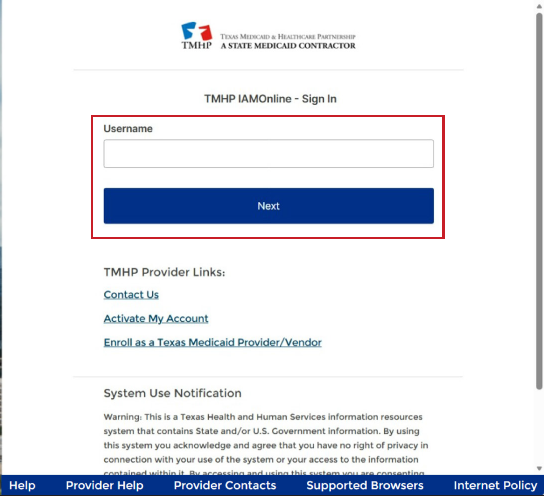
Screenshot source: How to Access TMHP Applications Using IAMOnline, page 15 (August 14, 2026).
TL;DR: use your own login, and give your biller their own
Use your own IAMOnline login and MFA. Your biller gets their own General User account, which the practice administrator links to the provider records and permissions they need. PEMS enrollment, TexMedConnect eligibility and claims, and managed care plan access are separate tasks. TMHP user types and permissions.
Who needs their own IAMOnline login
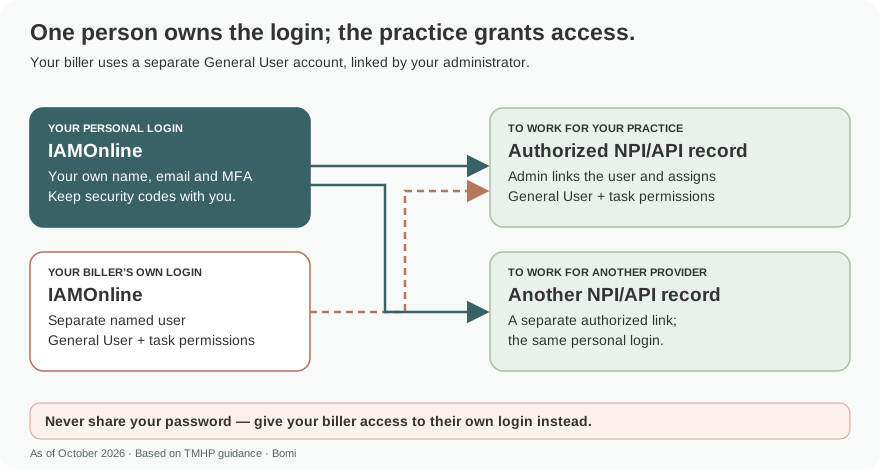
Each clinician, staff member or biller who needs access should use their own named user. The My Account guide requires a unique user email. Keep passwords and security codes with the account owner. My Account user requirements.
One person owns each login: use your own name, email and MFA. My Account can link that user to multiple authorized NPI/API records; the administrator repeats the provider-linking process for each record. Never share your password — give your biller access to their own login instead. User types and provider linking in the My Account guide.
What your IAMOnline login opens
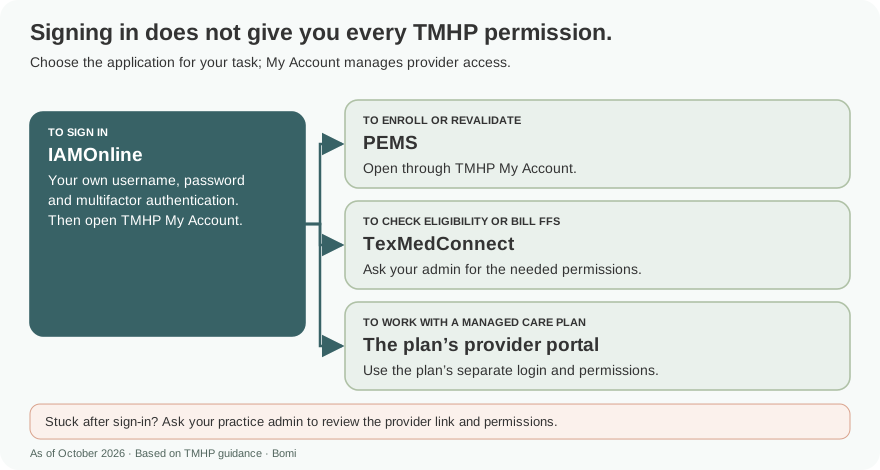
PEMS handles enrollment, revalidation and enrollment changes; TexMedConnect supports eligibility and fee-for-service claims. STAR, STAR+PLUS and STAR Kids plans have separate provider portals for their managed care work. PEMS resources; TexMedConnect resources; Managed care handbook.
Before you create access
Identify the enrolled NPI/API and current practice administrator first. A new enrollment applicant uses a different activation choice from an existing enrolled provider. An account does not establish Medicaid enrollment. Official account activation choices.
Account setup steps
The public account page offers different routes. A new applicant can select Create a Provider Enrollment Account. An existing enrolled provider has a separate Create Account and link to a PEMS provider option with provider validation. Choose the route that matches the actual record. Open official account activation.
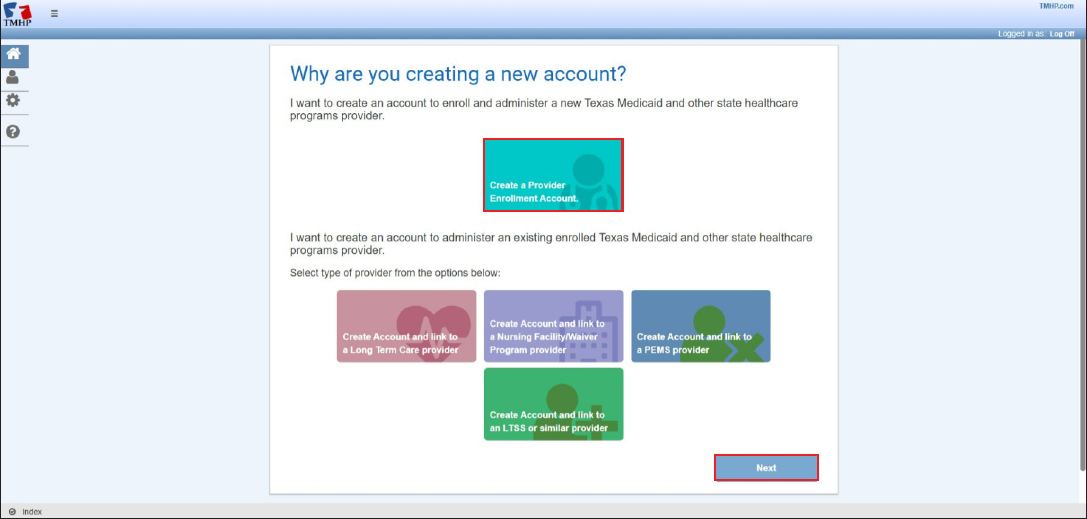
Screenshot source: TMHP My Account User Guide, page 12 (PDF page 15; June 5, 2026).
If the practice already has an administrator, ask that person to arrange your access. Creating a new enrollment account does not establish Medicaid participation or replace the existing provider administrator.
For a new enrollment account, follow the required fields, terms and verification on the activation page. Complete the emailed IAMOnline activation and security setup, then use My Account to reach PEMS. Follow the current IAMOnline access guide.
Add your biller/delegate
Use the guide’s General User account type for a biller, with the permissions needed for the agreed work. Billing services, vendors and clearinghouses cannot register as account administrators. Your practice administrator creates or links the biller’s own user and assigns access for each authorized provider identifier. My Account user types, pages 9–11.
An acute-care account administrator can create a new user or link an existing one. The guide requires a unique user email and lets the administrator select provider identifiers and permissions. Use the My Account User Guide.
New user: select Create a new user from the My Account dashboard, select the NPI/API, complete the account information and choose the required permissions. Use More Info to review a permission before selecting it, then select Create User.
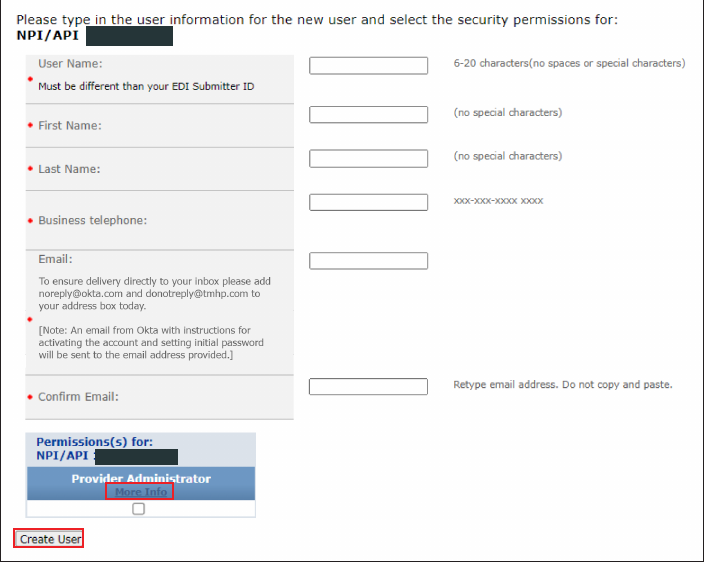
Screenshot source: TMHP My Account User Guide, page 26 (PDF page 29; June 5, 2026).
Existing user: select Link an existing user, choose the NPI/API, enter the username and use Find User. Select permissions and then Link User. Repeat only for provider identifiers the biller is authorized to access.
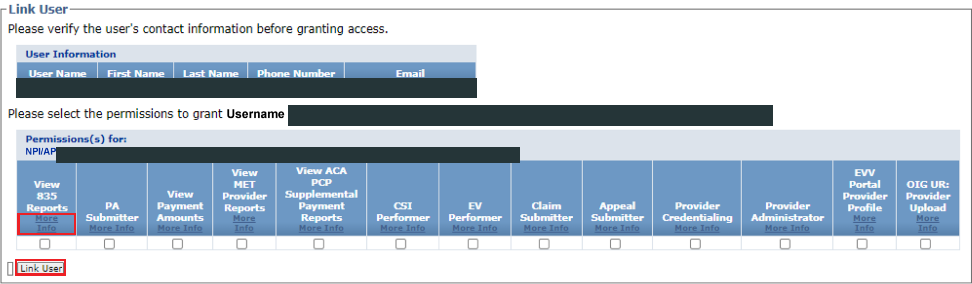
Screenshot source: TMHP My Account User Guide, page 28 (PDF page 31; June 5, 2026).
Recommended handoff: the biller completes their own activation and MFA, then confirms the intended provider and application are available. Keep passwords and security codes with their named account owner. Give the biller the permissions needed for the agreed work rather than automatically assigning administrator access.
Login errors & lockouts
First separate an authentication problem from a permission problem. If IAMOnline works but the intended provider or application is unavailable, ask the practice administrator to review the provider link and permission assignment. Do not create duplicate enrollment requests to solve an access problem.
The current IAMOnline guide describes separate 90-day inactivity rules for the account and individual applications. Signing in to one application does not keep every other application active. For restoration help, TMHP lists the EDI Help Desk at 888-863-3638. Check the current inactivity and support instructions.
Use PEMS for Texas Medicaid therapist enrollment
Verify eligibility in TexMedConnect
Frequently Asked Questions
What is the TMHP provider login?
Open the official TMHP My Account entry at secure.tmhp.com/MyAccount/default.aspx. IAMOnline authenticates your named user; My Account controls provider and application permissions.
How do I reset my TMHP password?
Follow the recovery instructions in TMHP’s current IAMOnline access guide. For deactivated account or application access, TMHP lists the EDI Help Desk at 888-863-3638.
Is IAMOnline the same as TMHP My Account?
IAMOnline handles authentication and MFA. My Account manages provider links, roles and application permissions.
Can my biller use my TMHP password?
Use a separate named user. The My Account administrator can create a user or link an existing user to the authorized NPI/API and permissions.
Does creating a TMHP account enroll me in Medicaid?
No. Account access enables the enrollment workflow. The provider still needs the appropriate PEMS request and approval.
Want Bomi to handle insurance billing?
Bomi helps therapy practices with benefit checks, claims, denials, balances, CAQH, attestations, and revenue management.
Book a call
About Bomi
Founded by George Ruan, Dax Earl, and Andrey Goder, Bomi helps independent therapists and group practices with insurance billing, credentialing, and payer follow-up. Bomi grew out of Dax’s experience helping his mother with her therapy practice, with a clear purpose: reduce the administrative burden of insurance while keeping practice owners in control.
Meet our founders