
OHP Prior Authorization for Therapists: Fee-for-Service and CCO Routing
By George Ruan • July 5, 2026
As of October 9, 2026, start an OHP behavioral health prior authorization check by establishing who covers the service. OHA’s PA instructions direct CCO-covered services to the CCO and fee-for-service services to OHA’s process. For Open Card behavioral health, also check the specialty program route before submitting a generic request.
Sections
Does this therapy service need prior authorization?
Use the current program guidelines or the MMIS HSC List Inquiry to check the exact service and condition. OHA also directs providers to check the Prioritized List and current PA guidance. Do not apply one CCO’s coverage grid to another plan or assume a familiar therapy code settles every circumstance.
Write down the CPT/HCPCS code, diagnosis, setting, requested dates and units, payer and network status before looking up the rule. This gives staff a concrete question to resolve. Keep the requirement source and review date with the authorization task so a later reviewer can see which policy you used.
Fee-for-service behavioral health has specialty routes
OHA’s behavioral health rules and guidelines links ABA prior authorization resources through its Acentra resource link and IQA request forms through Comagine for state plan personal care and residential services. Its authorization contacts also identify Comagine for 1915(i), Adult Foster Home, Residential Treatment and Personal Care Attendant services.
Open the resource for your actual program before choosing a submission method. If you cannot identify the route, ask the program contact a specific routing question. Avoid sending the same clinical packet to several destinations in the hope that one will accept it. Generic MMIS instructions do not replace a program’s clinical review process.
Initial requests through the OHA PA process
For requests using the generic OHA process, the official page lists the Provider Portal or MSC 3971, updated December 2025. It asks for only the clinical documentation needed for review and requires the requesting, performing and referring providers to be OHP-enrolled. Check the current submission instructions and forms.
Before sending, compare the provider identifiers and requested service details with the records you intend to bill. Save the submitted packet and request reference together. If you need help getting into the portal, follow MMIS login recovery rather than creating a duplicate provider account.
Only when the service uses OHA’s generic portal process, choose Prior Authorization > New after signing in. The guide requires Prior Auth Submit to enter a request, or Prior Auth Inquiry to check one; ask the administrator for the role needed. Specialty program and CCO routes above still control their own requests. OHA Prior Authorization guide, pages 2 and 4.

Screenshot source: OHA MMIS Provider Portal Prior Authorization (September 2024), page 4.
Add documents to an existing request
OHA says to search by Prior Authorization Number in the portal. For faxed updates, put the existing PA number on the EDMS coversheet with MSC 3971 and the requested documentation; otherwise OHA processes it as a new request. Existing-request update instructions.
Keep a single office tracking record for that request. When more information is requested, record what is missing and who will supply it. Confirm the existing number before uploading an update so your follow-up remains attached to the intended review.
The portal guide shows a message with the PA number after saving and an Attachments button for supporting documents. Keep the PA number with the request and use the current update instructions above when adding information; a saved or pending request is not approval. OHA Prior Authorization guide, page 8.
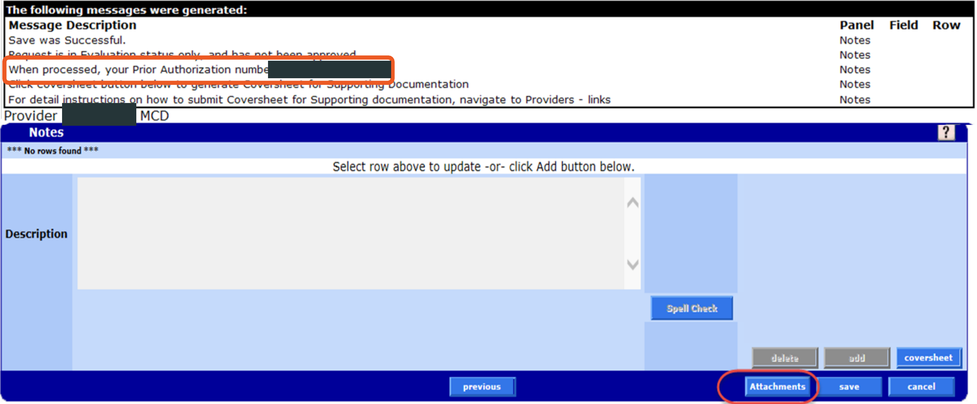
Screenshot source: OHA MMIS Provider Portal Prior Authorization (September 2024), page 8.
Check status and track the approved details
OHA directs providers to PA Inquiry and its written notices for status. Official status guidance. Compare the decision with the provider, service, dates and units you requested, and assign a follow-up date for anything still unresolved. Do not turn a pending request into an assumed approval in your scheduling notes.
Related Oregon provider guides
Frequently Asked Questions
Do all Open Card behavioral health authorizations go through one MMIS queue?
Check the program route. OHA links specialty ABA resources and Comagine IQA resources in addition to its generic PA submission instructions.
Where do I send a CCO-covered service’s authorization request?
Follow the responsible CCO’s current process for that service, after verifying the member’s coverage.
How do I avoid creating a duplicate OHA PA request?
Use the existing PA number when submitting an update, following OHA’s portal or fax update instructions linked above.
Want Bomi to handle insurance billing?
Bomi helps therapy practices with benefit checks, claims, denials, balances, CAQH, attestations, and revenue management.
Book a call
About Bomi
Founded by George Ruan, Dax Earl, and Andrey Goder, Bomi helps independent therapists and group practices with insurance billing, credentialing, and payer follow-up. Bomi grew out of Dax’s experience helping his mother with her therapy practice, with a clear purpose: reduce the administrative burden of insurance while keeping practice owners in control.
Meet our founders