
Oregon MMIS Login: Password Reset, Locked Account and PIN Help
By George Ruan • October 9, 2026
For Oregon MMIS provider login, open the official Oregon Medicaid Provider Portal and sign in with your own username and password. Last checked: October 9, 2026.
Sections
- Direct links: Oregon MMIS login, setup and password help
- TL;DR: use your own login, and give your biller their own
- Who needs their own Oregon MMIS login
- Before you create access
- Account setup steps
- Add your biller as a clerk
- Login errors: password reset before lockout
- Locked Oregon MMIS account
- Missing PIN letter is a setup problem
- Browser and administrator problems
- Related Oregon provider guides
- Frequently Asked Questions
Direct links: Oregon MMIS login, setup and password help
Provider Services: 800-336-6016, option 5; team.provider-access@oha.oregon.gov. Official account help
The Oregon MMIS sign-in page has username and password fields; existing users choose login, and first-time provider users with a PIN letter choose setup account.
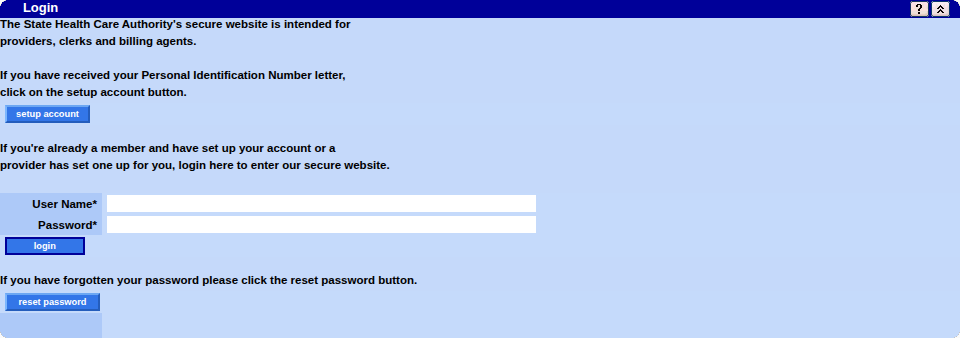
Screenshot source: Screenshot of the public Oregon MMIS sign-in page, captured October 9, 2026.
TL;DR: use your own login, and give your biller their own
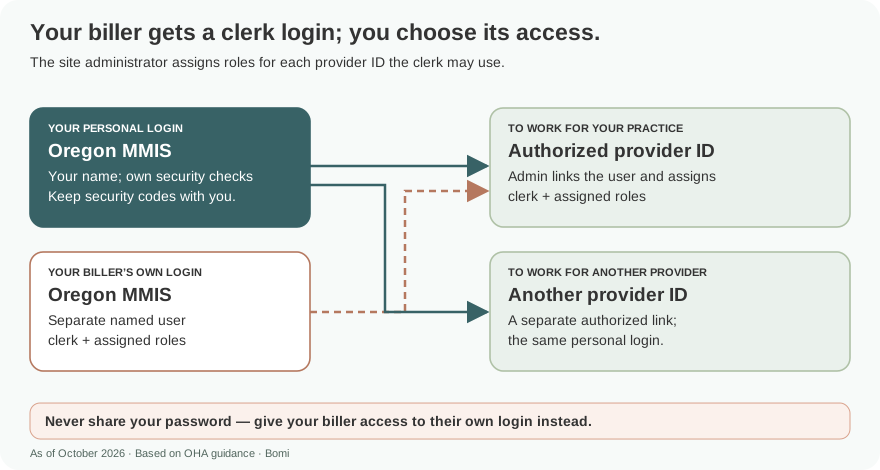
Use your own MMIS login. Your biller gets their own clerk user, which the site administrator adds and gives the roles they need for each provider ID. Enrollment paperwork and CCO plan access are separate from signing in. OHA account and clerk instructions.
Who needs their own Oregon MMIS login
Recommended access practice: each person uses their own named login and keeps their password, recovery answers and any MFA codes private. The guide calls an added user a clerk. A clerk serving multiple provider IDs must be added to each ID separately; access does not carry over automatically. Never share your password — give your biller access to their own login instead. Account Maintenance, pages 4 and 10.
Before you create access
Identify the existing provider ID and site administrator first. First-time setup uses the PIN letter; password recovery is for an already established user. Confirm the intended record before creating another account. OHA setup and recovery guidance.
Account setup steps
For a first-time provider account, choose Account > Account Setup and use the provider ID and case-sensitive PIN from the PIN letter. The public sign-in banner and OHA’s reset-specific help disagree on password length and symbols; see the attributed guidance below and ask Provider Services to confirm which rules apply. OHA Account Setup guide, pages 3–5.
The official guide shows the portal’s Account menu: use Secure Site for existing access, Account Setup for first-time PIN setup, or Reset Password for recovery.

Screenshot source: OHA MMIS Provider Portal Account Setup (September 2024), page 3.
Detailed first-time MMIS account creation
Add your biller as a clerk
The site administrator opens Account > Clerk Maintenance, chooses add clerk and enters the biller’s own user information. For an existing username, use Search to find that user. Assign the needed roles from Available Roles, then submit. Repeat the authorization separately for every provider ID the biller may access. OHA Account Setup pages 8–10 and Account Maintenance page 10.
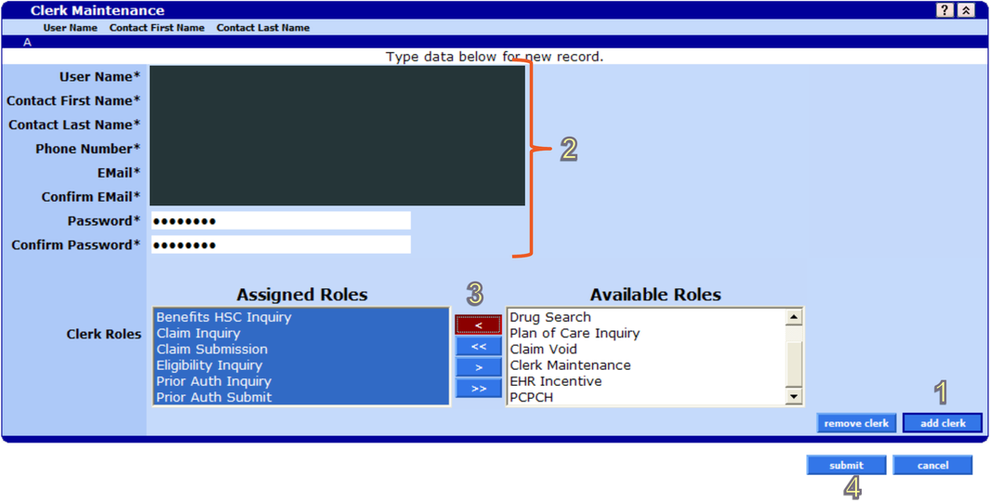
Screenshot source: OHA MMIS Provider Portal Account Setup (September 2024), page 8.
Login errors: password reset before lockout
OHA’s portal help page says to select the blue Password Reset button while the account is not yet locked. Answer one security question; the answer is case-sensitive. For the new password, that page specifies at least eight characters, at least one capital letter and one numeric digit, and no previously used password. It warns that symbols are rejected even though the system lists them as required. These are OHA’s published reset instructions; the conflicting sign-in banner is described below. Read OHA’s current reset instructions.
Check whether a password manager is filling an old password or a different username. Keep the reset attempt separate from your normal sign-in attempt so you can tell which step failed. If the new password is rejected, record the exact error text without recording the password or security answer.
If you can already sign in and need to change the password, open Account > Change Password, enter the current password, new password and confirmation, then save. The form below shows those fields; confirm the applicable password rules with Provider Services because the published sources disagree. Account Maintenance guide, page 8.

Screenshot source: OHA MMIS Provider Portal Account Maintenance (September 2024), page 8.
Rechecked October 10, 2026: the public sign-in banner lists 15–30 characters with uppercase, lowercase, a number and a special character. OHA’s reset-specific help page instead gives an eight-character minimum and warns that symbols are rejected even though listed as required. These published instructions conflict. The banner does not establish that OHA’s reset warning no longer applies; ask Provider Services at 800-336-6016, option 5, to confirm the applicable reset rules rather than repeatedly guessing. Current public sign-in instructions.
Locked Oregon MMIS account
For lockout, OHA lists 800-336-6016 or team.provider-access@oha.oregon.gov. Have the account username and NPI or MCD/DMAP number ready. Password-reset assistance is option 5; email from the address associated with the username. Official account-support instructions.
Stop guessing once the portal says the account is locked. Tell support whether you can reach the login page, whether Password Reset failed, and whether another authorized user can access the same provider record. Those observations help distinguish your user account from an organization-wide access problem. Do not send a password or security answer in the support request.
Missing PIN letter is a setup problem
OHA uses a PIN letter for initial portal access. To request a replacement, its page lists team.provider-access@odhsoha.oregon.gov and asks for your name, NPI and the Mail To address on the account. This is a different mailbox spelling from lockout support. PIN-letter guidance.
A replacement PIN is not the same task as resetting an established user’s password. For first-time registration and how the PIN fits with your Medicaid provider record, use our MMIS account-creation guide. This recovery article starts after you have identified which account or provider record you need.
Browser and administrator problems
OHA’s current portal page names Firefox and Microsoft Edge as compatible browsers. If the site administrator has left, it directs the organization’s CFO or Privacy and Security Officer to request the administrator change. Check the current browser and administrator guidance.
Try a supported browser before treating a blank or unresponsive screen as a password failure. For an administrator change, gather the old and new administrator details specified on OHA’s page. Ask the responsible officer to follow that process; a coworker’s working login does not resolve who should administer the provider account.
After access is restored, test the task you came to complete: eligibility, an existing authorization inquiry or the correct provider record. A successful login is only the first step. Keep the recovery date and support reference in your office’s access log so the next staff member can follow the same route.
Related Oregon provider guides
Frequently Asked Questions
Where is the Oregon MMIS login?
OHA links www.or-medicaid.gov from its official Provider Portal page. Use that provider login for MMIS access.
Is a PIN letter the same as a password reset?
No. Identify whether you are setting up access with a PIN letter or recovering an existing user account, then follow the matching OHA instructions linked above.
Should I keep trying passwords on a locked account?
Use the official lockout support route rather than continuing to guess. Have your username and provider identifier ready.
Want Bomi to handle insurance billing?
Bomi helps therapy practices with benefit checks, claims, denials, balances, CAQH, attestations, and revenue management.
Book a call
About Bomi
Founded by George Ruan, Dax Earl, and Andrey Goder, Bomi helps independent therapists and group practices with insurance billing, credentialing, and payer follow-up. Bomi grew out of Dax’s experience helping his mother with her therapy practice, with a clear purpose: reduce the administrative burden of insurance while keeping practice owners in control.
Meet our founders