
NCTracks Login: NCID Account Setup and Biller Access
By George Ruan • October 9, 2026
For NCTracks provider login, open the official NCTracks Provider Portal and sign in with your own NCID. The practice must also authorize your account for its provider record. Public setup instructions checked October 9, 2026.
Sections
- Direct links: NCTracks login, NCID registration and account help
- TL;DR: use your own login, and give your biller their own
- Who needs their own NCTracks login
- Before you create access
- Create your NCID account
- Set up the practice's Office Administrator
- Add your biller or office staff in User Maintenance
- Portal access and Billing Agent setup are separate
- Login errors: NCID recovery or missing provider access
- Choose the next NCTracks task
- Frequently Asked Questions
Direct links: NCTracks login, NCID registration and account help
The NCID login screen shown in the August 2025 NCTracks enrollment guide asks for your username; first-time users choose Register Now.
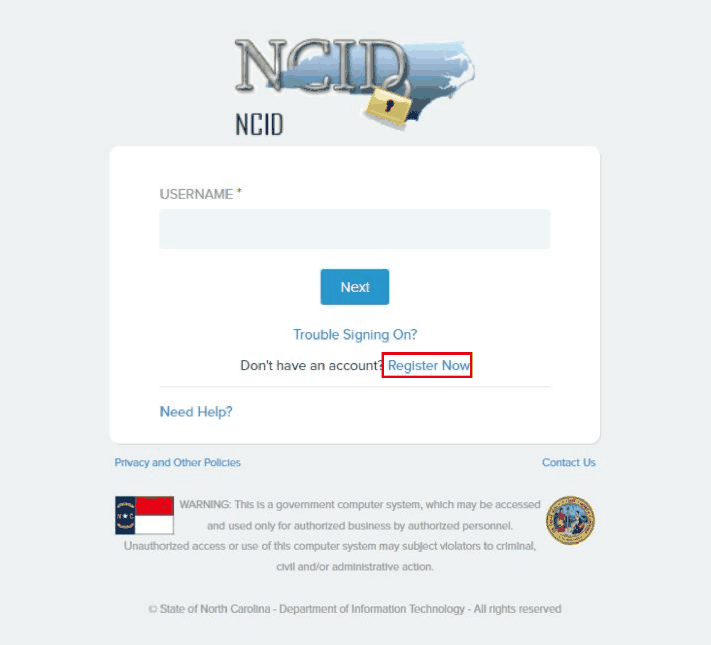
Screenshot source: How to Enroll in NC Medicaid — Individual, V2.0, August 6, 2025, PDF page 13 (printed page 7).
TL;DR: use your own login, and give your biller their own
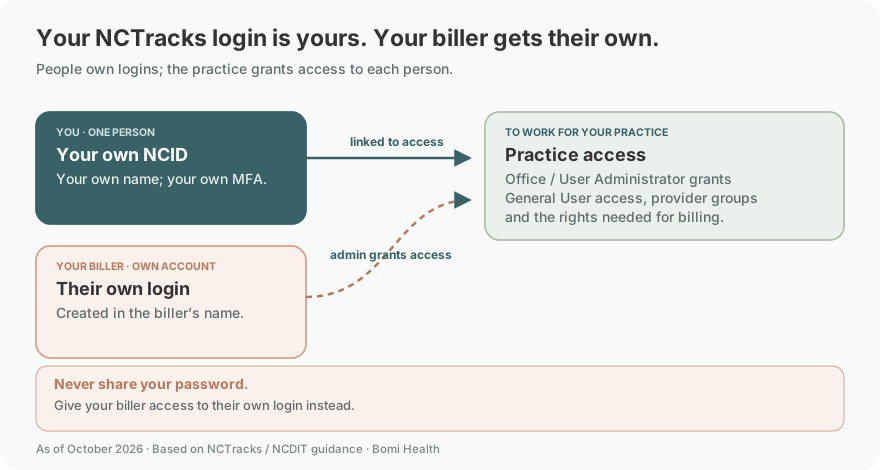
Use your own NCID and keep your authentication methods with you. Your biller uses their own NCID; the Office Administrator or User Administrator adds them as a General User and grants the access needed for your practice. Provider enrollment, plan contracts and a Billing Agent relationship are separate from that person’s login. NCTracks user access guide
Who needs their own NCTracks login
Each person needs their own NCID in their own name. Keep your MFA with that account and never share your password. The Office Administrator or User Administrator links the biller’s own account to the practice and assigns the required provider groups and access rights. Named-user provisioning · NCID authentication guidance
Before you create access
Check whether you already have an NCID, who is the practice’s Office Administrator, and which provider record you need to use. Creating another password does not authorize an NPI. NCTracks getting started
Create your NCID account
Open MyNCID and choose Create an Account. Use the state's individual/business registration guide to select the appropriate account type, enter your own information and complete the email activation. Do not use instructions for state or local government employees when creating an outside practice account.
Keep access to the email and authentication methods you register. The NCID MFA guide explains account verification and MFA settings. If sign-in stops before you reach NCTracks, use MyNCID's account recovery options first; an NCTracks administrator cannot solve a password problem by changing your NPI permissions.
Set up the practice's Office Administrator
NCTracks' getting-started instructions identify the Office Administrator, or OA, as an owner or managing employee of the provider organization. The OA manages access to the practice's provider records. Decide who holds that responsibility before delegating day-to-day billing work.
An outside biller should have a named account with the needed access. Avoid making an outside vendor the practice's administrator simply to get claims moving. If your NPI is already controlled by a former employee or another administrator, use our wrong Office Administrator recovery guide before starting another registration.
Add your biller or office staff in User Maintenance
The OA or an authorized User Administrator, or UA, can provision portal users. NCTracks' User Maintenance instructions give this route:
Your biller signs in with their own NCID and their own authentication methods. The OA or UA signs in with their own account and opens User Administration, then User Maintenance, to add or maintain the named user. Current User Maintenance instructions
Verify the biller’s NCID and email, then choose General User unless the person needs User Administrator responsibilities. The currently published provisioning guide illustrates these fields in an older screen layout; use the newer User Maintenance notice for navigation. Provisioning guide
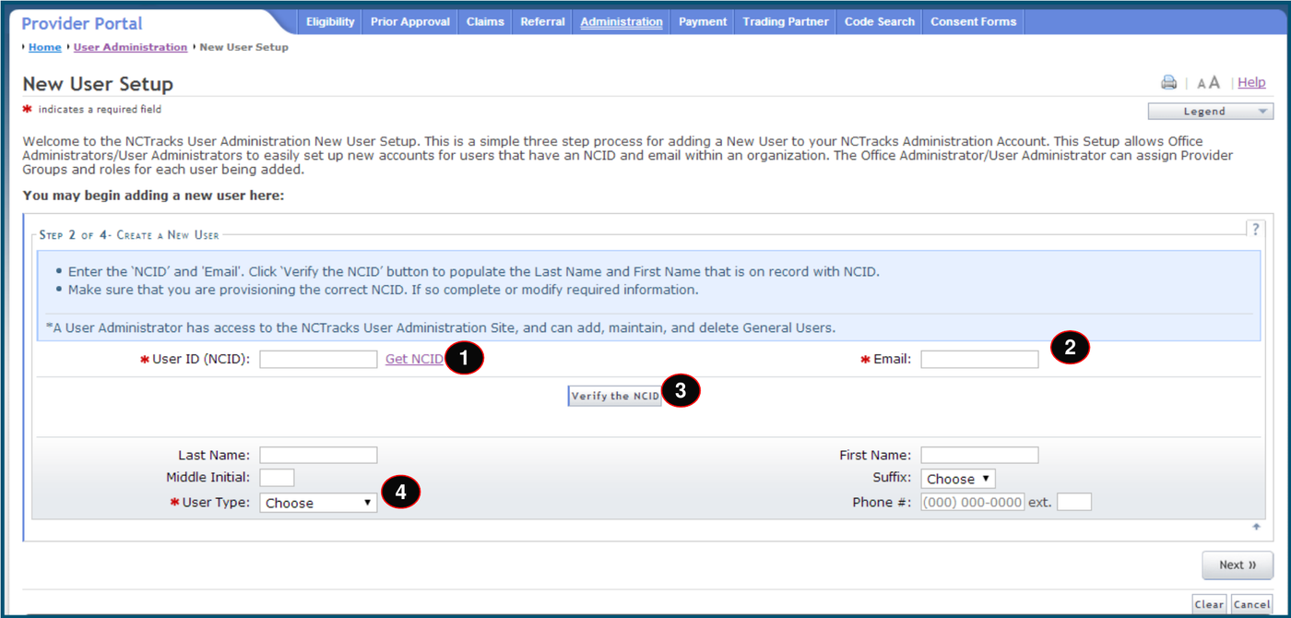
Screenshot source: Provider User Provisioning Participant User Guide, legacy layout (PDF metadata February 7, 2019), PDF page 29 (printed page 24).
Assign the provider groups and access rights for the biller’s work, then save. The older guide illustrates moving the applicable groups into Selected Groups; sample identifiers are masked.
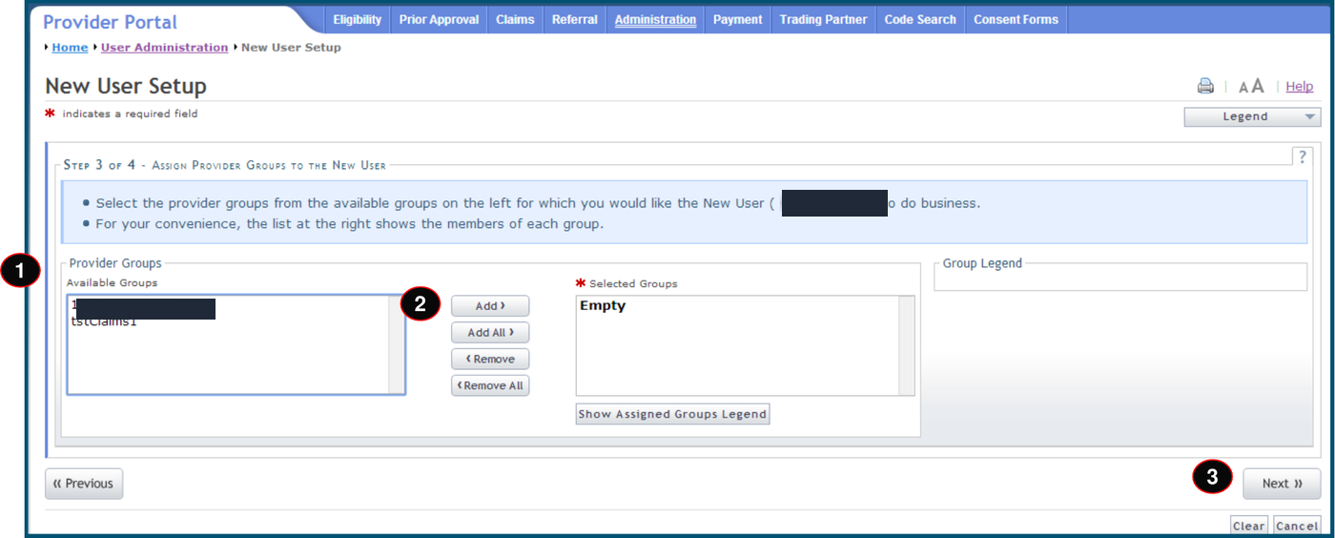
Screenshot source: Provider User Provisioning Participant User Guide, legacy layout (PDF metadata February 7, 2019), PDF page 30 (printed page 25).
Have the user sign out and back in after changes so the new access applies. Current User Maintenance instructions
The user provisioning guide distinguishes a General User from a User Administrator. Choose administrative rights deliberately rather than granting every biller permission to manage other users. Its older screen illustrations can differ from the current portal; use the newer User Maintenance notice for the navigation above.
Portal access and Billing Agent setup are separate
If a biller can log in but cannot perform the intended task, first check their provider group and access rights. If an outside company will submit electronic claims or receive remittance transactions, also review the separate NCTracks Billing Agent relationship. That guide covers the MCR and transaction-routing choices; this article covers the person's login.
When staff or vendors leave, review their named access. NCTracks instructs administrators to close users no longer associated with the provider record. An administrator change can also require a separate MCR to correct owner/managing-employee relationships; changing one user's access does not finish that provider-record work.
Login errors: NCID recovery or missing provider access
If sign-in fails before NCTracks opens, start with MyNCID’s recovery options and the NCID authentication guide. If you can sign in but cannot see the provider record or intended function, ask the OA or UA to check your provider groups and access rights. MyNCID · NCID MFA help · User Maintenance
Choose the next NCTracks task
For a new clinician, continue with therapist enrollment. For an existing practice, use eligibility verification before the appointment, then review claims and telehealth routing. These tasks depend on the correct provider record and date of service, not just a successful login.
Frequently Asked Questions
Where is the NCTracks provider login?
Start at the official NCTracks Provider Portal and sign in with your own NCID. The practice must also authorize your account for the relevant provider record.
Can my biller use my NCID?
Give the biller their own named account and appropriate provider-group access through User Maintenance. Portal access and an electronic Billing Agent relationship are separate tasks.
Who should be the NCTracks Office Administrator?
NCTracks identifies the OA as an owner or managing employee. Use the existing OA recovery guide if a former employee or incorrect person controls the record.
Planning a private practice?
Use Bomi's free Build resources to plan the business, provider identity, payer setup, and billing workflow before you see clients.
Use Build resources
About Bomi
Founded by George Ruan, Dax Earl, and Andrey Goder, Bomi helps independent therapists and group practices with insurance billing, credentialing, and payer follow-up. Bomi grew out of Dax’s experience helping his mother with her therapy practice, with a clear purpose: reduce the administrative burden of insurance while keeping practice owners in control.
Meet our founders