
New Mexico Medicaid Behavioral Health Enrollment
By George Ruan • October 9, 2026
As of October 9, 2026.
To enroll as a New Mexico Medicaid behavioral health provider, start with YesNM’s Provider & Presumptive Eligibility Determiner (PED) Enrollment System. HCA identifies it as the tool for enrollment, revalidation, updates, and application-status tracking. As of October 9, 2026, this is the state enrollment route to use. HCA provider enrollment system.
PED means Presumptive Eligibility Determiner: a separate function for helping people apply for Medicaid coverage. The shared system name does not mean a therapist should select a PED application to enroll for billing. Choose the provider application that matches the entity and service. HCA provider and PED overview.
Sections
- Before you start: provider type, taxonomy, and documents
- Create your account and enrollment workspace
- Complete the right individual or group application
- Who signs the enrollment application?
- Track the application determination
- After state approval: MCO credentialing and billing setup
- Related New Mexico Medicaid guides
- Need help with New Mexico Medicaid billing?
- Frequently Asked Questions
Before you start: provider type, taxonomy, and documents
Use HCA’s current Provider Enrollment Matrix to identify your provider type, taxonomy, and required documents. HCA’s provider overview links the matrix; the enrollment FAQ points users to the matrix and its Taxonomy 101 training. A general therapy license label is not enough to choose the right enrollment record. HCA current Provider Enrollment Matrix entry.
A new application is required for each separate provider type under an NPI. Multiple taxonomies under one provider type can be included on one application; taxonomies spanning different provider types require separate applications. HCA taxonomy and application FAQ.
Create your account and enrollment workspace
Create your own YesNM provider account using the official account guide, or use your existing account.
Create the enrollment workspace or ask its administrator to invite you. HCA allows one workspace per NPI.
For a practice working with a credentialer, invite that person through the workspace using their email; maintain at least one administrator.
Source for these steps: HCA workspace and user FAQ.
The HCA account-creation guide shows the name, email and password fields before email verification. Use your own details and have access to your own email when setting up the account. HCA provider account guide.
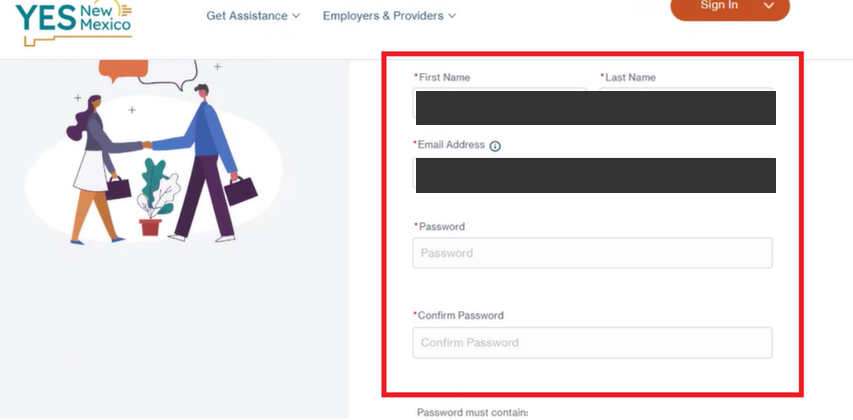
Screenshot source: Creating a Provider and PED Enrollment System Provider Account, page 2.
Complete the right individual or group application
HCA’s FAQ says rendering providers are required for groups except for its enumerated exempt provider types. For a behavioral health group, check the current matrix and group application training rather than assuming a group enrollment automatically includes every therapist. HCA group billing FAQ.
Before submitting, compare the legal entity, NPI, taxonomy/provider type, service address, and uploaded documents with your source records.
For a group, check which rendering clinicians need to be associated and whether their own enrollment work is complete.
Keep a clear owner for notices and follow-up. A submitted application is still waiting for a determination.
These are suggested preparation checks. HCA’s behavioral health manual and fee schedule determine service/provider qualifications; portal account access does not establish that a clinician may bill every behavioral health code. HCA behavioral health manual and fee schedule guidance.
Who signs the enrollment application?
HCA’s enrollment FAQ says an individual provider must sign their own application even when an administrator prepares it. Group applications may be signed by an eligible owner/controlling-interest person or an approved delegated official. An administrator role alone does not prove group signature authority. HCA signature and delegated-official FAQ.
HCA’s October 2025 e-signature job aid adds a Send for Signature route and preserves a Send to Rendering route. The administrator verifies the signer’s email, sends the request, waits for the signature notification, then submits. Follow the current job aid rather than assuming every signature requires a new provider account. HCA streamlined e-signature job aid.
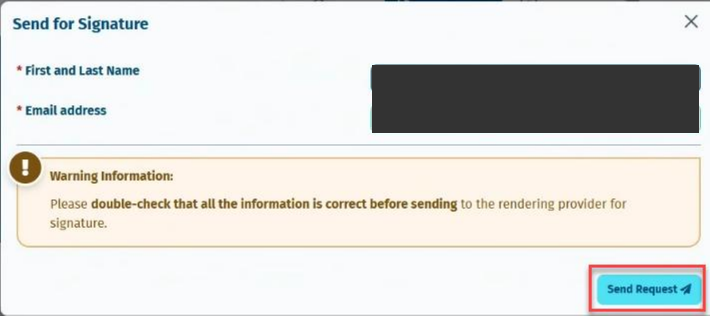
Screenshot source: Admin and Credentialer E-signature Job Aid, page 1.
Track the application determination
The enrollment FAQ says determination information arrives through the preferred contact method and the Message Center, with an email alert for a new message. If a determination notice is missing, it directs providers to CCSC. Save the result and check it against the provider/entity you intended to enroll. HCA application determination FAQ.
After state approval: MCO credentialing and billing setup
Centralized CertifyOS verification does not replace state enrollment or each plan’s participation request. Once the state record is ready, continue the MCO work and set up the appropriate claims organization access. Keep the approval and effective dates available to the staff who verify eligibility and bill. Official CVO and state-enrollment distinction.
Related New Mexico Medicaid guides
Need help with New Mexico Medicaid billing?
Bomi helps therapy practices coordinate credentialing, eligibility, claims, and denial follow-up. Bring the state enrollment record, requested plan participation, and unresolved billing questions into one clear workflow.
See Bomi’s billing services or credentialing support.
Frequently Asked Questions
Where do I enroll as a New Mexico Medicaid behavioral health provider?
Use the Provider & PED Enrollment System reached through YesNM, and use HCA’s current enrollment matrix to choose the provider type and required documents.
Can my credentialer sign my individual provider application?
HCA’s FAQ requires the individual provider to sign their own application, even if an administrator prepares it.
Is a PED application the same as therapist enrollment?
No. PED refers to a Presumptive Eligibility Determiner. A therapist enrolling for billing should use the appropriate provider application.
Growing a group practice?
Bomi helps coordinate insurance operations across providers, payers, rosters, claims, denials, and reporting.
See group support
About Bomi
Founded by George Ruan, Dax Earl, and Andrey Goder, Bomi helps independent therapists and group practices with insurance billing, credentialing, and payer follow-up. Bomi grew out of Dax’s experience helping his mother with her therapy practice, with a clear purpose: reduce the administrative burden of insurance while keeping practice owners in control.
Meet our founders