
NJMMIS Login: Provider Account Setup and Biller Access
By George Ruan • October 9, 2026
For NJMMIS provider login, open the official NJMMIS Provider Login and sign in with your own account. Use the practice’s provider access for eligible portal work; Medicaid provider enrollment and health-plan contracts are separate.
Sections
- Direct links: NJMMIS sign-in, registration and help
- TL;DR: use your own login and give your biller their own
- Who needs their own NJMMIS login
- Before you create access
- Set up the account and complete the first login
- Add your biller
- Why is NJMMIS saying my username or password is invalid?
- Related guides
- Frequently Asked Questions
Direct links: NJMMIS sign-in, registration and help
Provider Login · Provider Registration · Reset Password · Portal access FAQ. Provider Services: 800-776-6334. The FAQ identifies NJMMISNJWebAdmin@gainwelltechnologies.com for primary-account help.
Provider enrollment applications are separate from website registration. HIPAA Submitter Login is a separate sign-in for registered electronic submitters, not another permission opened by the provider password.
In the manual, the provider sign-in is on the left; the separate electronic-submitter sign-in is on the right.
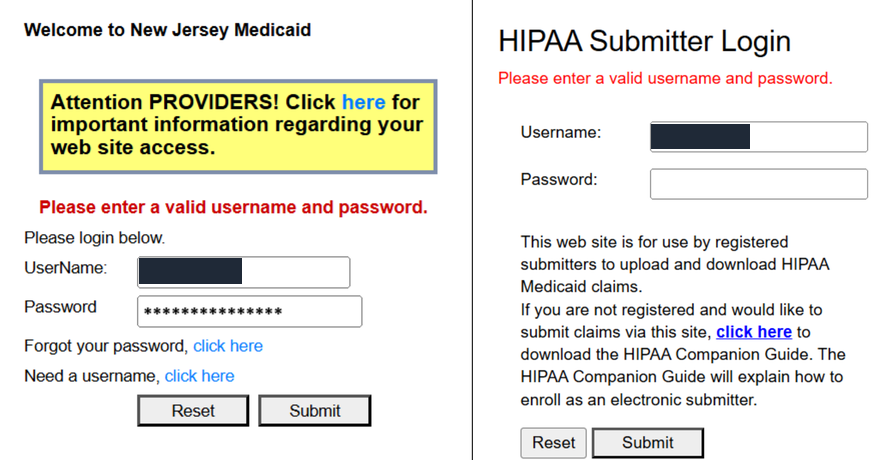
Screenshot source: NJMMIS Primary Account Administrator Guide (current FAQ-linked edition; October 2025 PDF metadata), PDF page 14.
TL;DR: use your own login and give your biller their own
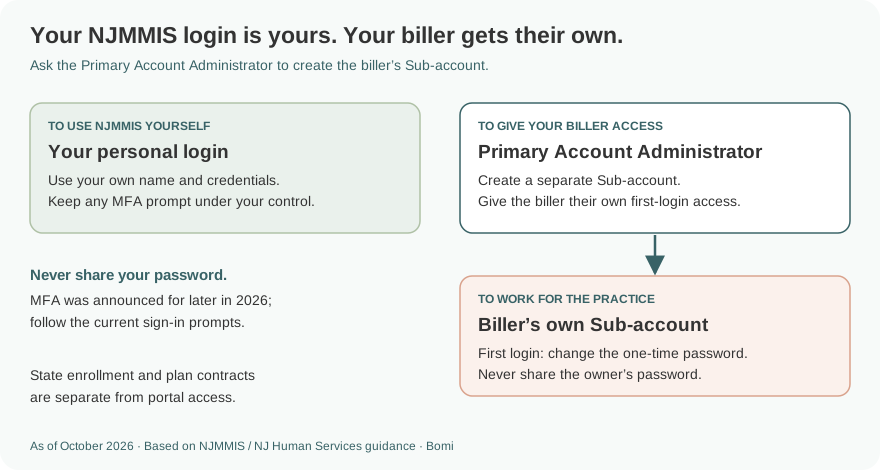
Use your own NJMMIS login. Your biller gets a separate Sub-account that the practice’s Primary Account Administrator creates. State enrollment, plan contracts and electronic-submitter access are separate.
Who needs their own NJMMIS login
Each person who works in the portal needs their own credentials. The current administrator guide describes administrator-created Sub-accounts; the password FAQ says not to share credentials. Never share your password with your biller.
Keep any MFA prompt under your own control. The April 2026 MFA notice announces a rollout later in 2026; as of October 9, the public notice does not establish that every account already has MFA. Follow current prompts and keep personal contact information ready.
Before you create access
Confirm which enrolled provider record needs reports and who will manage its users. The registration page asks for the primary Medicaid ID and provider contact/address information. Match the enrolled record. Medicaid and Charity Care registration use separate credentials under the registration help; do not assume one password covers both.
Set up the account and complete the first login
For a new primary account, follow Provider Registration and the registration help. The help describes verified credentials sent by certified mail. Website registration does not replace a provider application or guarantee plan participation.
For a new Sub-account, get the user ID and one-time password from the Primary Account Administrator. Sign in yourself, change that password and set your challenge question and response. The administrator guide shows these first-login requirements on pages 12–13. Follow the current password prompts. The guide’s page 12 password screen lists at least 15 characters, a number, a special character, a lowercase letter and an uppercase letter.
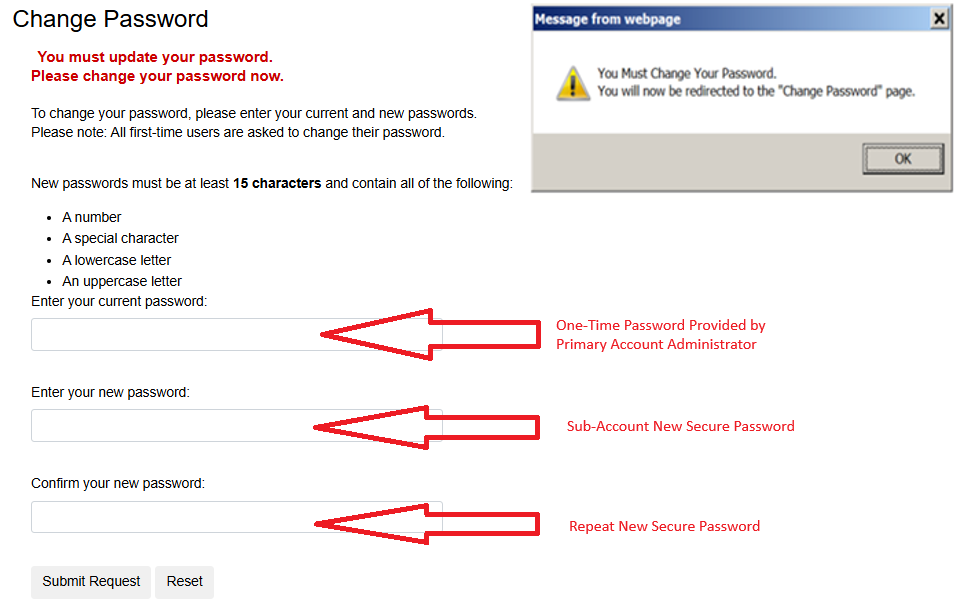
Screenshot source: NJMMIS Primary Account Administrator Guide (current FAQ-linked edition; October 2025 PDF metadata), PDF page 12.
Add your biller
The Primary Account Administrator opens Manage Sub Accounts and chooses the new-account link shown on page 10 of the administrator guide. Create a separate Sub-account for the biller using the required personal-name fields and a one-time password.
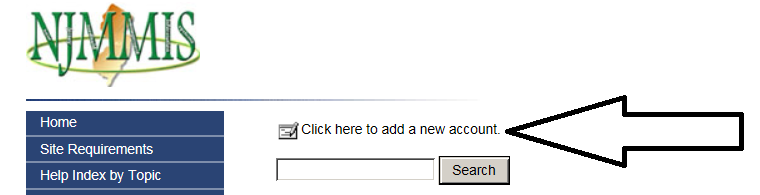
Screenshot source: NJMMIS Primary Account Administrator Guide (current FAQ-linked edition; October 2025 PDF metadata), PDF page 10.
Give the biller their own first-login credentials through your practice’s normal secure process. They change the one-time password and complete their own challenge information. Keep the practice’s primary password private. The guide’s role is Sub-account; it does not establish a special outside-biller role or a right to link multiple practices to one login.
Why is NJMMIS saying my username or password is invalid?
An invalid-credentials message can also mean disabled access. The current access FAQ describes locking or disabling after three failed attempts or 90 days without a login; new accounts need their initial login within 30 days. Use the reset path for an active account. A disabled Sub-account should ask its Primary Account Administrator to re-enable access; primary-account users contact the NJMMIS webmaster.
The administrator guide shows Account Activated and Password Enabled controls for unlocking a Sub-account. Check both statuses instead of repeatedly guessing a password. Do not create another practice registration to work around an existing user’s lockout.
Related guides
Choose the correct state enrollment route, verify eligibility in REVS or eMEVS, and separate MCO credentialing from state approval.
Frequently Asked Questions
Where is the NJMMIS provider login?
Use www.njmmis.com/login.aspx for provider access. The HIPAA Submitter Login is a separate sign-in for registered electronic submitters.
Can my biller use my NJMMIS password?
No. The Primary Account Administrator creates a separate Sub-account. The biller changes their one-time password and sets their own challenge information.
Does NJMMIS registration enroll me in Medicaid?
No. Website registration, state provider enrollment and MCO credentialing are separate tasks.
How do I unlock an NJMMIS Sub-account?
Ask the Primary Account Administrator to check Account Activated and Password Enabled using the current guide. Primary-account users contact the NJMMIS webmaster.
Is NJMMIS MFA already required for every user?
The April 2026 notice announces a rollout later in 2026. As of October 9, the public notice does not establish universal activation; follow current prompts and use your own contact information.
Planning a private practice?
Use Bomi's free Build resources to plan the business, provider identity, payer setup, and billing workflow before you see clients.
Use Build resources
About Bomi
Founded by George Ruan, Dax Earl, and Andrey Goder, Bomi helps independent therapists and group practices with insurance billing, credentialing, and payer follow-up. Bomi grew out of Dax’s experience helping his mother with her therapy practice, with a clear purpose: reduce the administrative burden of insurance while keeping practice owners in control.
Meet our founders