
Nevada Medicaid EVS: Verify Eligibility in PWP
By George Ruan • October 9, 2026
For Nevada Medicaid eligibility verification, use the official Provider Web Portal (PWP), formerly EVS. Open the provider login from medicaid.nv.gov and use an authorized provider or delegate account. Provider Flex is for enrollment work. Nevada Medicaid PWP / EVS login
The Flex FAQ confirms that eligibility remains in PWP. If you can see an enrollment application but no eligibility function, check which system you opened before creating another user or changing the provider application. Provider Flex FAQ
Checked October 9, 2026 against the September 2026 eligibility manual. This guide is for providers and authorized billers checking coverage for a visit. Bomi can help organize the result and the next billing questions in a secure workflow.
Sections
- Start with the correct member and service date
- Open coverage details and retain the response reference
- A Medicaid Fee For Service row can coexist with an MCO
- Why checking the plan matters after the statewide expansion
- Troubleshoot the inquiry without changing the enrollment
- Related Nevada Medicaid tasks
- Frequently Asked Questions
Start with the correct member and service date
From My Home in PWP, open Eligibility. Enter a supported recipient identifier and any required birth date, choose a service-date range within one month, then Submit.
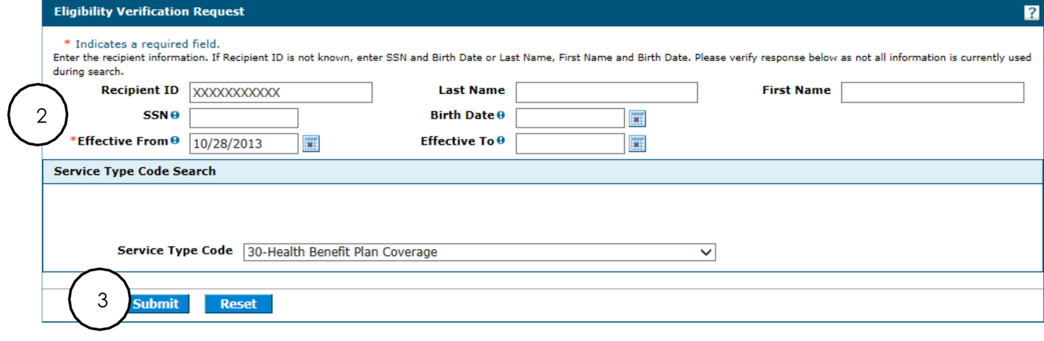
Screenshot source: Nevada Medicaid PWP User Manual Chapter 2, September 25, 2026, PDF page 4 (printed page 3).
Confirm that the returned person and coverage dates match the visit you are checking.
The manual describes present-month and historical lookups, with no dates beyond the current month and no range spanning months. Break a cross-month review into separate inquiries. Do not enter real identifiers into an ordinary email or shared troubleshooting document. PWP Chapter 2 eligibility
Open coverage details and retain the response reference
Review the coverage links and expand their details. The manual tells users to note the Verification Response ID. Check MCO coverage and Other Insurance Detail Information as applicable, rather than stopping at the first active coverage row. PWP Chapter 2 eligibility
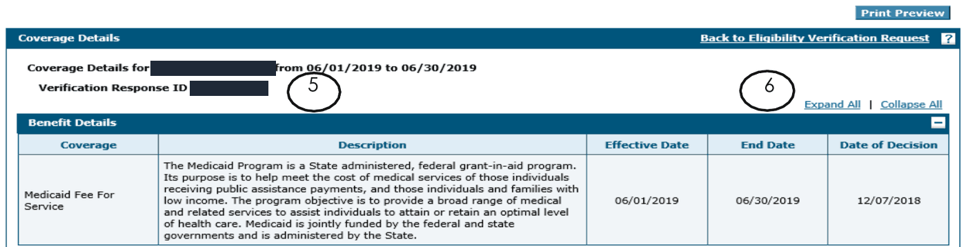
Screenshot source: Nevada Medicaid PWP User Manual Chapter 2, September 25, 2026, PDF page 6 (printed page 5).
For a practical billing record, we recommend storing the date checked, requested service date, returned plan/date information, response reference and any unresolved question. Keep that evidence in the secure patient billing record, with access limited to the team doing the work.
A Medicaid Fee For Service row can coexist with an MCO
The eligibility manual explicitly says PWP may display the Medicaid Fee For Service or Nevada Check Up benefit plan alongside an MCO coverage plan for a member enrolled in managed care. The FFS benefit row alone does not establish that you should submit the therapy claim to the state. PWP Chapter 2 eligibility
Read the complete coverage result for the requested date and reconcile the assigned MCO with your plan-participation records. If the result is unclear, ask the responsible payer to clarify the claim route before treating the encounter as FFS.
Why checking the plan matters after the statewide expansion
Nevada’s current health-plan overview confirms statewide availability beginning January 1, 2026. An older rural coverage assumption can therefore send a claim down the wrong path. Verify each relevant service date rather than copying an old plan name forward indefinitely. Health plans overview
Confirm coverage for the visit date and identify the responsible payer.
Compare the member’s plan with the clinician and billing entity’s participation records.
Check the service’s authorization and other-insurance questions through the applicable payer workflow.
Resolve a mismatch before using the result as the basis for a claim.
This is a recommended operational review, not an additional portal screen. Eligibility, network participation and authorization answer different questions; document which answer is still missing so the next person does not repeat the wrong task.
Troubleshoot the inquiry without changing the enrollment
If the search fails, compare the entered identifier, birth date and date range with the manual. If the whole portal is unavailable, check the official home page’s notices and known issues. Do not submit a replacement provider enrollment merely to repair an eligibility lookup. Provider portal home
When escalating a problem, we recommend recording the portal, time, requested date range and error description in the secure support workflow. Share only the identifiers the official support channel needs, and keep screenshots containing patient information out of general chat.
Related Nevada Medicaid tasks
Give your biller named delegate access · Nevada Medicaid Provider Portal and Flex Login · Nevada Medicaid FFS vs MCO Credentialing · Nevada Medicaid Behavioral Health Claims and Telehealth
Frequently Asked Questions
Is Nevada Medicaid EVS now called PWP?
Nevada labels the Provider Web Portal as formerly EVS. Its eligibility function is documented in PWP User Manual Chapter 2.
Can I search eligibility across two months in one inquiry?
The current manual says the requested service dates must remain within one month and cannot go beyond the current month. Split a cross-month review into separate inquiries.
Does a Medicaid Fee For Service row mean there is no MCO?
No. The manual says the FFS or Check Up benefit row can appear alongside MCO coverage. Review the complete coverage details for the service date.
Want Bomi to handle insurance billing?
Bomi helps therapy practices with benefit checks, claims, denials, balances, CAQH, attestations, and revenue management.
Book a call
About Bomi
Founded by George Ruan, Dax Earl, and Andrey Goder, Bomi helps independent therapists and group practices with insurance billing, credentialing, and payer follow-up. Bomi grew out of Dax’s experience helping his mother with her therapy practice, with a clear purpose: reduce the administrative burden of insurance while keeping practice owners in control.
Meet our founders