
Nevada Medicaid Provider Web Portal Login: PWP and Provider Flex
By George Ruan • October 9, 2026
For Nevada Medicaid Provider Web Portal login, open the official PWP sign-in and use your registered Provider or Delegate User ID, password and MFA. For enrollment applications, open Provider Flex. Public instructions checked October 9, 2026.
Sections
- Direct links: PWP login, Provider Flex and account help
- TL;DR: use your own login, and give your biller their own
- Who needs their own Nevada Medicaid login
- Before you create access
- Use existing credentials or create the right account
- New Provider Flex users: registration and MFA
- Add your biller: named Delegate access
- Login errors: missing application, User ID or password
- Related Nevada Medicaid tasks
- Frequently Asked Questions
Direct links: PWP login, Provider Flex and account help
Account and MFA help — official Getting Started guide — contact center: (877) 638-3472.
The PWP login form has User ID, Password and Log In controls; new users start with Register Now.
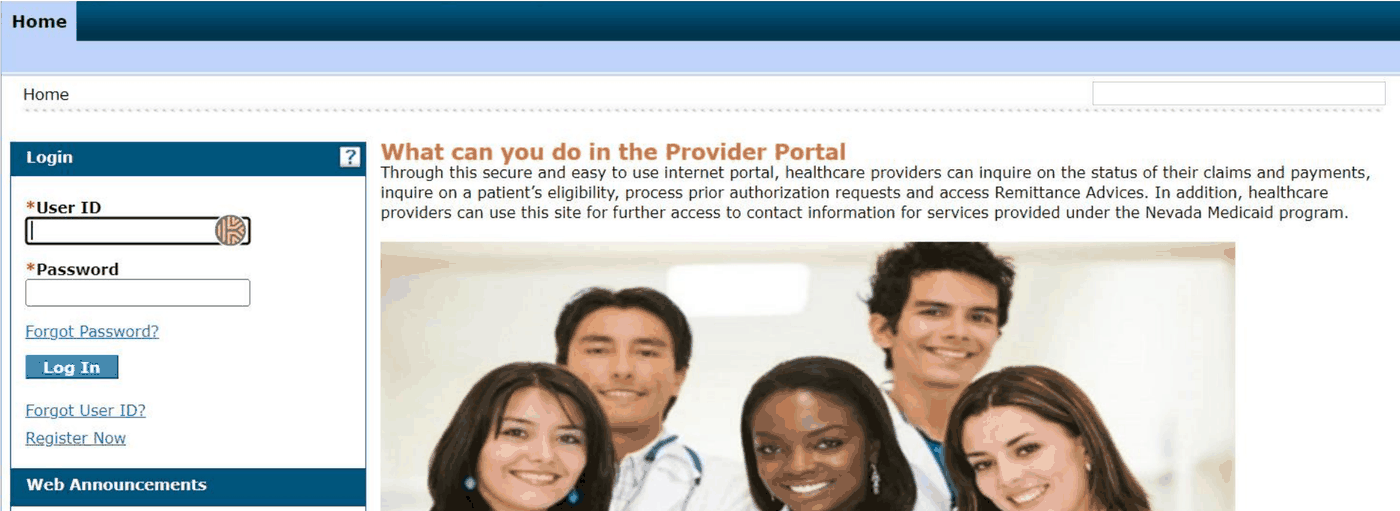
Screenshot source: Nevada Medicaid PWP User Manual Chapter 1, updated February 18, 2026, PDF page 15 (printed page 13).
TL;DR: use your own login, and give your biller their own
Use your own registered Nevada Medicaid account and MFA. Your biller gets their own Delegate login, and the provider administrator grants the functions needed for your practice. PWP handles eligibility and claims; Flex enrollment applications and managed care plan billing are separate tasks. Nevada personal Delegate and MFA rules
Who needs their own Nevada Medicaid login
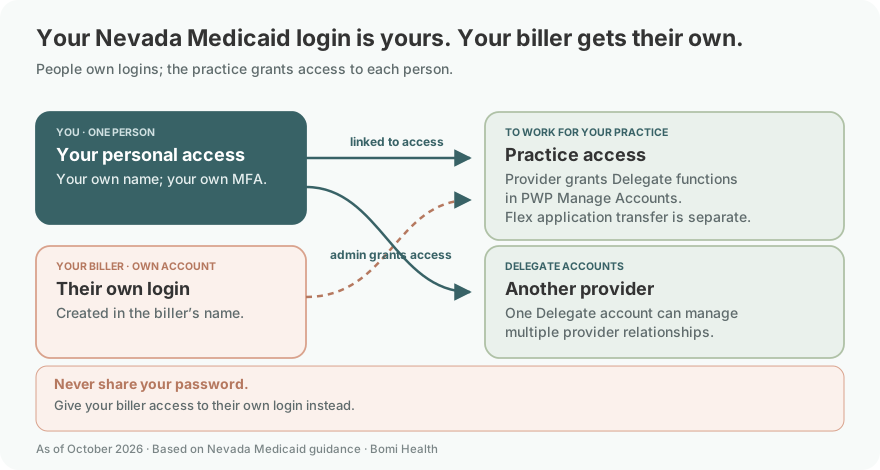
Each biller or staff member needs their own named account and MFA. Nevada’s MFA announcement says account sharing is not supported and users acting for a provider should have personal Delegate accounts. Give your biller permissions rather than your password.
Use your own name for personal Delegate access and keep MFA with that individual. The guide permits a Delegate to manage enrollments for multiple providers; each provider still grants the applicable functions. A Provider account is limited to its NPI.
Before you create access
Check whether you already have PWP credentials, whether your office already has its administrative registration, and which provider relationship or enrollment application you need. The registration page permits one administrative registration per NPI, tax ID and ZIP combination. A biller’s Delegate relationship and an existing Flex application transfer are separate tasks.
Use existing credentials or create the right account
The July 2026 Flex guide says existing PWP credentials work in Flex. A PWP Provider account can submit enrollments for its own NPI; a Delegate account can manage enrollments for multiple providers. Choose according to the work you actually perform. Flex Getting Started
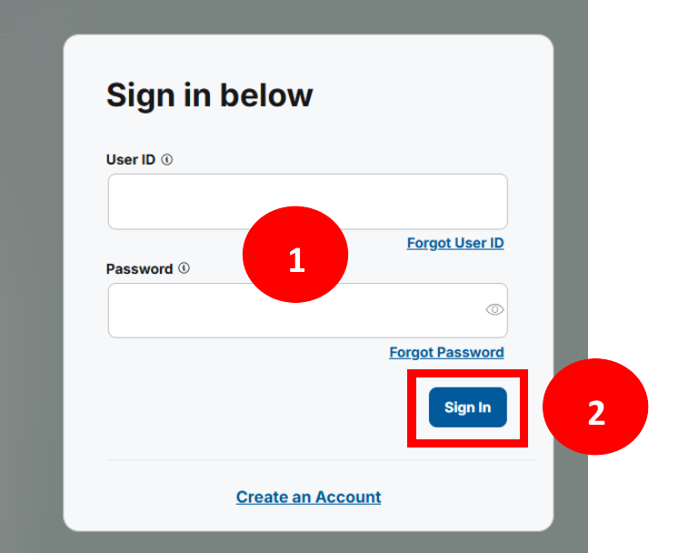
Screenshot source: Nevada Provider Flex User Guide: Getting Started, July 31, 2026, PDF page 4 (printed page 3).
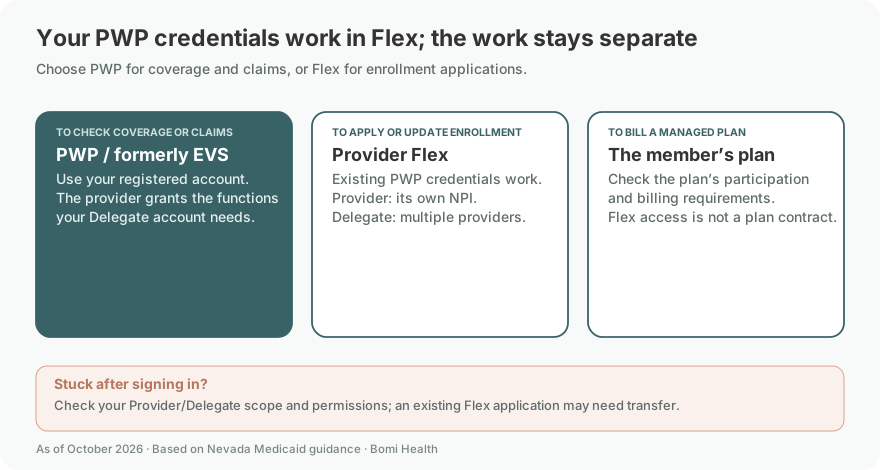
For PWP administration, Nevada’s registration page allows one administrative registration per NPI, tax ID and ZIP combination. A delegate gets a code from the registered provider. Check whether the office already has an administrator before registering again. PWP registration
The PWP manual describes Register Now, selection of the Provider or Delegate role, entry of required matching information, account credentials, contact information and MFA. Gather the enrollment record first so the identifiers match what the state has on file. PWP Chapter 1
New Provider Flex users: registration and MFA
If you do not already have a User ID, choose Create an Account on the Flex sign-in page and enter the required information in your own name.
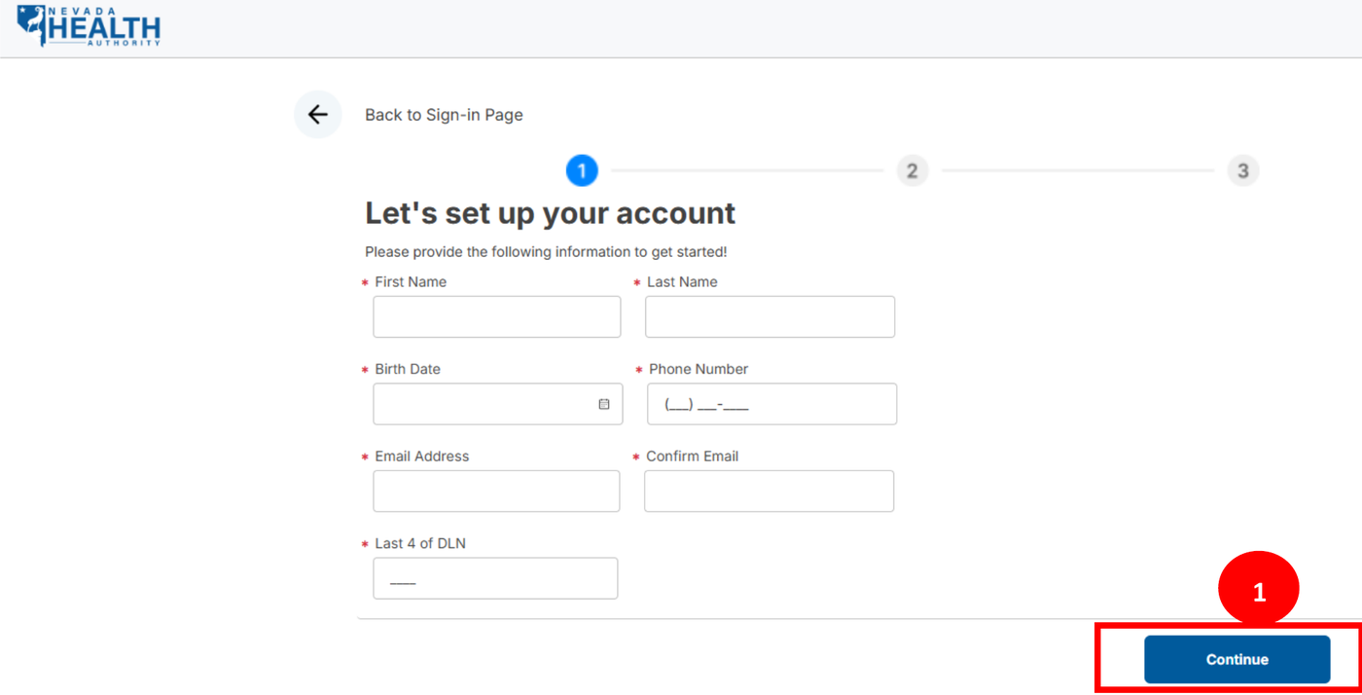
Screenshot source: Nevada Provider Flex User Guide: Getting Started, July 31, 2026, PDF page 5 (printed page 4).
Choose an available User ID and password, accept the agreement and submit. Sign in and enroll in an available MFA method, then complete verification to reach the dashboard.
These steps follow the current Getting Started guide. Keep access to the registration email and chosen MFA method with the named user. Do not treat a confirmation email as approval of the provider enrollment itself. Flex Getting Started
Nevada required MFA for Provider Flex beginning August 25, 2025. Use the current guide when deciding whether to reuse a PWP MFA setup or configure a factor. WA 3702
Add your biller: named Delegate access
Your biller uses their own personal Delegate login, never the owner’s password. The provider administrator adds or links that Delegate through PWP Manage Accounts and selects the functions for the practice. The biller retains their own MFA.
For PWP access, the provider administrator creates or links the biller’s Delegate relationship and assigns the required functions. The PWP Chapter 1 manual documents that authorization. An active Flex application may also require transfer by the receiving user’s exact User ID; follow our detailed Delegate and application-transfer guide for the applicable handoff.
Login errors: missing application, User ID or password
First check the account role and NPI. For a biller taking over someone else’s application, use the existing delegate/transfer workflow rather than sharing the original creator’s password. The Flex FAQ distinguishes the applications a delegate can see from those visible to a Provider or Administrator. Provider Flex FAQ
Use the documented Forgot User ID or Forgot Password route. The guide says a Provider/Admin User ID created in PWP must be retrieved through PWP. Recover the existing identity before building a duplicate account. Flex Getting Started
For a practical handoff, we recommend recording the task, correct portal, named administrator, delegate relationship and unresolved access issue in one secure setup checklist. Keep passwords, identity documents and MFA codes out of that shared checklist.
Related Nevada Medicaid tasks
Give your biller named delegate access · Nevada Medicaid Therapist Enrollment: PT 14 · Nevada Medicaid EVS: Verify Eligibility in PWP
Frequently Asked Questions
What is the Nevada Medicaid provider login?
Use the official Provider Web Portal (PWP) sign-in for eligibility, claims and prior authorizations. Use Provider Flex for enrollment applications. Both entry points are linked from medicaid.nv.gov.
What is the Provider Flex login?
Use flex.medicaid.nv.gov. Existing PWP User IDs and passwords can also sign into Flex; Provider or Delegate scope still controls which enrollment applications you can manage.
Is EVS the same as Provider Flex?
No. Nevada labels PWP as formerly EVS. PWP supports operational eligibility and claims functions; Provider Flex is the enrollment application tool.
How do I reset my Nevada Medicaid portal password?
Use the documented Forgot Password route for your account. For a Provider/Admin User ID originally created in PWP, retrieve the User ID through PWP. Follow the official Getting Started guide and contact (877) 638-3472 for account or MFA help.
How do I give my biller Nevada Medicaid portal access?
Use a named Delegate account with the appropriate PWP functions. An existing active Provider Flex application may need a separate transfer by exact User ID; sharing the owner’s login is not supported.
Need help getting payer-ready?
For practices enrolled in Bomi Billing, our team handles CAQH, payer applications, attestations, roster updates, and ongoing credentialing. Credentialing requires Bomi Billing.
Credentialing with billing
About Bomi
Founded by George Ruan, Dax Earl, and Andrey Goder, Bomi helps independent therapists and group practices with insurance billing, credentialing, and payer follow-up. Bomi grew out of Dax’s experience helping his mother with her therapy practice, with a clear purpose: reduce the administrative burden of insurance while keeping practice owners in control.
Meet our founders