
Nebraska Provider Data Management System Login: Enrollment and Biller Access
By George Ruan • October 9, 2026
For Nebraska Provider Data Management System provider login, open Nebraska PDMS sign-in and sign in with your own account.
Sections
Direct links: Nebraska PDMS login and account help
The PDMS login shown in the current-linked account guide has separate account creation and password/User ID recovery links.
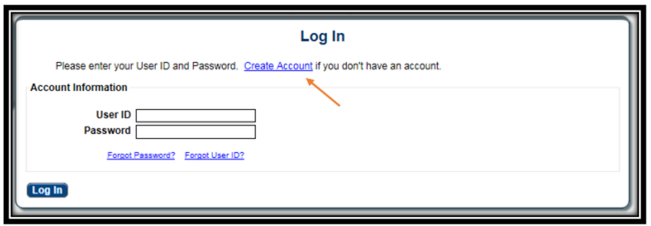
Screenshot source: Nebraska Provider Location Account Creation October 19, 2018, PDF page 1.
TL;DR: use your own login, and give your biller their own
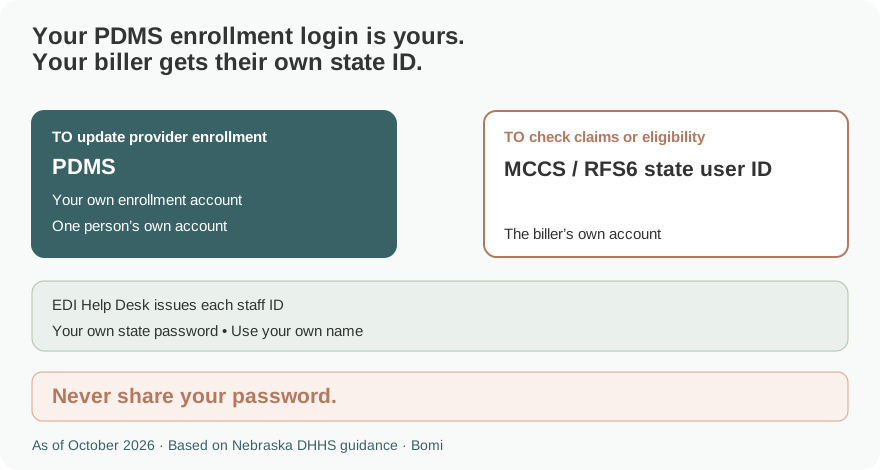
Use your own enrollment portal login. Your biller needs their own state user ID for MCCS claims or RFS6 eligibility, issued through the EDI Help Desk. That state ID is separate from the Maximus enrollment portal account; there is no documented PDMS delegate invitation to substitute for it. Official guide.
Who needs their own Nebraska PDMS login
PDMS is the Nebraska Provider Data Management System for enrollment work. The state’s billing-access instructions require a separate login ID and password for each person who uses its claims or eligibility systems and prohibit sharing. Never share your password. Ask for the access the person actually needs: enrollment assistance and billing access are different tasks. Official guide.
Before you create access
For PDMS registration, have the Tax ID used for the provider location. The current-linked October 19, 2018 guide distinguishes a business EIN from an individual/solo provider’s permitted EIN or SSN. Existing-provider verification may request NPI, taxonomy, ZIP code, ZIP extension and Medicaid Provider ID matching the system’s records. Official guide.
For billing or eligibility access, use the state’s Provider Internet Access instructions. They identify MCCS for claim status and RFS6 for eligibility, an agency confidentiality agreement/application, and an external-access confidentiality statement for each person. A PDMS username does not replace that state user ID. Official guide.
How to create your Nebraska PDMS account
Choose Create Account from the PDMS login. Enter and confirm the Tax ID, choose the appropriate type, and select Next. For an existing provider, complete the matching provider information requested by the portal. Official guide.
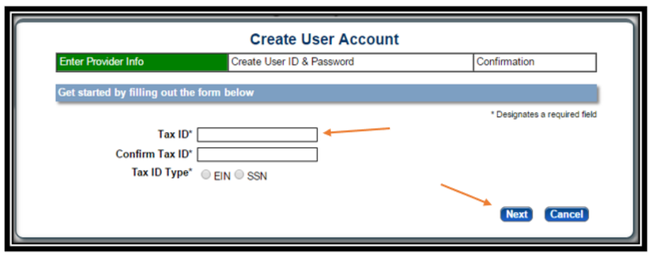
Screenshot source: Nebraska Provider Location Account Creation October 19, 2018, PDF page 2.
Complete the required personal account and security fields and register. Activate the account through the email link before signing in. Follow the live password requirements rather than treating the older manual’s example password as something to reuse. Official guide.
If existing-provider information will not match, the account-creation guide directs users to customer service at 844-374-5022. Do not create an unrelated new-provider record to work around a mismatch. Official guide.
Add your biller
For MCCS/RFS6 work, follow the state’s EDI Help Desk process. The agency supplies its required agreement/application and each biller supplies their own external-access confidentiality statement. The state says each staff member gets a separate user ID; sharing an existing ID breaches the access agreement. Official guide.
The official page lists the EDI Help Desk at 402-471-9461 or 866-498-4357. Use it to arrange individual staff access and report staff changes. The published PDMS guides do not document an Add Delegate role or a biller invitation menu, so there is no such menu illustrated here. Official guide.
For enrollment help inside PDMS, consult the current enrollment resources and Maximus support. Page 5 of the Provider Management Home guide says an existing location not being managed by you appears under Other Providers with the same Tax ID. Choose Manage for that registration instead of creating a New Provider Location, then follow the prompts. Customer Service may need to transfer the registration; this is not an automatic transfer of control or a biller invitation. Official guide.
Login errors and account recovery
For PDMS credentials, use Forgot/Reset Password or Forgot User ID on the PDMS login panel. For a state SS ID used by MCCS/RFS6, the official state instructions point to the separate state password-management page. These recovery paths are for different accounts. Official guide.
Related guides
How Oregon MMIS accounts and biller access work explains a separate state’s access model. Use the guide for the state whose Medicaid program you bill.
Frequently Asked Questions
Where is the Nebraska Medicaid enrollment portal login?
Use the Nebraska Provider Data Management System login on nebraskamedicaidproviderenrollment.com for enrollment work.
Is a Nebraska PDMS account the same as an MCCS or RFS6 login?
No. PDMS enrollment credentials are separate from the state user ID used for MCCS claim status or RFS6 eligibility.
How does my biller get Nebraska Medicaid claims access?
Use the state EDI Help Desk process. Each staff member needs their own state user ID and external-access confidentiality statement; the agency also supplies the required agreement/application.
Can my biller use my Nebraska state password?
No. The state explicitly requires separate login IDs and passwords for each staff member and prohibits sharing.
Where is Add Delegate in Nebraska PDMS?
The currently published PDMS account and management guides do not document that role or invitation menu. Contact the appropriate enrollment or EDI support team for the task rather than assuming a delegate workflow exists.
Planning a private practice?
Use Bomi's free Build resources to plan the business, provider identity, payer setup, and billing workflow before you see clients.
Use Build resources
About Bomi
Founded by George Ruan, Dax Earl, and Andrey Goder, Bomi helps independent therapists and group practices with insurance billing, credentialing, and payer follow-up. Bomi grew out of Dax’s experience helping his mother with her therapy practice, with a clear purpose: reduce the administrative burden of insurance while keeping practice owners in control.
Meet our founders