
MESA Provider Portal Login: Mississippi Account Setup and Delegate Access
By George Ruan • October 9, 2026
For MESA Provider Portal provider login, open MESA sign-in and sign in with your own account.
Sections
Direct links: MESA login and account help
The public MESA login begins with User ID. Password entry comes later in the sign-in sequence.
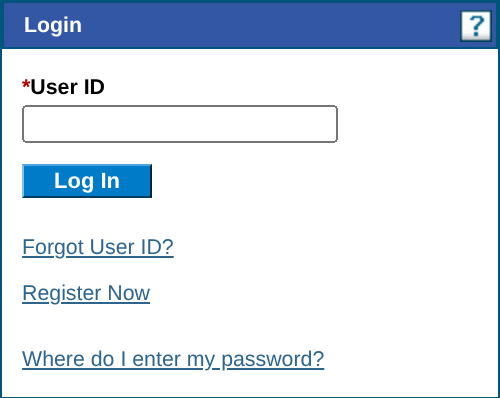
Screenshot source: Screenshot of the public MESA Provider Portal sign-in page, captured October 9, 2026.
TL;DR: use your own login, and give your biller their own
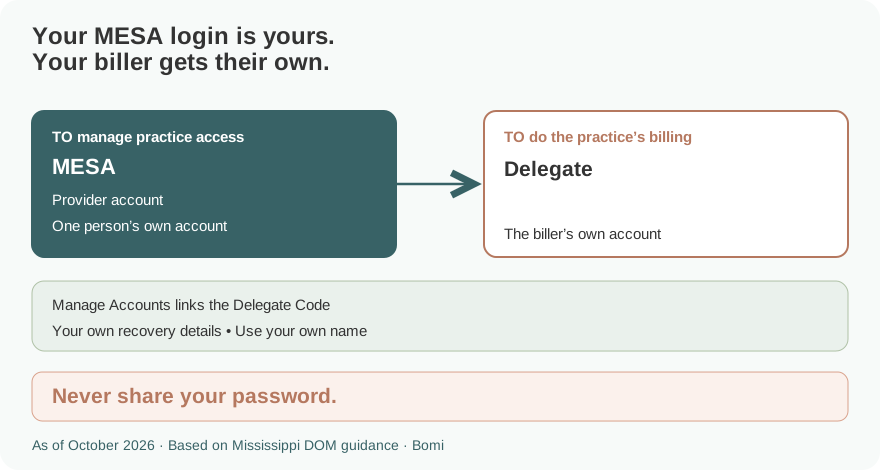
Use your own MESA login. Your biller uses a separate Delegate login that the provider links using the Delegate Code and assigned functions. Initial Medicaid enrollment is a separate application; you do not need a portal account to start that application. Official guide.
Who needs their own MESA login
The provider account and each Delegate account have separate credentials. Never share your password. A delegate can serve multiple linked provider accounts and select the provider when signing in or switch later; the provider still controls the functions available for its own account. Official guide.
Before you create access
The current provider FAQ says portal accounts are available to providers already enrolled in Mississippi Medicaid. For initial enrollment, use Provider Enrollment Access on the public portal; an existing secure portal login is not required to begin the enrollment application. Official guide.
For delegate registration, the provider first establishes the assignment and supplies the Delegate Code. The delegate’s registration identity details must match the provider’s entry. The official Provider Portal Processes v1.4 describes the registration and email-confirmation steps. Official guide.
How to create your MESA account
An enrolled provider begins at Register Now on the MESA provider home and selects the registration option appropriate to that provider. Follow the current registration prompts and activate the account as directed. Do not select an unrelated account type to bypass a provider-record mismatch. Official guide.
For a delegate, choose Register Now, then Delegate. The v1.4 guide asks for the matching name, birth date, last four digits of the driver’s license number and Delegate Code. Continue through the account-security steps and confirm the account through the email link before logging in. Official guide.
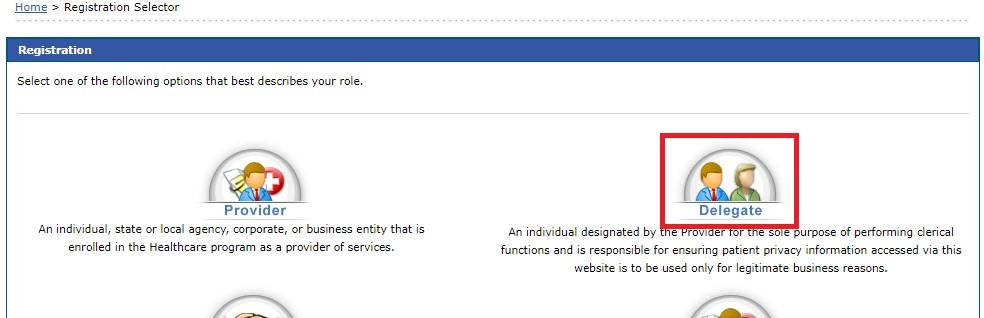
Screenshot source: MESA Provider Portal Processes v1.4, PDF page 4, Figure 5.
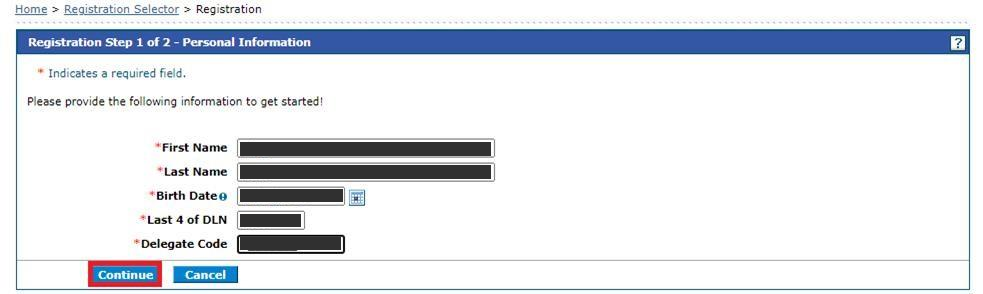
Screenshot source: MESA Provider Portal Processes v1.4, PDF page 4, Figure 6; sample values masked.
Add your biller
The provider signs in and opens Manage Accounts under User Details to manage delegate access. Have the biller register their own Delegate account using the assignment information and Delegate Code. Grant the functions needed for that provider’s work rather than giving the biller the provider’s password. Official guide.
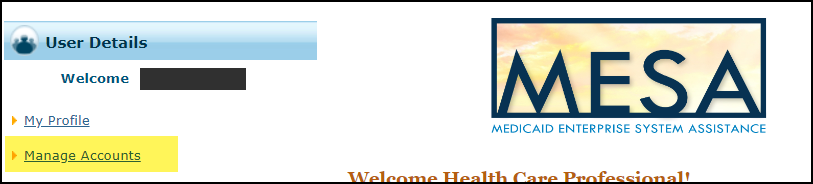
Screenshot source: MESA Managing Delegates CCO job aid v0.1 (2024), PDF page 1, Figure 2; sample username masked.
If the biller already has a MESA Delegate Code, use that code when linking another provider account. The v1.4 guide says multi-provider delegates are shown a Switch Provider panel. Selecting a provider changes the account being worked; it does not grant functions the provider has not authorized. Official guide.
Login errors and account recovery
MESA starts with User ID and Log In, then the challenge and site-key/passphrase checks before the password. If the site key or passphrase is not correct, do not enter the password; follow the official support instructions. Forgot User ID is on the first login panel and password recovery is part of the later password step. Official guide.
For provider account assistance, the official MESA resources list Provider/Beneficiary Services at 800-884-3222. If a delegate can sign in but cannot see the needed work, first confirm the correct provider is selected and that the provider has assigned the function. Official guide.
Related guides
How Oregon MMIS accounts and biller access work explains a separate state’s access model. Use the guide for the state whose Medicaid program you bill.
Frequently Asked Questions
Where is the Mississippi MESA provider login?
Use the official MESA Provider Portal at portal.ms-medicaid-mesa.com/ms/Provider/. Start with your own User ID.
Do I need a MESA portal login to enroll in Mississippi Medicaid?
No. The current provider FAQ says an initial enrollment application can be started through Provider Enrollment Access without a portal account.
How does my biller get a MESA login?
The provider establishes delegate access and supplies the Delegate Code and matching registration details. The biller registers a separate Delegate account and confirms the activation email.
Can a MESA delegate work for multiple providers?
Yes. The official v1.4 guide describes delegates linked to multiple provider accounts and the Switch Provider panel used to select the correct account.
What is the MESA provider support number?
The official MESA resource page lists Provider/Beneficiary Services at 800-884-3222.
Planning a private practice?
Use Bomi's free Build resources to plan the business, provider identity, payer setup, and billing workflow before you see clients.
Use Build resources
About Bomi
Founded by George Ruan, Dax Earl, and Andrey Goder, Bomi helps independent therapists and group practices with insurance billing, credentialing, and payer follow-up. Bomi grew out of Dax’s experience helping his mother with her therapy practice, with a clear purpose: reduce the administrative burden of insurance while keeping practice owners in control.
Meet our founders