
Humana Login: Medicare Advantage Portal and Biller Access
By George Ruan • October 10, 2026
For Humana provider login, open Availity Essentials and sign in with your own Availity user ID and password.
Last checked: October 10, 2026.
Sections
- Direct links: Humana login, registration and help
- TL;DR: use your own login, and give your biller their own
- Who needs their own Availity login
- Before you create access: Medicare Advantage or commercial?
- Set up access to Humana Payer Spaces
- Does Humana require another payer registration or PIN?
- Give your biller access to Humana tools
- Humana login errors: password or missing payer tool?
- Related guides
- Frequently Asked Questions
Direct links: Humana login, registration and help
Provider login — the official Availity sign-in page.
New Availity registration — if your practice already has an organization, ask its administrator for your own user access.
Forgot user ID or password — choose the matching recovery link on the sign-in page.
Availity login and technical help — 800-282-4548.
Join the Humana network — separate from creating an Availity account.
Humana portal instructions — check payer-specific access and tools.
Humana payer help — MA eligibility/claims: 800-457-4708; commercial eligibility/claims: 800-448-6262.
The Availity sign-in card looks like this. Existing users choose Sign In; the recovery links are below the password field.
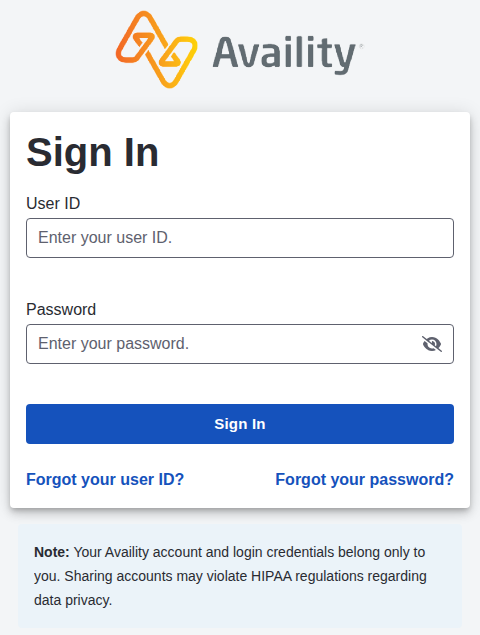
Screenshot source: Public Availity sign-in page, captured October 10, 2026.
TL;DR: use your own login, and give your biller their own
Use your own Availity account, then open Humana Payer Spaces. Your biller uses their own account with administrator-assigned roles; the Claim Status role is required for users assigned overpayment tasks. Network participation is separate. Humana’s portal page and January 2026 Overpayments Tool training explain access.
Who needs their own Availity login
Each person uses their own user ID and two-step verification. The administrator grants the biller access for the intended work. Humana’s overpayment instructions name the Claim Status role for users assigned tasks; that is a tool-specific requirement, not permission for every Humana application. Availity administrator guide.
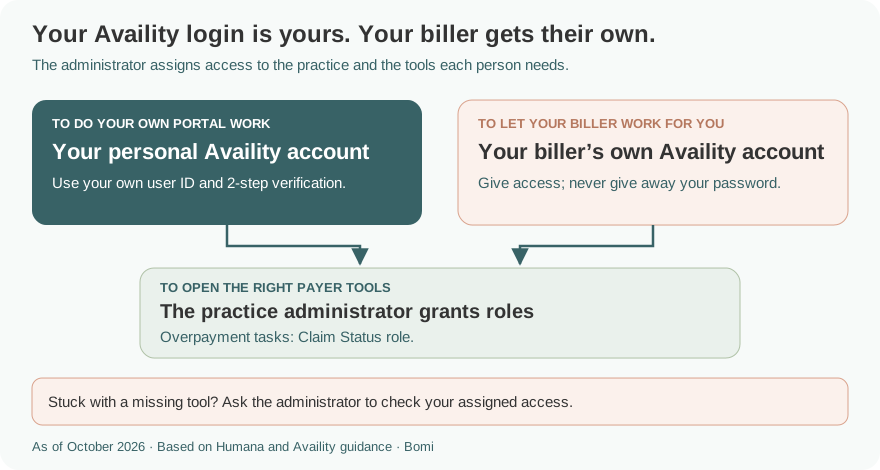
The role example above follows the payer’s tool-specific instructions; it is not a blanket role for every billing task.
Before you create access: Medicare Advantage or commercial?
As of this review, Humana has completed its exit from Employer Group Commercial Medical. Its 2025 annual report says the exit was finalized during 2025. Do not mistake an employer’s group Medicare Advantage coverage for an active employer commercial medical product. Humana 2025 annual report.
For current MA transactions, use Humana’s Availity instructions and verify the member’s plan. For an older commercial medical claim, Humana still lists a commercial eligibility/claims support number. Healthy Horizons Medicaid, Humana Military/TRICARE and other products require their own plan instructions. Humana provider support is the plan-specific starting point.
Set up access to Humana Payer Spaces
If the practice already uses Availity, ask its administrator for your own user access. If the organization has not registered, use the shared registration route above. Humana’s portal page directs existing organizations to their administrator; it does not tell every user to create another organization. Humana self-service portal.
After signing in, select Payer Spaces → Humana. Choose the application that matches the task: Humana’s consolidated guide lists Authorization Management and ERA/EFT Enrollment among its payer applications. Payment enrollment is a separate action from obtaining a login; do not change bank information just to test access. Humana tools and resources guide.
Does Humana require another payer registration or PIN?
Start with the selected tool’s requirements rather than looking for a universal Humana portal PIN. The published setup route is Availity registration plus the access your administrator assigns. For example, the Overpayments Tool training specifies Claim Status for assigned users. Humana portal instructions; Humana Making It Easier training.
For training, open Payer Spaces → Humana → Humana Learning Center. It is a useful place to check a tool’s current instructions before requesting more permissions. Humana web-based training.
Give your biller access to Humana tools
Ask the administrator to give the biller the roles for the selected transaction. For overpayment tasks, Humana explicitly names Claim Status. Do not share the practice owner’s credentials or assume access to one app includes every Humana tool. Payer access instructions.
For creating the organization, inviting a biller and assigning Availity user access, use our existing Availity biller-access guide. Keep the biller on their own account and give only the functions you intend them to use.
If you do not know who grants access, the Availity guide shows an administrator lookup. This generic Availity figure is not a payer-specific enrollment screen.
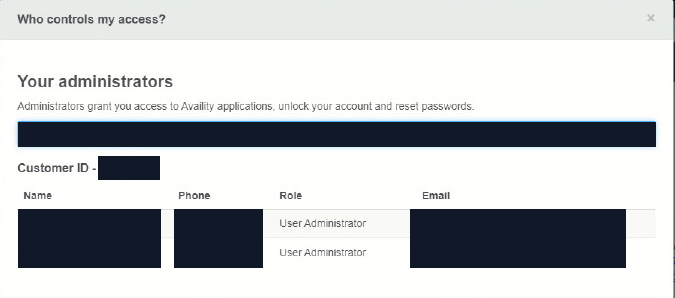
Screenshot source: Availity Reference Guide for Administrators (©2025), PDF page 3; account values masked.
Humana login errors: password or missing payer tool?
For a forgotten user ID or password, use the two recovery links on the official login page. If you can sign in but cannot open a tool, ask the organization administrator to check access before registering another organization. The Availity administrator guide distinguishes account recovery from user permissions. For technical help, contact Availity Client Services at 800-282-4548.
For a payer transaction or participation question, use Humana’s own provider instructions rather than treating it as a password reset.
For MA eligibility or claims questions, Humana lists 800-457-4708. For commercial eligibility or claims, it lists 800-448-6262. Those payer lines serve a different purpose from Availity’s 800-282-4548 login support. Humana help and support.
Related guides
Availity organization and biller setup — registration, invitations and user permissions.
Aetna commercial provider login — Aetna’s own PIN and payer-tool requirements.
Anthem provider login — state and product selection before payer-specific access.
BCBS plan login selector — verify which Blue plan’s portal applies.
Frequently Asked Questions
Where is the Humana provider login?
Humana directs providers to Availity Essentials. Sign in with your own user ID and open Payer Spaces, then Humana, for its payer-specific applications.
Does Humana still have commercial medical plans?
Humana’s 2025 annual report says it finalized its Employer Group Commercial Medical exit during 2025. Its provider support page still lists a commercial eligibility/claims line for commercial questions; check the plan and service date.
How do I give my biller access to Humana?
Use the existing Availity organization and biller-access guide. The administrator grants the biller their own user access and the roles needed for the work. Humana names Claim Status for users assigned overpayment tasks.
Do I need a separate Humana PIN for Availity login?
Humana’s published portal setup directs users to Availity registration and administrator-assigned access. Follow each payer tool’s requirements; the instructions cited here do not establish a universal Humana PIN for sign-in.
Who helps with a Humana claim versus an Availity password?
Use Availity’s recovery links or 800-282-4548 for login help. Humana lists 800-457-4708 for Medicare Advantage eligibility/claims and 800-448-6262 for commercial eligibility/claims.
Planning a private practice?
Use Bomi's free Build resources to plan the business, provider identity, payer setup, and billing workflow before you see clients.
Use Build resources
About Bomi
Founded by George Ruan, Dax Earl, and Andrey Goder, Bomi helps independent therapists and group practices with insurance billing, credentialing, and payer follow-up. Bomi grew out of Dax’s experience helping his mother with her therapy practice, with a clear purpose: reduce the administrative burden of insurance while keeping practice owners in control.
Meet our founders