
BCBS Login: Find Your Plan’s Availity Portal and Biller Access
By George Ruan • October 10, 2026
For BCBS plans on Availity provider login, open Availity Essentials and sign in with your own Availity user ID and password.
Last checked: October 10, 2026.
Sections
- Direct links: BCBS plans on Availity login, registration and help
- TL;DR: choose the Blue plan, then use your own login
- Who needs their own Availity login
- Before you create access: which BCBS provider portal?
- Payer setup example: Kansas Payer Spaces and BlueAccess
- Payer-specific permissions: Michigan and Illinois differ
- Give your biller access to the selected Blue plan’s tools
- BCBS login errors: password or missing payer tool?
- Related guides
- Frequently Asked Questions
Direct links: BCBS plans on Availity login, registration and help
Provider login — the official Availity sign-in page.
New Availity registration — if your practice already has an organization, ask its administrator for your own user access.
Forgot user ID or password — choose the matching recovery link on the sign-in page.
Availity login and technical help — 800-282-4548.
BCBS Michigan enrollment and change access — separate from creating an Availity account.
BCBS plans on Availity portal instructions — check payer-specific access and tools.
Anthem state-plan portal guide — Anthem has its own state and product routes.
Blue Cross NC Blue e — a separate portal route; do not substitute Availity for Blue e setup.
The Availity sign-in card looks like this. Existing users choose Sign In; the recovery links are below the password field.
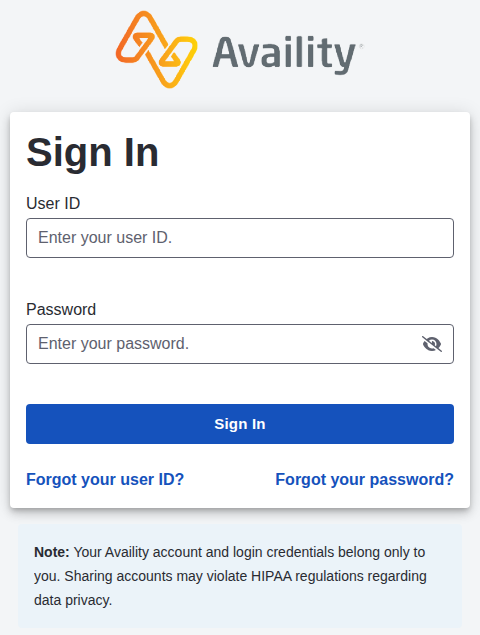
Screenshot source: Public Availity sign-in page, captured October 10, 2026.
TL;DR: choose the Blue plan, then use your own login
For the Blue plans listed below, start with the plan’s official provider instructions and use your own Availity account where directed. Your biller gets their own access from the practice administrator. Tool registration and network enrollment vary by plan; a Blue logo alone does not identify the right portal. BCBS Michigan’s administrator guide describes individual accounts and tool permissions.
Who needs their own Availity login
Each person uses their own account. The administrator grants the appropriate plan and tool access; Michigan’s Provider Enrollment and Change Self-Service specifically uses the Provider Data Management role. That requirement does not define a universal role for every Blue plan. Availity administrator guide.
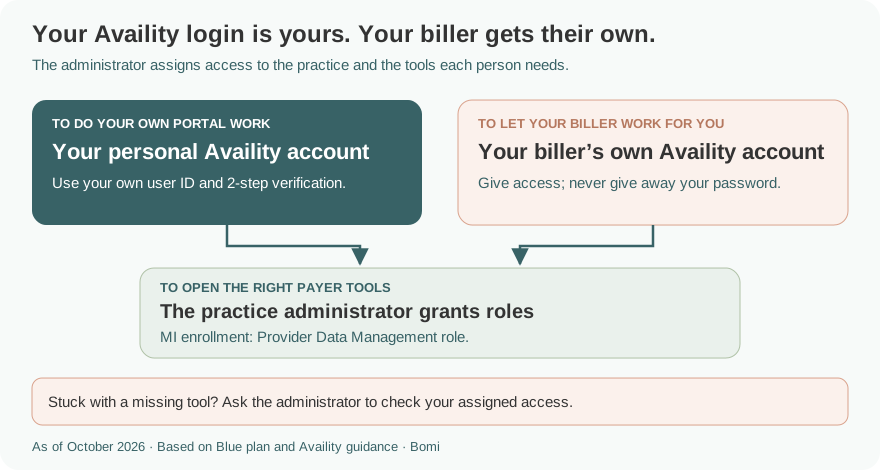
The role example above follows the payer’s tool-specific instructions; it is not a blanket role for every billing task.
Before you create access: which BCBS provider portal?
Use the exact plan and product on the member’s card, then its provider website. These are selected verified examples, not an exhaustive list of Blue plans. For Anthem, use the Anthem state-plan guide; its payer-specific setup should not be copied to an independent Blue plan.
Blue Cross and Blue Shield of Illinois — Availity provider tools; authorization routes vary by product and vendor.
Blue Cross Blue Shield of Michigan and Blue Care Network — Availity for Blue Cross commercial, Medicare Plus Blue, BCN commercial and BCN Advantage; the dropdown label is BCBS Michigan and Blue Care Network.
Blue Cross and Blue Shield of Kansas commercial — Availity plus a BlueAccess link for additional secure tools.
BCBS Kansas Medicare Advantage — follow its MA provider-portal instructions, rather than assuming the commercial BlueAccess route is identical.
Blue Cross and Blue Shield of Montana — its provider Availity entry is separate from member or producer sign-in.
Highmark — use its Availity instructions and plan-specific access guidance.
Blue Cross NC Blue e — follow the existing Blue e billing-service access guide for that separate system.
Payer setup example: Kansas Payer Spaces and BlueAccess
The March 2024 BCBS Kansas guide shows Payer Spaces → the Kansas tile, then Resources → BCBSKS Provider Secure Section (BlueAccess) for additional secure functions. This is a Kansas commercial example, not a menu for all Blue plans. BCBSKS Availity guide, printed pages 2–3.
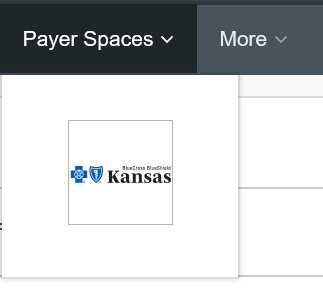
Screenshot source: BCBS Kansas Availity guide (March 2024), PDF page 4 / printed page 2.
Payer-specific permissions: Michigan and Illinois differ
Michigan’s current enrollment/change page links a guide that requires two administrator actions for Provider Enrollment and Change Self-Service: assign Provider Data Management to the user and add the Type 2 provider within the organization. The user then opens the BCBSM/BCN payer space and the application tile. Do not confuse this enrollment-management permission with general claim-status access. BCBSM current tool page; administrator instructions, pages 2–3.
By contrast, BCBSIL says its Availity Authorizations & Referrals tool needs no separate user enrollment. It routes requests through Patient Registration → Authorizations & Referrals → Authorization Request, then the payer and organization. Blue Cross Community Health Plans has a Medicaid Authorization Portal, and Carelon or EviCore-managed authorizations use their designated routes. BCBSIL authorization instructions.
Give your biller access to the selected Blue plan’s tools
Have the administrator check the selected payer tool’s permissions, not just whether the biller can sign in. For Michigan enrollment/change access, the exact role is Provider Data Management. For a separate portal such as Blue e, use that portal’s billing-service authorization process. Payer access instructions.
For creating the organization, inviting a biller and assigning Availity user access, use our existing Availity biller-access guide. Keep the biller on their own account and give only the functions you intend them to use.
If you do not know who grants access, the Availity guide shows an administrator lookup. This generic Availity figure is not a payer-specific enrollment screen.
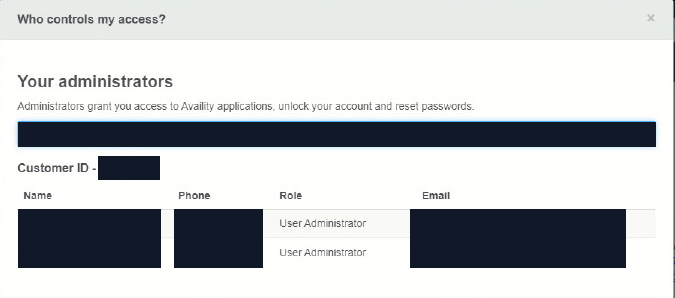
Screenshot source: Availity Reference Guide for Administrators (©2025), PDF page 3; account values masked.
BCBS login errors: password or missing payer tool?
For a forgotten user ID or password, use the two recovery links on the official login page. If you can sign in but cannot open a tool, ask the organization administrator to check access before registering another organization. The Availity administrator guide distinguishes account recovery from user permissions. For technical help, contact Availity Client Services at 800-282-4548.
For a payer transaction or participation question, use BCBS’s own provider instructions rather than treating it as a password reset.
Related guides
Availity organization and biller setup — the shared workflow for Availity users.
Blue Cross NC Blue e biller access — its separate billing-entity and authorization requirements.
Anthem provider login — state selection and Anthem-specific enrollment/reporting access.
BCBSIL credentialing — joining the Illinois network is separate from portal login.
BlueCard out-of-state claims — claim-routing questions after identifying the member’s plan.
Frequently Asked Questions
Where is the BCBS provider login?
Start with the exact Blue plan’s provider instructions. The plans listed here use Availity for specified functions, but other portal routes exist, including Blue Cross NC Blue e and payer-specific applications.
Do all BCBS plans use the same Availity registration?
No single payer setup rule covers every Blue plan. A personal Availity account is separate from tool-specific permissions or payer registration. Check the plan and product before following another plan’s steps.
What role does a biller need for BCBS Michigan enrollment changes?
BCBS Michigan’s instructions require the Provider Data Management role and the Type 2 provider within the Availity organization for Provider Enrollment and Change Self-Service. That is a specific tool requirement, not a universal BCBS billing role.
Does BCBSIL require separate registration for Availity authorizations?
BCBSIL says no separate user enrollment is needed for its Availity Authorizations & Referrals tool. Product and vendor routing still matters, including Medicaid Authorization Portal, Carelon and EviCore routes.
Is Blue Cross NC Blue e the same as Availity?
Blue e has its own access and billing-service authorization instructions. Use the existing Blue e guide rather than repeating Availity organization setup for that separate portal.
Want Bomi to handle insurance billing?
Bomi helps therapy practices with benefit checks, claims, denials, balances, CAQH, attestations, and revenue management.
Book a call
About Bomi
Founded by George Ruan, Dax Earl, and Andrey Goder, Bomi helps independent therapists and group practices with insurance billing, credentialing, and payer follow-up. Bomi grew out of Dax’s experience helping his mother with her therapy practice, with a clear purpose: reduce the administrative burden of insurance while keeping practice owners in control.
Meet our founders