
AHCCCS Online Login: Provider Account and Biller Access
By George Ruan • October 9, 2026
For AHCCCS Online provider login, open the official AHCCCS Online sign-in page and sign in with your own master or individual account. This is the provider portal used for eligibility and enrollment verification and AHCCCS fee-for-service claim functions. Provider enrollment applications belong in APEP, a separate system. AHCCCS describes the portal functions here.
Account guidance reviewed: October 9, 2026.
Sections
- Direct links: AHCCCS Online login and registration
- TL;DR: use your own login, and give your biller their own
- Who needs their own AHCCCS Online login
- Before you create access
- Account setup steps
- Complete ID.me identity verification
- Add your biller as an individual user
- Login errors, lockouts and password recovery
- What to do after account setup
- Frequently Asked Questions
Direct links: AHCCCS Online login and registration
The AHCCCS Online sign-in screen asks for your username and password; new users start from the registration link above.
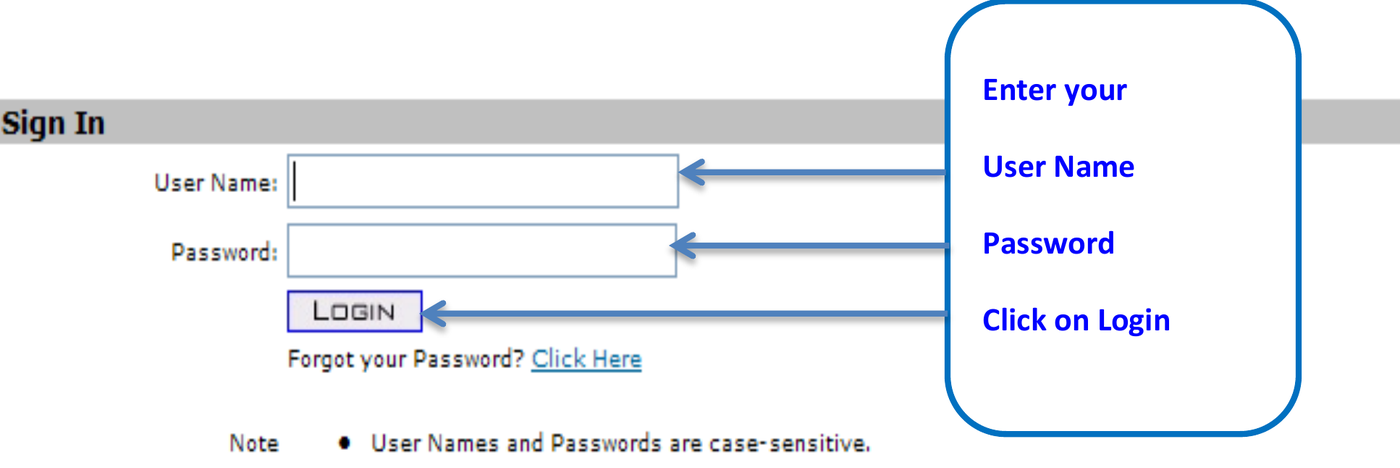
Screenshot source: AHCCCS Online Eligibility and Enrollment Verification manual, page 5; current manual-index copy, PDF metadata October 2013.
TL;DR: use your own login, and give your biller their own
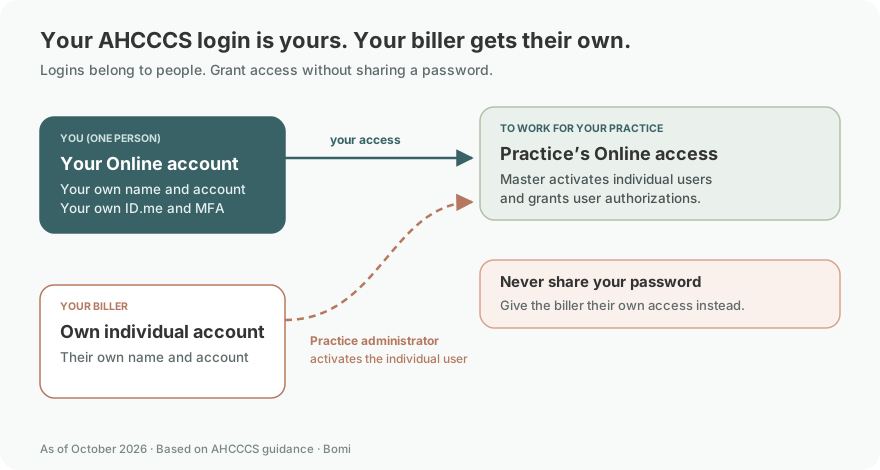
Use your own AHCCCS Online account. Your biller registers their own individual account, and your practice’s master account holder activates it and grants permissions. APEP provider enrollment and health-plan claims are separate.
Official account and permission FAQ.
Who needs their own AHCCCS Online login
Each person needs their own master or individual account, with their own ID.me verification. Keep your own name, recovery details and any MFA tied to you; never share your password. The first organization account is the master account. The master activates later individual accounts, including your biller’s, and chooses the functions they can use.
AHCCCS Online account FAQ and AHCCCS ID.me guidance.
Before you create access
Have the organization’s AHCCCS provider ID or group billing ID available, confirm its provider-record address, and find out who holds master access. Individual accounts need master approval; new master accounts need the mailed activation code. AHCCCS account-registration FAQ.
Account setup steps
Check for an existing master account. Ask the practice who already administers AHCCCS Online before registering another master. If there is an existing master, use the individual-user path and coordinate activation with that person.
Use the official registration page. Read the terms and follow the account-type instructions. The registration entry is separate from the APEP provider application; it does not itself enroll a therapist in Arizona Medicaid.
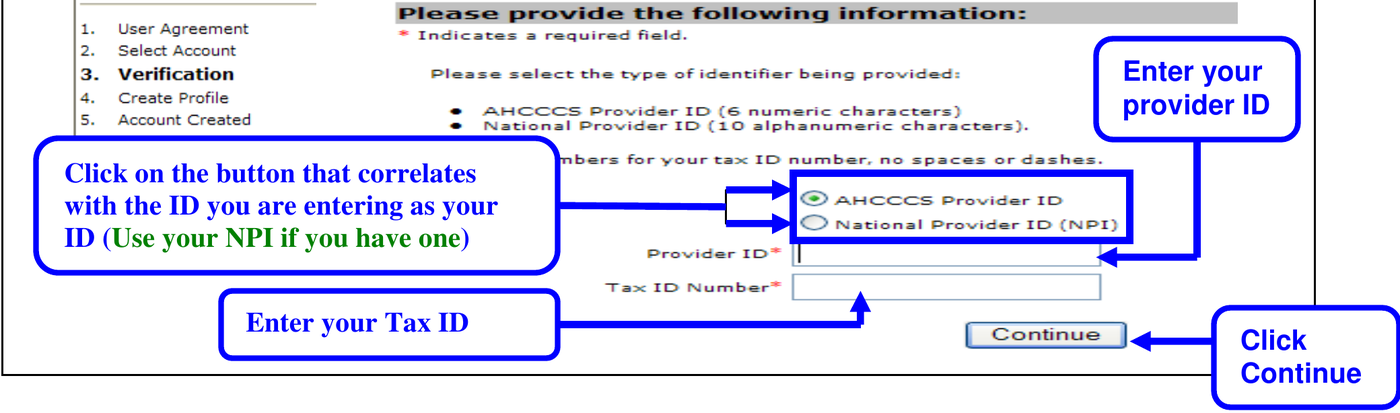
Screenshot source: AHCCCS Online Create an ID and Password manual, page 3 (printed page 9), revised October 4, 2013; current manual-index copy.
For a new master, complete mailed-code activation. The FAQ says AHCCCS mails an authentication code to the provider address on record. The code must be activated within 15 days. Confirm the address and follow the current FAQ if the letter does not arrive.
For an individual user, ask the master to activate access. The master approves the user and grants the required authorizations. Signing in successfully does not mean every claim or provider record will be available.
These account and activation steps come from the AHCCCS Online FAQ. Do not promise immediate access when a mailed authentication code or administrator approval is still outstanding.
Complete ID.me identity verification
AHCCCS requires ID.me identity verification for AHCCCS Online users; the agency introduced the requirement January 4, 2024. After the AHCCCS Online login, users are directed to ID.me and can create an ID.me account if needed. Follow that verification flow as the individual account holder. Read AHCCCS’s ID.me notice.
Treat identity verification and practice permissions as separate checks. ID.me verifies the person; the master account controls AHCCCS Online user access. APEP domain access is another enrollment-system permission, covered in our existing APEP biller-access guide.
Add your biller as an individual user
Have the biller register their own individual account. Never share your password. The master uses Admin, Pending Approvals and Approve User, then selects the needed User Authorization options and saves with Update Authorization. The FAQ says permission changes may take up to five minutes. Official user-activation instructions. APEP domain access is a separate permission.
Login errors, lockouts and password recovery
After three failed attempts, an individual account needs a password reset; a master account is locked for 15 minutes. Start Forgot your Password from the login page. If you cannot answer the security questions, ask the master to send the recovery email; individual users must use the master for reset help. Recovery emails expire after 30 minutes. AHCCCS lockout and recovery FAQ.
If you can log in but cannot see the right claims
The FAQ ties access to user authorizations and provider/group affiliation. A master account does not automatically make every unrelated provider’s claims visible. For a group, check the billing provider ID and active affiliations, then ask the master to review the individual user’s permissions. See group and user-access guidance.
Individual password or account problem: start with your organization’s master account, as the FAQ directs.
Master-account problem or wrong mailing address: use the Service Desk instructions in the official FAQ. It lists servicedesk@azahcccs.gov and warns against sending usernames or passwords.
Enrollment application or APEP domain problem: use APEP resources rather than changing AHCCCS Online permissions.
Keep the current AHCCCS Online FAQ bookmarked so support and account-recovery instructions come from the agency.
What to do after account setup
Use the portal to verify AHCCCS eligibility and plan enrollment for the session date. Then identify the payer before choosing a claim submission route. Our behavioral health claims and telehealth guide explains the FFS-versus-plan boundary. AHCCCS Online access does not create a health-plan contract.
Frequently Asked Questions
How do I reset my AHCCCS Online password?
Use Forgot your Password on the official login page. If an individual user cannot answer the security questions, the master account holder can send a recovery email. Follow the official FAQ; recovery emails expire after 30 minutes.
Why is my AHCCCS Online account locked?
Three failed login attempts require a password reset for an individual account; a master account is locked for 15 minutes. Inactivity, missing activation or changes to the provider organization can also prevent access. Check the official account FAQ and your master account holder.
Where is the AHCCCS Online provider portal login?
Use the official AHCCCS Online login linked at the top of this guide. It is a provider portal for eligibility/enrollment verification and AHCCCS fee-for-service functions.
Is AHCCCS Online the same as APEP?
No. AHCCCS Online supports provider operational functions; APEP is the AHCCCS Provider Enrollment Portal for enrollment applications and enrollment-record management.
Why does AHCCCS Online ask me to use ID.me?
AHCCCS requires individual identity verification through ID.me. The agency introduced this requirement January 4, 2024. It is separate from master-account permission approval.
Why can I sign in but not see my practice’s claims?
Check the individual user’s authorizations, the billing provider ID, and the provider’s group affiliation with the master account. A successful login alone does not establish access to every provider record.
Planning a private practice?
Use Bomi's free Build resources to plan the business, provider identity, payer setup, and billing workflow before you see clients.
Use Build resources
About Bomi
Founded by George Ruan, Dax Earl, and Andrey Goder, Bomi helps independent therapists and group practices with insurance billing, credentialing, and payer follow-up. Bomi grew out of Dax’s experience helping his mother with her therapy practice, with a clear purpose: reduce the administrative burden of insurance while keeping practice owners in control.
Meet our founders