
PRISM Login: Utah Medicaid, UtahID and Biller Access
By George Ruan • October 9, 2026
For PRISM provider login, open PRISM official login and sign in through your own UtahID before selecting your approved PRISM access.
Links and current guide versions checked October 9, 2026. For provider and biller information, see the official Medicaid provider page.
Sections
- Direct links: PRISM sign-in, setup and help
- TL;DR: use your own login, and give your biller their own
- Who needs their own PRISM login
- Before you create access
- Create or use your PRISM account
- Add your biller: provider domain and profile
- Login errors, forgotten IDs and missing access
- Related guides
- Frequently Asked Questions
Direct links: PRISM sign-in, setup and help
User-name help: try your registered email address; UtahID FAQ
UtahID IT Service Desk: 801-890-4222; this is identity-sign-in help. Ask the provider account administrator about domain/profile access.
The PRISM sign-in page looks like this. Use your own account when signing in.
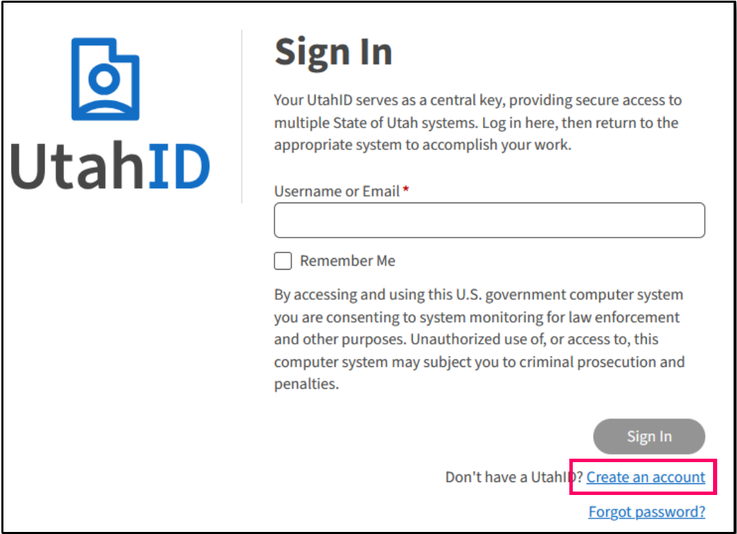
Screenshot source: Provider Account Administrator Manual, April 13, 2026, PDF 5.
TL;DR: use your own login, and give your biller their own
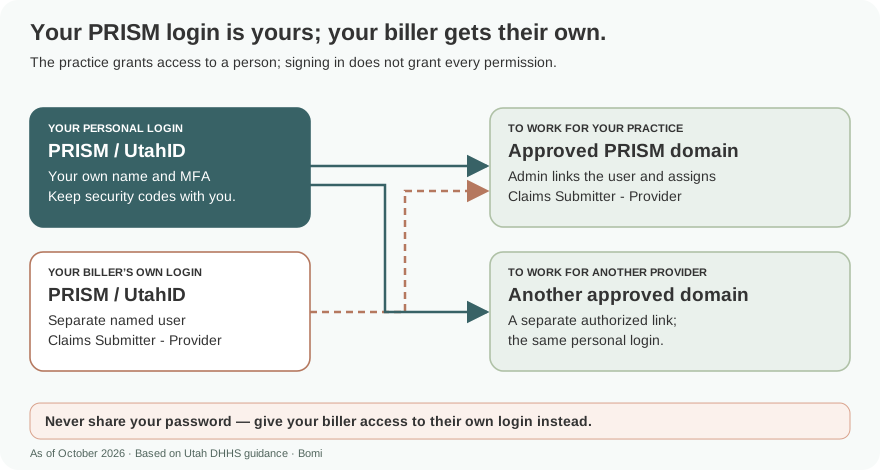
Use your own UtahID. Your biller uses their own UtahID and requests access to the provider’s PRISM domain; its account administrator approves the needed profile. Signing in does not automatically approve that provider access. official guide.
Who needs their own PRISM login
Each person uses their own UtahID and MFA. The provider account administrator approves the user’s provider-domain registration and profiles. The guide supports requesting another domain with an existing UtahID, but each domain needs its own approval. Never share your password. official guide.
Before you create access
Have the NPI or Provider ID needed to request the correct domain. Follow the access-agreement instructions in the Provider Account Administrator Manual. The administrator should confirm which profile the biller needs before approving the request. official guide.
Create or use your PRISM account
Sign in through UtahID, then request PRISM domain registration using the provider NPI or Provider ID. Submit the request and wait for the provider account administrator’s review. An existing UtahID user can request an additional domain through the guide’s existing-user process. official guide.
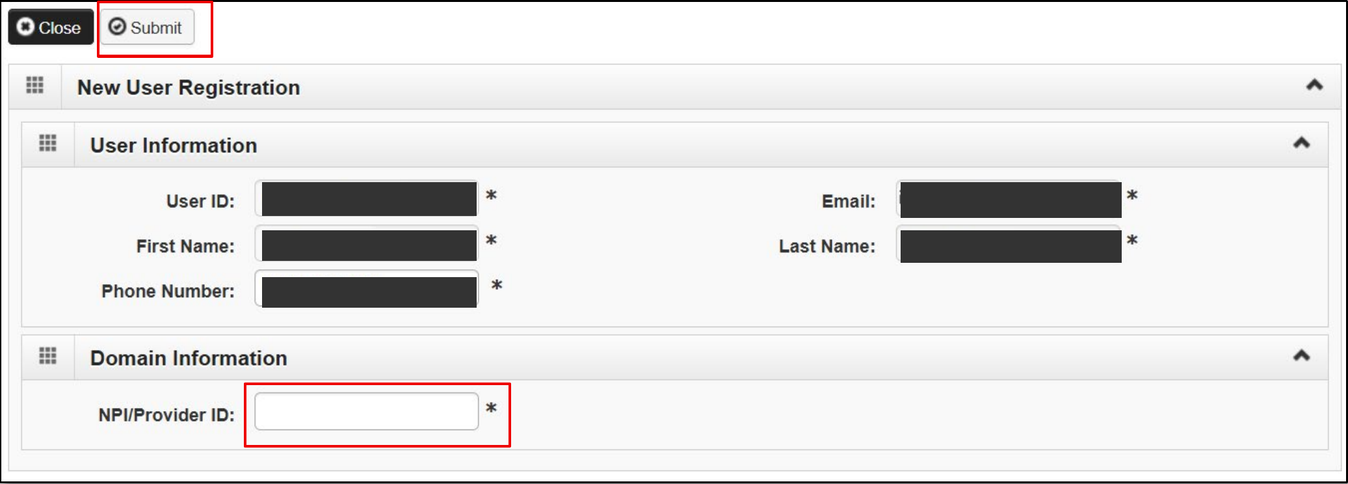
Screenshot source: Provider Account Administrator Manual, April 13, 2026, PDF 8; sample user contact details covered.
Add your biller: provider domain and profile
The biller signs in with their own UtahID and submits the domain request. The administrator with the EXT Provider Account Administrator profile opens the In Review user list, selects profiles such as Claims Submitter - Provider, saves and approves. Select only the profiles needed for that person’s work. official guide.
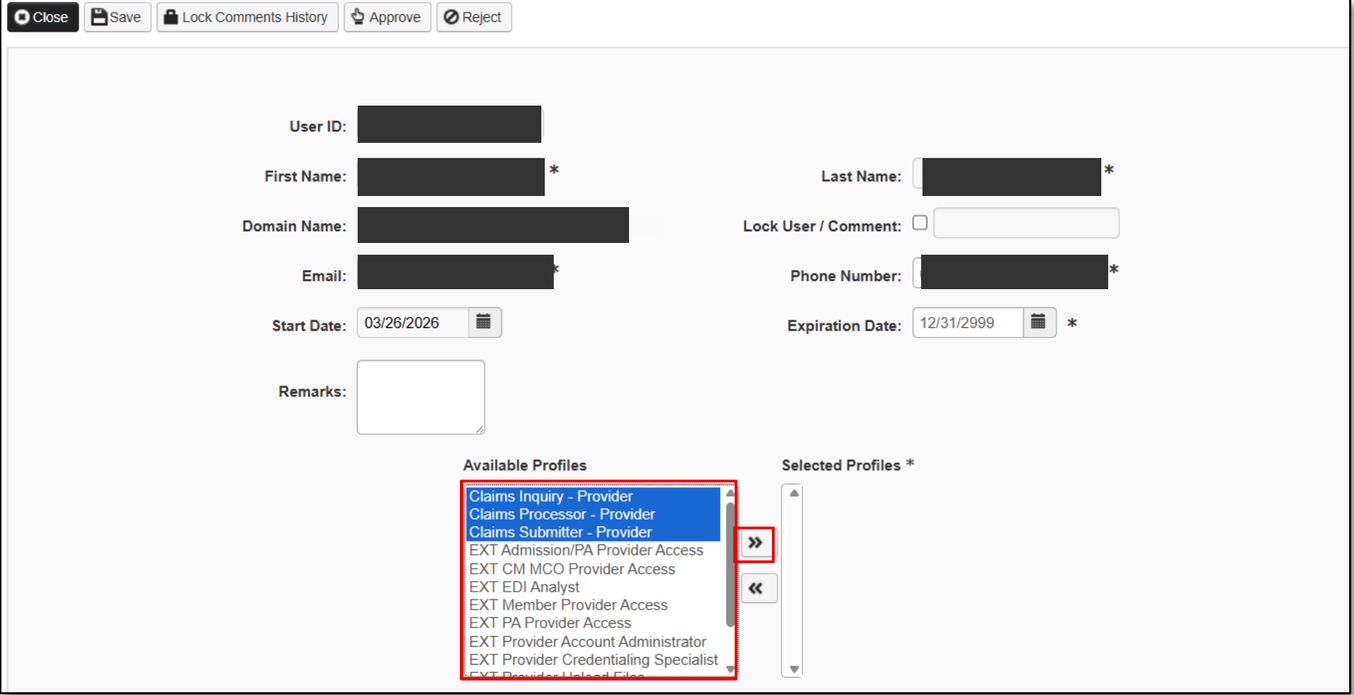
Screenshot source: Provider Account Administrator Manual, April 13, 2026, PDF 13; sample user/domain/contact details covered.
Login errors, forgotten IDs and missing access
Use UtahID’s Forgot password control for password recovery. Utah Medicaid’s Accessing PRISM page links its ForgeRock troubleshooting guidance: start from the correct official URL and follow its browser, private-window or cache advice. Missing provider access requires domain or profile review by the administrator. official guide.
Related guides
Check which provider number the account should represent in our NPI Type 1 vs Type 2 guide. For help with practice enrollment and payer access, see Bomi credentialing support.
Frequently Asked Questions
Where is the Utah Medicaid PRISM provider login?
Start at prism.health.utah.gov and use your own UtahID. PRISM provider-domain access and profiles must be approved separately.
How do I give my biller Utah PRISM access?
The biller uses their own UtahID and requests the provider domain. The EXT Provider Account Administrator reviews the request, assigns the needed profile and approves it.
Can one UtahID access more than one PRISM provider domain?
The administrator manual includes an additional-domain process for an existing UtahID. Access and profiles require approval for each domain.
Planning a private practice?
Use Bomi's free Build resources to plan the business, provider identity, payer setup, and billing workflow before you see clients.
Use Build resources
About Bomi
Founded by George Ruan, Dax Earl, and Andrey Goder, Bomi helps independent therapists and group practices with insurance billing, credentialing, and payer follow-up. Bomi grew out of Dax’s experience helping his mother with her therapy practice, with a clear purpose: reduce the administrative burden of insurance while keeping practice owners in control.
Meet our founders