
Humana Military Login: TRICARE East Provider Portal
By George Ruan • July 14, 2026
For Humana Military provider login, open TRICARE East provider self-service and sign in with your own user account. The official self-service overview links to this provider route.
Last checked: October 10, 2026.
Sections
- Direct links: Humana Military login, registration and help
- TL;DR: use your own login, and give your biller their own
- Who needs their own Humana Military login
- Before you create access: certification and the region
- Create your account and link the certified provider
- Add your biller with their own Third party access
- Use self-service for eligibility, claims and authorizations
- Certification status is a different task
- Login recovery and missing provider access
- Related TRICARE East guides
- Frequently Asked Questions
Direct links: Humana Military login, registration and help
The provider login entry has Log in for existing users and Create your account for first-time users.
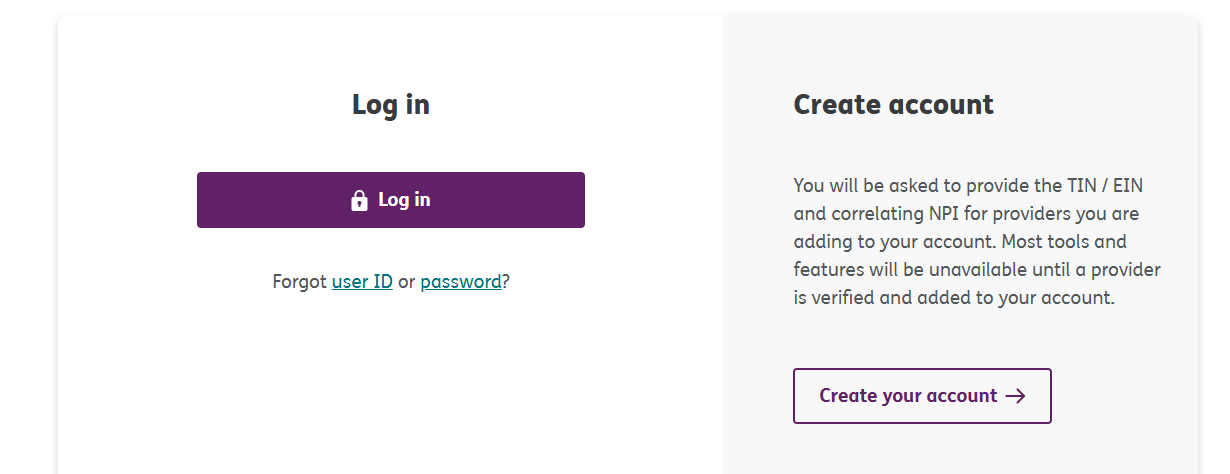
Screenshot source: Humana Military Provider Self-Service Tutorial, July 2026, page 3.
TL;DR: use your own login, and give your biller their own
Use your own login and verification method. An outside biller creates their own login and requests access as Third party; the manual route goes to the practice site administrator or Humana Military if there is no administrator. The self-service tutorial, pages 6–12 explains those steps; provider certification and a network contract are separate approvals.
Who needs their own Humana Military login
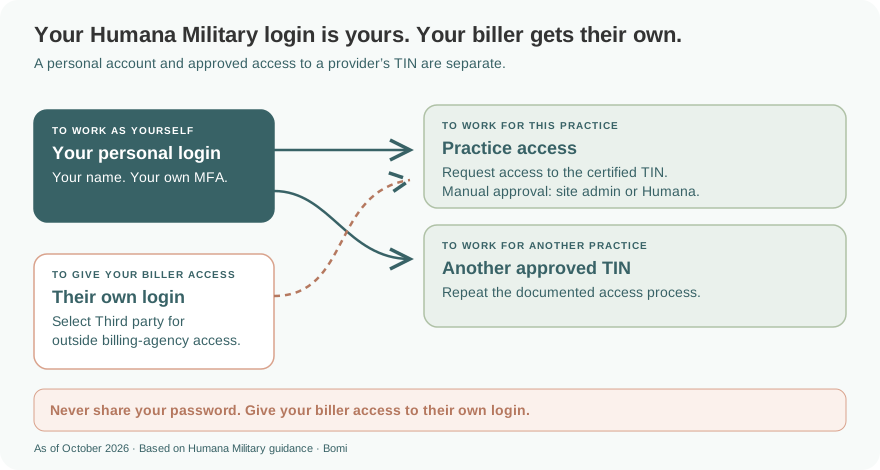
Each person needs their own account. Humana Military’s security guidance requires a personal email rather than a shared email and a security-code verification method. A biller should use their own name, email and login, never the clinician’s password.
One user can add multiple TIN/EINs by repeating the approval process for each, as shown on tutorial page 12. That does not automatically grant access to every practice.
Before you create access: certification and the region
Have the nine-digit TIN/EIN and correlating NPI ready. Humana Military’s registration overview says most tools are unavailable until a provider is verified and added. Tutorial page 9 requires the TIN/EIN to be TRICARE-certified and asks for the primary-location ZIP code.
Use the official TRICARE region tool and confirm the patient’s plan before choosing a contractor. East regional business uses Humana Military; West uses TriWest. TRICARE For Life and US Family Health Plan have other partners. For West portal work, use our TriWest / Availity provider login guide.
Create your account and link the certified provider
Choose Create your account on the official provider entry. Follow the consent and user-agreement screens, verify your own email, and create your own user ID and password. Sign in and complete the verification prompts.
Add the provider TIN/EIN and primary-location ZIP code. Use the certified provider information; adding account access is different from affiliating a new practitioner to the practice.
Choose Employee/Owner if that describes your relationship, or Third party for an outside organization such as a billing agency. Complete the applicable access approval; a new user account alone does not verify provider access.
These account and provider-access steps are documented on tutorial pages 3–12.
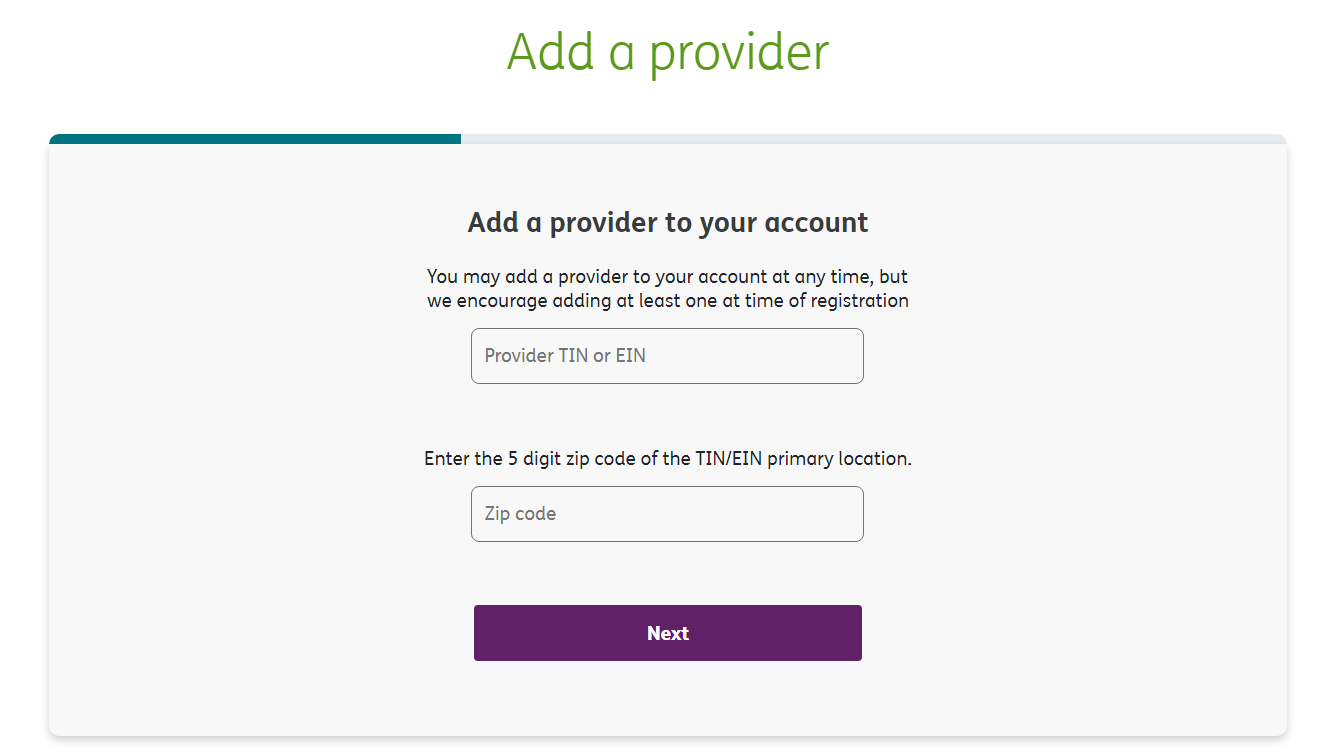
Screenshot source: Humana Military Provider Self-Service Tutorial, July 2026, page 9.
Add your biller with their own Third party access
The outside biller signs in with their own account, adds the practice’s certified TIN/EIN and selects Third party. Tutorial page 10 then asks for the approver’s name and contact information. An employee doing billing uses Employee/Owner when that matches their relationship; Third party is not a universal role for every staff member.
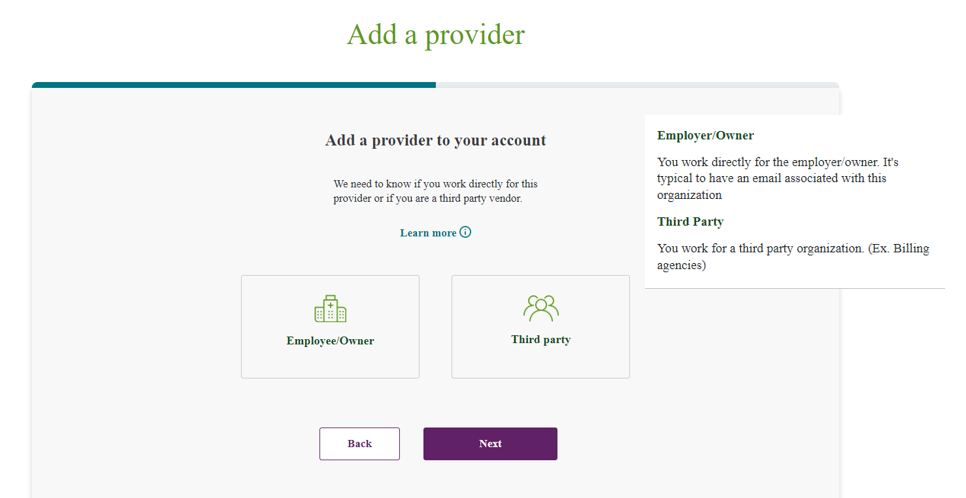
Screenshot source: Humana Military Provider Self-Service Tutorial, July 2026, page 10.
The approval instructions, pages 10–12 list Activation code, Fax key code, On site and Manual. If the first three are unavailable, Manual sends the request to the practice site administrator; if none exists, a Humana Military associate reviews it. The biller receives an email when access is approved. Never send them your password or verification code.
Use self-service for eligibility, claims and authorizations
The self-service features page lists patient eligibility, referrals and authorizations, claim submission/status, remittances and profile updates. The tutorial shows Patient profile on page 20, the referral and authorization center on pages 18–19, and the provider access claims center on pages 21–23.
For East electronic claims, Humana Military’s claims page lists payer ID 99727. Keep the East claims route separate from TriWest West, whose claims guidelines list 99726. The patient’s eligibility and any required referral or authorization must still be checked; signing in is not an approval of care.
For web claims, tutorial page 23 documents a separate tax-ID setup through Submit an XPC in the claims center. The self-service FAQ, page 2 calls this Submit an XPressClaim and requires registering the location with the claims processor. Follow the current screen; provider access alone does not finish web-claim registration. Use the official claims page for electronic-claim and payment enrollment instructions.
Use the current East referral and authorization guidance for the patient, plan and service. Do not infer that all behavioral-health services have the same approval requirements.
Certification status is a different task
The provider certification FAQ separates certification from network participation. Online application searches use the certification tracker; certification letters can also be retrieved from the correspondence tab in self-service. Use our TRICARE East certification-status guide for that workflow, rather than opening another login account.
Login recovery and missing provider access
Use Forgot user ID or password on the official provider entry. Follow the current recovery screens and enhanced security guidance; security questions were removed. Keep your personal email current in My User Profile and use your own verification method.
If the TIN is rejected or the tools are missing, check the certified TIN/EIN, primary-location ZIP code and access approval against tutorial pages 9–12. For additional assistance, Humana Military publishes 800-444-5445.
Related TRICARE East guides
Frequently Asked Questions
Where is the TRICARE East provider portal login?
Use Humana Military’s official provider self-service login. Choose Log in and use your own user account and verification method. Most tools remain unavailable until a provider is verified and added.
How do I create a Humana Military provider self-service account?
Choose Create your account on the provider entry, complete your own user registration, then add the certified TIN/EIN with the primary-location ZIP code and finish the applicable access approval. Have the correlating NPI ready.
How do I give my biller access to TRICARE East?
An outside biller creates their own account and requests the practice TIN/EIN as Third party, supplying approver contact information. Manual approval goes to the practice site administrator, or Humana Military if there is no administrator. Never share your login.
Why can I log in but not see my provider tools?
A user account is separate from verified provider access. Check the certified TIN/EIN, primary-location ZIP code and approval status. Humana Military says most features are unavailable until providers are added.
What is the TRICARE East payer ID in 2026?
Humana Military’s current claims page lists 99727 for TRICARE East. TriWest’s West claims guidelines list 99726; use the appropriate regional claims route.
Is Humana Military login the same as TRICARE certification status?
No. The certification tracker checks online application status; provider self-service provides approved account access, claims, eligibility, correspondence and referral tools. Certification also does not create a network contract.
Need help getting payer-ready?
For practices enrolled in Bomi Billing, our team handles CAQH, payer applications, attestations, roster updates, and ongoing credentialing. Credentialing requires Bomi Billing.
Credentialing with billing
About Bomi
Founded by George Ruan, Dax Earl, and Andrey Goder, Bomi helps independent therapists and group practices with insurance billing, credentialing, and payer follow-up. Bomi grew out of Dax’s experience helping his mother with her therapy practice, with a clear purpose: reduce the administrative burden of insurance while keeping practice owners in control.
Meet our founders