
TennCare Provider Registration Login: Portal Account Setup
By George Ruan • July 6, 2026
For TennCare Provider Registration provider login, open the official registration portal sign-in page and use your own authorized organizational user account. Individual clinicians start through the separate TennCare CAQH Roster Registration link on that page.
Login routes checked October 10, 2026.
Sections
- Direct links: TennCare Provider Registration login and account help
- TL;DR: use your own login, and arrange separate biller access
- Who needs their own Provider Registration login
- Before you create access: individual or organizational provider
- TennCare Provider Registration account setup
- Add your biller: ask about a separate authorized user
- Login errors, password reset and user ID recovery
- Related TennCare guides
- Official sources
- Frequently Asked Questions
Direct links: TennCare Provider Registration login and account help
Provider Registration login: existing organizational users.
Create an organizational account: group or entity registration; not the individual roster form.
Individual TennCare CAQH Roster Registration: individual provider registration.
Reset Password: user ID and account email.
Forgot User ID: account email and group identifiers requested by the form.
Provider Registration help: 800-852-2683, option 5, or Provider.Registration@tn.gov.
Enrollment instructions: registration and approval steps are separate from sign-in.
The Provider Registration sign-in page looks like this; existing organizational users enter their user ID and password.
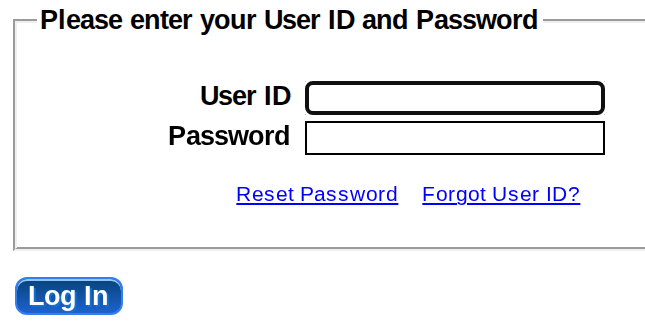
Screenshot source: Screenshot of the public TennCare Provider Registration sign-in page, captured October 10, 2026.
TL;DR: use your own login, and arrange separate biller access
Use your own authorized login. If your biller needs access, ask Provider Registration which separate-user process applies to your organizational record. TennCare Online Services and MCO contracting are separate.
Who needs their own Provider Registration login
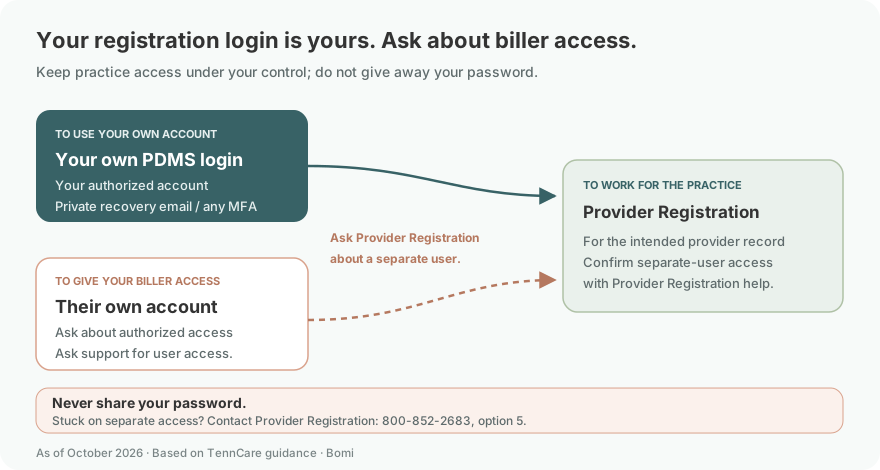
Keep the registration account under practice control. Never share your password with your biller; ask Provider Registration about separate authorized access before anyone uses the account. Keep your own recovery email and any MFA under your control.
Before you create access: individual or organizational provider
The public sign-in page gives organizational providers Create Account and gives individual providers TennCare CAQH Roster Registration. Follow the route for the provider record you are registering. Having a user ID does not mean TennCare has approved the provider or an MCO has contracted with the practice. See the official enrollment instructions.

Screenshot source: Screenshot of the public TennCare Provider Registration sign-in page, captured October 10, 2026.
TennCare Provider Registration account setup
For a group or entity, open Create Account and answer the existing-provider, category/type, tax ID and organization prompts for that record.
Complete the portal’s provider-information, user-ID/password and confirmation steps. Follow the emailed activation instructions described in How to Apply.
For an individual clinician, use TennCare CAQH Roster Registration instead. TennCare describes individual enrollment as basic portal registration plus the required Data Spring, formerly CAQH ProView, profile. Follow the current instructions for both parts.
Return to the correct account route and follow TennCare’s registration review. Keep the provider approval and any MCO contracting steps separate from account creation.
Add your biller: ask about a separate authorized user
Before giving a biller access, contact Provider Registration assistance at 800-852-2683, option 5, or Provider.Registration@tn.gov. Ask how the biller can use their own authorized account for the specific organizational record. Do not assume that the Provider Staff role used by TennCare Online Services also exists in PDMS, and do not share the owner’s password while waiting for instructions.
For eligibility work, the Online Services login guide explains the separate administrator-requested Provider Staff process.
Login errors, password reset and user ID recovery
Forgot your password: use Reset Password with your user ID and account email address.
Forgot your user ID: use Forgot User ID with the account email, group tax ID, group NPI or TennCare Medicaid ID, and ZIP requested on the form.
Locked out or recovery does not work: contact Provider Registration help. The public sources do not establish a self-service unlock interval; follow support’s instructions.
Individual provider cannot find an organizational login: check whether the task belongs in individual CAQH roster registration instead of creating a second group account.
Related TennCare guides
For help organizing registration and billing follow-up, talk with Bomi.
Official sources
Frequently Asked Questions
Where is the TennCare provider registration portal login?
Use the official PDMS Provider Registration sign-in page linked above. Existing organizational users enter their own user ID and password; individual clinicians use the separate TennCare CAQH Roster Registration route.
How do I create a TennCare provider registration account?
Organizations use Create Account and complete provider information, user ID/password, confirmation and the state’s activation instructions. Individual clinicians follow the separate roster registration and required Data Spring, formerly CAQH ProView, process.
How do I reset my TennCare Provider Registration password?
Use Reset Password with your user ID and account email. Forgot User ID asks for account email and the group identifiers shown on its form. If recovery fails or the account is locked, contact Provider Registration at 800-852-2683, option 5, or Provider.Registration@tn.gov.
Can my biller use my TennCare provider portal login?
Do not share your password. Ask Provider Registration how to arrange separate authorized access for the organizational record. The public PDMS instructions do not document a named biller role; the Provider Staff role in Online Services belongs to a separate system.
Is TennCare Provider Registration the same as TennCare Online Services?
No. Provider Registration handles the state provider record and registration. MyTennCare Online Services is the separate provider eligibility and transaction route. State registration does not replace MCO contracting.
Planning a private practice?
Use Bomi's free Build resources to plan the business, provider identity, payer setup, and billing workflow before you see clients.
Use Build resources
About Bomi
Founded by George Ruan, Dax Earl, and Andrey Goder, Bomi helps independent therapists and group practices with insurance billing, credentialing, and payer follow-up. Bomi grew out of Dax’s experience helping his mother with her therapy practice, with a clear purpose: reduce the administrative burden of insurance while keeping practice owners in control.
Meet our founders