
MyTennCare Login: Online Services for Providers
By George Ruan • July 6, 2026
For MyTennCare provider login, open the official MyTennCare Login and sign in with the TNT credentials issued for your own account. The state Online Services page identifies this route for users with a TNT ID.
Login and account routes reviewed October 10, 2026. This guide covers provider Online Services access; members use a separate account route.
Sections
- Direct links: MyTennCare login, setup and account help
- TL;DR: use your own login, and give your biller their own
- Who needs their own MyTennCare login?
- Before you create access: existing account and TNT ID
- MyTennCare account setup
- Add your biller as Provider Staff
- MyTennCare login errors, resets and lockouts
- Frequently Asked Questions
- Sources
Direct links: MyTennCare login, setup and account help
MyTennCare provider login: Online Services access for users with a TNT ID.
New provider Online Services access: use only when the provider has never had TCOS access. The state page says not to use this form to add staff to an existing account.
Administrator staff-access requests: TennCare IS Service Portal; use TNT credentials and request New User Setup as directed by the state.
Unlock account / reset password guide: official recovery instructions linked from Online Services Help.
Login and account help: TCOS Service Desk support is ProvSrvcs.Correspondence@tn.gov; do not send passwords or recovery codes.
Provider Registration: separate state enrollment and provider-record work.
The MyTennCare login page looks like this; use your own username or email and password.
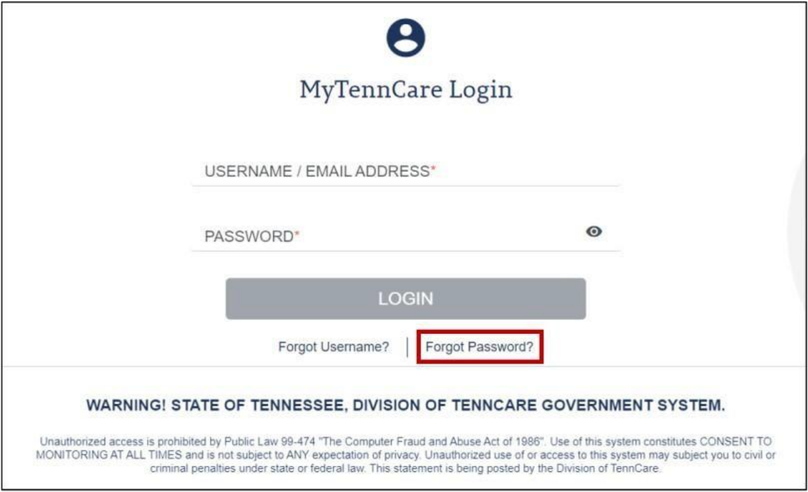
Screenshot source: Forgot or Reset MyTennCare Login Portal Password, page 1.
TL;DR: use your own login, and give your biller their own
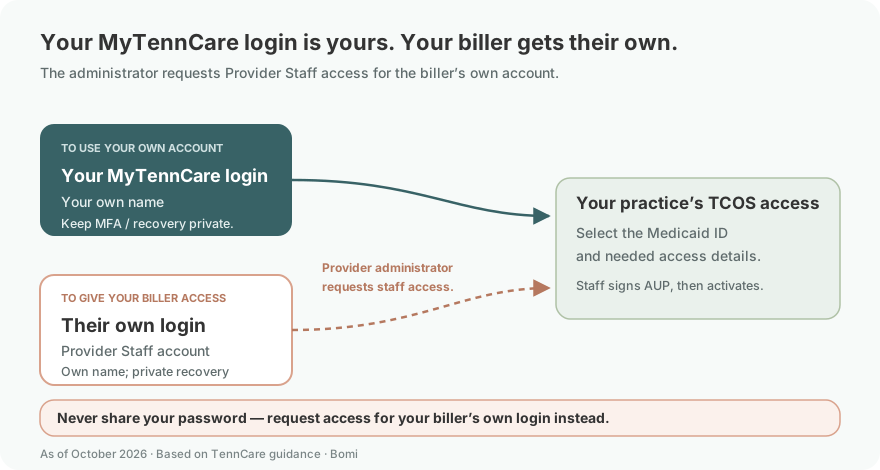
Use your own MyTennCare login. Your biller gets their own Provider Staff account that the provider administrator requests through the staff-access process. Provider Registration is separate, and Online Services claims functions are for long-term healthcare providers rather than every therapy practice.
Who needs their own MyTennCare login?
The Provider Staff account guide collects each staff member’s own name, mobile phone and email, and sends that person their Acceptable Use Policy and account activation. Have the administrator request a separate Provider Staff account for your biller. Never share your password; keep any MFA and recovery methods under your own control. The password reset guide describes personal recovery by registered email or security questions.
Members applying for coverage or managing their coverage account use TennCare Connect, a separate route from this provider login.
Before you create access: existing account and TNT ID
Find out whether this provider has previously had TCOS access and who administers it. Under the state guidance, a provider with no previous access uses the new-provider form; an existing administrator requests additional staff through the IS Service Portal. The help page limits its account guides to users who have been provided a TNT ID.
MyTennCare account setup
If the provider has never had TCOS access, use the official new-provider form linked by the state Online Services page to establish the account and administrator.
If the provider already has access, ask the administrator to use the staff-request route instead of submitting another new-provider form.
Use the account information and activation instructions issued for the intended user, then return to MyTennCare Login.
Confirm you reached the intended TCOS account and the functions relevant to your role. General eligibility access does not establish that a therapy practice has every long-term-provider claim function.
Add your biller as Provider Staff
The provider administrator requests a separate account for the biller through the TennCare IS Service Portal following the current staff-account guide. Search for New User Setup (TennCare Online Services).
Enter the biller’s own name, mobile phone and email. Enter the requesting provider administrator as Manager, and use Provider Staff for the staff account type. The email receives the user’s Acceptable Use Policy and is used to generate their login ID.
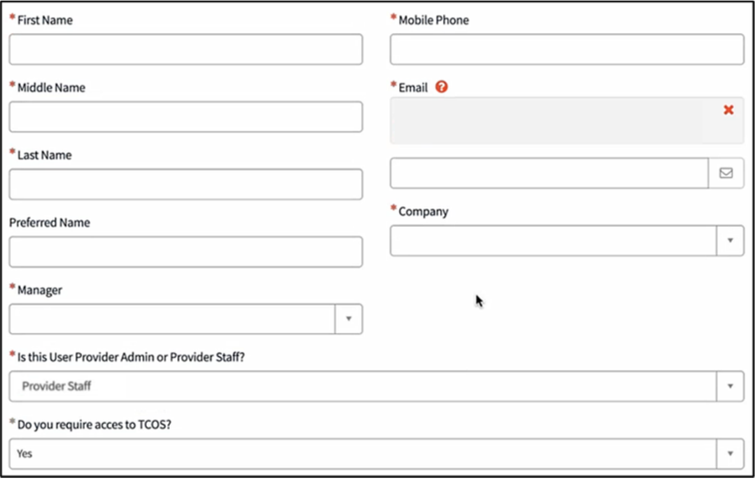
Screenshot source: Creating a New Provider Staff Account, pages 1–2.
In TCOS Trading Partner and Access Details, choose Add to select the provider record and permissions.
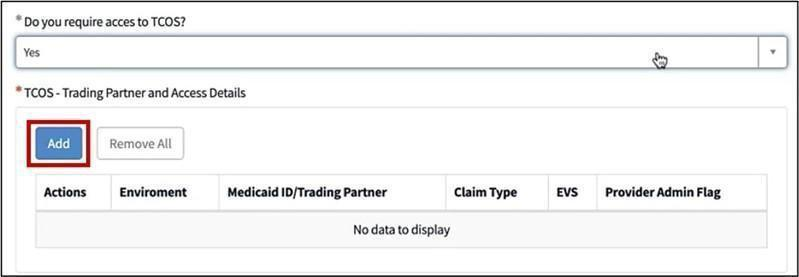
Screenshot source: Creating a New Provider Staff Account, page 2.
In the pop-up, select Production and the intended Medicaid ID/Trading Partner. Choose the applicable Claim Type; the guide says to choose Not Applicable when claims access is not needed. Check the Eligibility Verification choice for the intended work, then choose Add and Order Now to submit the request.
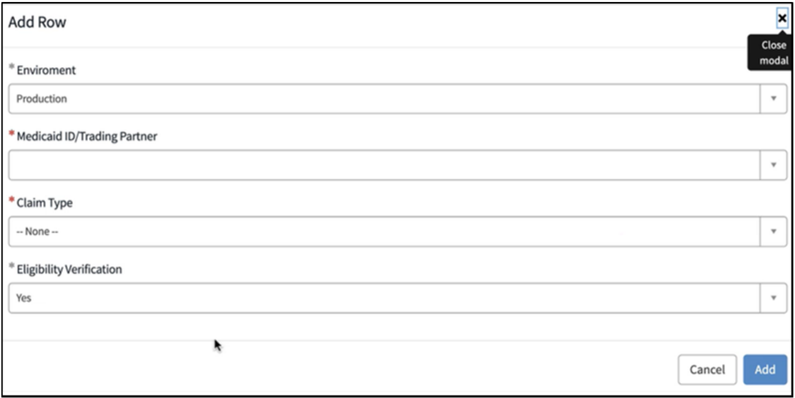
Screenshot source: Creating a New Provider Staff Account, page 3.
After approval, the biller signs their own Acceptable Use Policy through the issued Adobe Sign email; account creation completes before the activation email arrives. Use their own login and private recovery methods, never the administrator’s password. The guide requires the signed policy before creation completes.
MyTennCare login errors, resets and lockouts
Forgot password: the official recovery guide describes Forgot Password? on MyTennCare Login, the registered username or email, and the available recovery methods. Follow the current prompts.
Account locked or username unclear: start with Online Services Help and its account guides. The account-help guide identifies Service Desk support at ProvSrvcs.Correspondence@tn.gov for unresolved questions.
Need to add a user: use the administrator’s New User Setup path, not password sharing or the new-provider form. That distinction is explicit on the state page.
Signed in, but the wrong function is expected: check the service and role. The state’s Online Services page describes claims/transaction functions for long-term healthcare providers; it is not a universal therapy-claims portal.
For subsequent practice work, see verify TennCare eligibility and TennCare claims for therapists. Talk with Bomi if you need help organizing billing and credentialing follow-up.
Frequently Asked Questions
Where is MyTennCare Login?
Use mylogin.tenncare.gov, linked by the official TennCare Online Services page for users with a TNT ID. Sign in with the credentials issued for your own provider or staff account.
Is MyTennCare Login the same as TennCare Connect?
This article covers provider MyTennCare Login for Online Services. TennCare Connect is the separate member account route for coverage applications and coverage management.
How do I reset my MyTennCare Login password?
The official recovery guide describes Forgot Password? on MyTennCare Login, followed by the registered username or email and the available recovery method. Start through the official login and follow current prompts.
How do I add staff to TennCare Online Services?
The provider administrator requests New User Setup (TennCare Online Services) in the TennCare IS Service Portal, selects Provider Staff and the intended Medicaid ID and access details, and submits the request. The biller signs their own Acceptable Use Policy before their account is completed and activated. The new-provider form is not the staff-addition route.
Is TennCare Online Services the same as Provider Registration?
No. Provider Registration covers the state provider record. Online Services supports eligibility searches and the transactions described for long-term healthcare providers. A successful login does not replace enrollment or other payer requirements.
Sources
Official password recovery guide
TCOS and MyTennCare account help
TennCare Provider Registration
Creating a New Provider Staff Account
Want Bomi to handle insurance billing?
Bomi helps therapy practices with benefit checks, claims, denials, balances, CAQH, attestations, and revenue management.
Book a call
About Bomi
Founded by George Ruan, Dax Earl, and Andrey Goder, Bomi helps independent therapists and group practices with insurance billing, credentialing, and payer follow-up. Bomi grew out of Dax’s experience helping his mother with her therapy practice, with a clear purpose: reduce the administrative burden of insurance while keeping practice owners in control.
Meet our founders