
Authorizing Your Biller for Priority Health
By George Ruan • July 2, 2026
Rather than managing payer portals yourself, Bomi can handle your billing and credentialing for you — so you can get back to seeing clients sooner.
Priority Health is one of Michigan's largest health plans, and its provider portal — Prism — is where claim status, credentialing information, and plan communications live. Unlike most payer portals, Priority Health requires the practice itself to create the account: you verify your identity with ID.me, become the account's security administrator, and only then can you grant anyone else access.
That includes us. Much of the administrative work we handle for you — reviewing the status of your claims, keeping your credentialing information current — requires access to your Priority Health account. This guide walks through the one-time setup in four short parts: plan for about 30 minutes plus one phone call.
Important: you must become the provider Security Administrator (pSA) before Bomi's Prism access can work. If our request shows Affiliation Reparenting / No pSA, the request exists, but Bomi cannot see or work under your group until the pSA assignment is complete.
One heads-up before you start: Priority Health has announced it's replacing Prism with a new provider portal built in partnership with Epic, currently slated for September 1. Until that transition completes, Prism — and the steps below — are how account access works today.
Sections
Part 1: Verify Your Identity with ID.me
Go to Priority Health's provider self-service page and click the green Verify with ID.me button.

If you already have an ID.me account, just sign in. If not, click Create a wallet on the sign-in screen and follow the steps to create one.
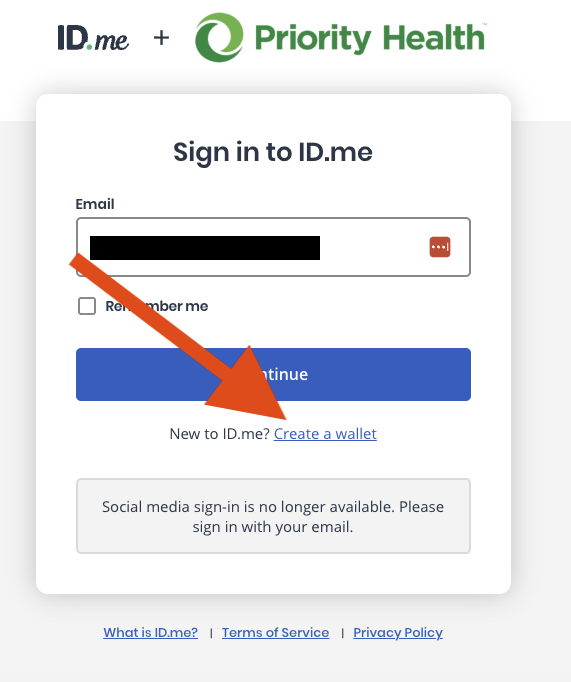
Once your ID.me login exists, navigate back to the self-service page and click Verify with ID.me again. This time ID.me walks you through identity verification — keep your state license or another government-issued ID handy. When it finishes, allow ID.me to share your verified name and email with Priority Health; declining ends the registration.
Part 2: Request Your Priority Health Account
With your identity verified, Prism lets you request a new Priority Health account. Enter your practice's details, and make sure to use your NPI Type 2 (your group NPI) and your EIN — not your individual NPI or SSN.
Priority Health reviews new account requests. Once yours is approved, they'll send you an email confirmation code to finish activating the account.
You may also see an Enrollment Detail page with an inquiry number, your group name, Status: Submitted, Stage: Credentialing, and your pSA name and email. That is the expected submitted-and-pending confirmation. It means Priority Health has the request; it does not mean Bomi has usable affiliation access yet. Once Priority Health approves the enrollment, the pSA should be able to approve Bomi's affiliation request in Prism.
Part 3: Become a Security Administrator (pSA)
A brand-new account can't approve access for anyone else yet. For that, you need to become a provider Security Administrator — a pSA. This pSA step is required before Bomi's Prism access can work. In Prism, go to General Requests → prism Security Admin (pSA) Assignment (under Web Tools & Services) and submit the request. If you'd rather handle it over the phone — or your request stalls — call Priority Health tech support at 800-942-4765, choose Option 5 (Prism help), and ask to be made the pSA for your organization.
Part 4: Approve Bomi's Affiliation Request
Once your account is active, signing in lands you on the Prism dashboard:

We'll submit an affiliation request from our own Prism account — that can happen at any point, even before you're the pSA, so just tell us when you start this process. The request stays pending until a pSA can approve it. Once you're the pSA, you'll see a Security Admin link at the top of the Prism homepage; open it and go to the Affiliation Requests tab — it lists every request from Prism users asking for access to your group or facility. Approve Bomi's request, and we can take it from there.
One detail worth knowing: if our request shows Yes in the TPA column, click that link to open the request details — the Approve option for third-party users lives there. Once approved, access takes effect right away and the request moves to your Approved Affiliations tab. Priority Health's prism security guide walks through the full pSA view.
If Bomi's request shows Affiliation Reparenting / No pSA, that means our request is present but not usable yet. Finish the pSA assignment first, then approve the affiliation request from the Security Admin area.
Quick Summary
Part 1: From Priority Health's provider self-service page, click Verify with ID.me, create your ID.me wallet if needed, and verify your identity with a state license or other government ID.
Part 2: Request your Priority Health account with your NPI Type 2 and EIN. An Enrollment Detail page showing Status Submitted and Stage Credentialing means the request is pending with Priority Health; activate the account when the approval code arrives.
Part 3: Submit General Requests → prism Security Admin (pSA) Assignment in Prism (or call 800-942-4765, Option 5) to become the pSA for your organization. This is required before Bomi's access can work.
Part 4: Approve Bomi's affiliation request under Security Admin → Affiliation Requests in Prism. If the request shows Affiliation Reparenting / No pSA, finish Part 3 first.
Once the affiliation request is approved, let us know and we'll confirm we can sign in. From there we monitor your claims and keep your credentialing information current through your account — and you can get back to your clients.
Frequently Asked Questions
What is Prism?
Prism is Priority Health's secure provider portal. It's where providers and their billers check claim status, manage credentialing and demographic information, and receive plan communications.
Why does my practice have to create the account instead of Bomi?
Priority Health ties every Prism account to a real person whose identity is verified through ID.me, and only your practice's own security administrator can approve access for others. Bomi can't create or own the account for you — you create it once, and then grant us access through an affiliation request.
What is ID.me?
ID.me is the identity-verification service Priority Health uses for new Prism accounts. Creating an ID.me account is free, and you verify with a state license or another government-issued ID.
What confirmation should I see after submitting the Prism enrollment?
An Enrollment Detail page with an inquiry number, your group name, Status Submitted, Stage Credentialing, and your pSA name/email is the expected submitted-and-pending confirmation. It means Priority Health has the request. Bomi's affiliation access is still separate: once Priority Health approves the enrollment, the pSA should be able to approve Bomi's affiliation request in Prism.
What is a pSA?
pSA stands for provider Security Administrator. The pSA controls who can access your organization's Prism account, including approving or denying affiliation requests from other Prism users — like your biller. If there is no pSA yet, Bomi's affiliation request may appear as pending, but Bomi cannot use it.
Can I add Bomi to my group directly, without an affiliation request?
No. Prism has no way for a pSA to add or invite an outside user — affiliation always starts from the user's side. We submit the request from our own Prism account using your group's Tax ID and NPI, and you approve it under Security Admin → Affiliation Requests. The pSA role exists precisely so every access request gets your review.
Can Bomi be the pSA instead of me?
No. Priority Health doesn't allow contracted third-party administrators to request or hold the pSA role — the pSA must be someone at your organization. You keep the pSA role; the day-to-day portal work is what you delegate to us once our affiliation is approved.
Can I just share my Prism login with my biller?
No. Prism logins are tied to an individual's verified ID.me identity, and sharing credentials can violate HIPAA regulations on data privacy. The secure, compliant way is to approve your biller's affiliation request so they work under their own login.
What does Bomi do with access to my Priority Health account?
We use it for the administrative work you've hired us for: reviewing the status of your claims and keeping your credentialing information up to date. You keep the security administrator role and can revoke our access at any time.
What if I already have a Priority Health account?
Skip to Part 3. If you're not yet a security administrator, call 800-942-4765 (Option 5) to become the pSA for your organization, then approve our affiliation request under Security Admin → Affiliation Requests. If our request shows No pSA, the pSA assignment still has to be completed before Bomi can access your group.
Does Bomi's access expire?
Prism provider affiliations renew annually: between June 1 and August 1 each year, the pSA reviews affiliated users under Security Administration → Affiliation Requests → Affiliation Renewals, and anyone not renewed is automatically removed after August 1. Priority Health sends pSAs reminders during the window — renew our affiliation there to avoid an interruption.
Is Prism being replaced?
Yes. Priority Health is replacing Prism with a new provider portal built in partnership with Epic, slated to launch September 1, 2026 — account registration for it opened in June. Prism remains in use during the transition, and we'll update this guide as the new portal rolls out.
Need help getting payer-ready?
For practices enrolled in Bomi Billing, our team handles CAQH, payer applications, attestations, roster updates, and ongoing credentialing. Credentialing requires Bomi Billing.
Credentialing with billing
About Bomi
Founded by George Ruan, Dax Earl, and Andrey Goder, Bomi helps independent therapists and group practices with insurance billing, credentialing, and payer follow-up. Bomi grew out of Dax’s experience helping his mother with her therapy practice, with a clear purpose: reduce the administrative burden of insurance while keeping practice owners in control.
Meet our founders