
NaviNet Login: Provider Accounts and Biller Access
By George Ruan • October 10, 2026
For NaviNet provider login, open the official NaviNet sign-in page and sign in with your own username and password. Check the plan first: Highmark and Independence Blue Cross now use different portals, explained below.
Sections
- Direct links: NaviNet sign-in, registration and help
- TL;DR: use your own login, and give your biller their own
- Who needs their own NaviNet login
- Which plans use NaviNet, Availity or PEAR?
- Before you create access
- Account setup: add an in-office staff user
- Add your biller: outside agencies use their own office
- NaviNet login errors and missing permissions
- Related provider login guides
- Frequently Asked Questions
Direct links: NaviNet sign-in, registration and help
The public NaviNet sign-in panel has username and password fields, recovery links, and Register for a new account.
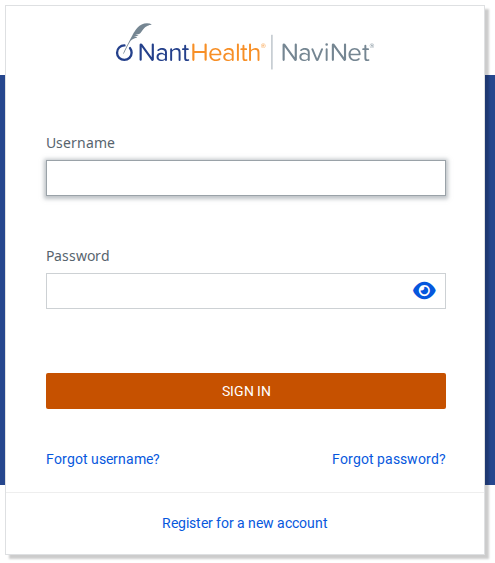
Screenshot source: Screenshot of the public NaviNet sign-in page, captured October 10, 2026.
TL;DR: use your own login, and give your biller their own
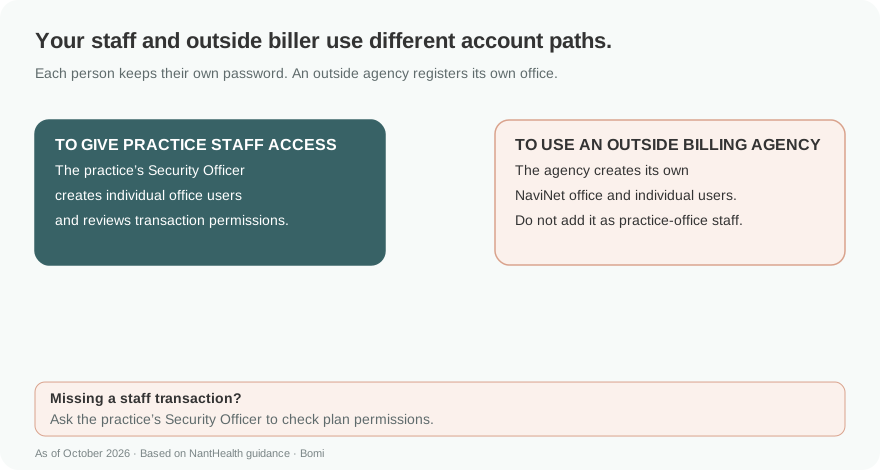
Your office’s Security Officer creates individual accounts for staff. An outside billing or credentialing agency must establish its own NaviNet office and users; do not add its staff as users of the practice’s office. Portal access does not replace the plan’s provider relationship. NantHealth security officer guide, pages 3–5.
Who needs their own NaviNet login
Each person needs their own credentials. The Security Officer controls user access and transaction permissions. Keep your password private, including when a biller helps with claims. In-office billing staff and an outside billing agency follow different account paths. Individual-user and security officer requirements, pages 3–5 and 13.
Which plans use NaviNet, Availity or PEAR?
As of October 10, 2026, AmeriHealth Caritas Louisiana publishes NaviNet as its provider portal. Use the plan’s own page to check its supported tools and current instructions. AmeriHealth Caritas Louisiana NaviNet resources.
AmeriHealth Caritas VIP Care in North Carolina also directs providers to NaviNet. That does not mean every AmeriHealth-branded product has the same portal. North Carolina VIP Care NaviNet resources.
Highmark’s current provider guidance directs users to Availity Essentials. An old Highmark NaviNet bookmark is not the current access path. Highmark Availity Essentials guidance.
Use our existing Availity biller-authorization guide for individual accounts and practice access when the plan directs you to Availity.
Independence Blue Cross directs providers to PEAR, whose Practice Management application replaced NaviNet Open. Its Organization Administrator uses the Provider Administration Tool (PAT) Third Party function to request access for a supporting organization. Follow IBX’s PEAR instructions rather than registering a new NaviNet office for IBX. IBX PEAR access and third-party guidance.
Before you create access
If your office already uses NaviNet, contact its Security Officer for an individual account. If the office is new to NaviNet, use the official registration form. An external agency should register its own office instead of asking the practice to create an in-office staff account for it. NaviNet registration entry.
NaviNet transactions and permissions vary by health plan. Verify the applicable plan and available transactions rather than assuming that one plan’s claims or authorization tools work for every member. Manage user permissions, page 5.
Account setup: add an in-office staff user
The Security Officer opens Administration > Create New User.
Enter the staff member’s own name, contact number and email when available. Do not use a generic name such as Billing.
Choose whether that user needs Security Officer privileges, add the user to the list, and select Continue User Creation.
Use Customize Access to review transaction permissions, then Complete User Creation. Follow the notification instructions for the individual user.
These steps apply to staff in the NaviNet office, including an in-office biller. First-time users change their temporary password and verify their email as instructed. Create new users, pages 3–5.
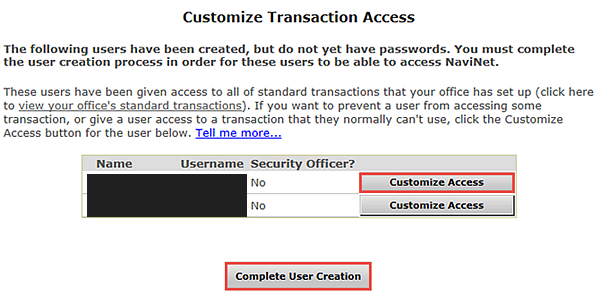
Screenshot source: NaviNet Security Officers, page 4; names and usernames solid-masked.
Add your biller: outside agencies use their own office
NantHealth expressly excludes third-party billing and credentialing agency staff from the practice-office user-creation flow. Have the agency establish its own NaviNet office and individual users. If the agency cannot see the necessary plan or provider records, use NaviNet support to confirm the appropriate access instead of sharing the practice login or making the agency an office staff user. Third-party rule, page 3; support, page 13.
NaviNet login errors and missing permissions
Use Forgot username or Forgot password on the public sign-in page for credential recovery. A disabled account can require the Security Officer to reactivate it and reset the password. Do not keep creating new office registrations to solve a user-level access problem. User status/reactivation, pages 7–8; passwords, page 11.
If Administration is missing, you may not be the Security Officer. For a missing transaction, the Security Officer uses Administration > Manage User Permissions and checks the relevant plan. A plan that moved to another portal needs its current destination, not a NaviNet permission change. Create users and manage permissions, pages 4–5.
Related provider login guides
Frequently Asked Questions
Where is the NaviNet provider login?
Open navinet.navimedix.com and use your individual username and password. Its public sign-in page also links to username recovery, password recovery and registration.
Does Highmark still use NaviNet?
Highmark’s current guidance directs providers to Availity Essentials. Use that guidance and the existing Availity biller-authorization guide.
Is Independence Blue Cross still on NaviNet?
IBX directs providers to PEAR. PEAR Practice Management replaced NaviNet Open; use IBX’s current PEAR enrollment and third-party access instructions.
Can I add my outside biller as a NaviNet staff user?
NantHealth says not to add third-party billing or credentialing agency users to your practice office. The agency must establish its own NaviNet office and users.
Who creates an account for my in-office biller?
Your NaviNet Security Officer creates an individual staff account and reviews its transaction permissions. Each person keeps their own password.
Want Bomi to handle insurance billing?
Bomi helps therapy practices with benefit checks, claims, denials, balances, CAQH, attestations, and revenue management.
Book a call
About Bomi
Founded by George Ruan, Dax Earl, and Andrey Goder, Bomi helps independent therapists and group practices with insurance billing, credentialing, and payer follow-up. Bomi grew out of Dax’s experience helping his mother with her therapy practice, with a clear purpose: reduce the administrative burden of insurance while keeping practice owners in control.
Meet our founders