
Magellan Login: Provider Portal and Biller Access
By George Ruan • October 10, 2026
For Magellan provider login, open MagellanProvider.com’s official sign-in page and use your own username and password. If the practice already has an Administrator, ask that person to create your individual access rather than starting another administrator account.New-user instructions
Sections
- Direct links: Magellan provider sign-in and account help
- TL;DR: use your own login, and give your biller their own
- Who needs their own Magellan login
- Which Magellan portal should you use?
- Before you create access
- Set up the first Administrator or request your staff account
- Add your biller in Administrator Setup
- Forgot your Magellan login or seeing deactivated?
- Keep portal setup separate from payer and program instructions
- Related provider login guides
- Frequently Asked Questions
Direct links: Magellan provider sign-in and account help
Magellan’s current website orientation shows the Sign In box below. Existing users use their own credentials; New User is for first-time account setup.
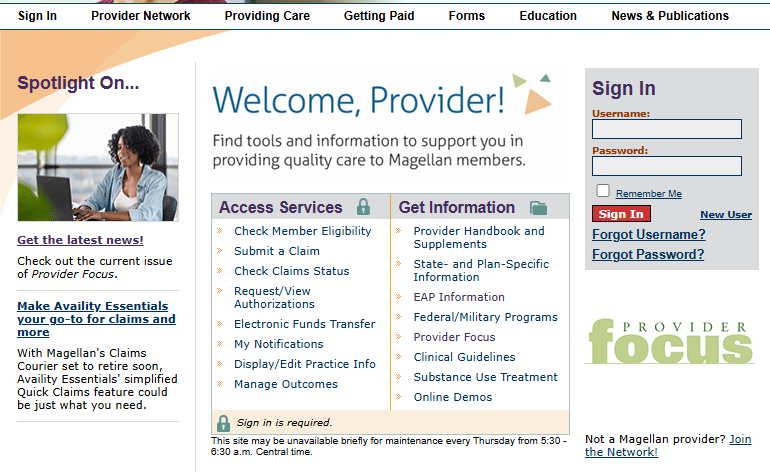
Screenshot source: Magellan Provider Website Orientation, current official download, page 15; PDF dated July 6, 2026 in file metadata.
TL;DR: use your own login, and give your biller their own
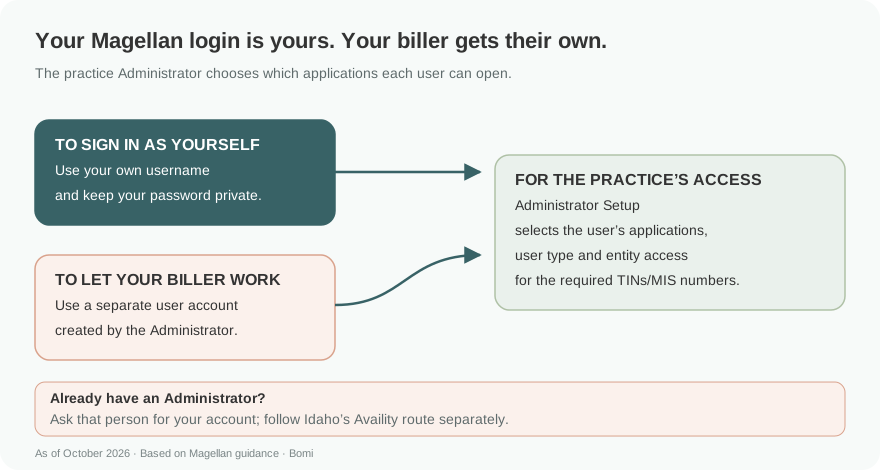
The practice Administrator grants access to additional users. Give a biller a named account with the applications and entity access they need. A MagellanProvider.com account and an Idaho Availity account follow different setup instructions. Administrator Setup, pages 17–18.
Who needs their own Magellan login
Magellan’s Administrator Setup manages additional user accounts within the practice. The Administrator enters each new user’s information and selects the applications and TINs/MIS numbers the person needs. Use that named-user flow for a biller instead of handing over the Administrator password. Administrator Setup, pages 17–18.
Which Magellan portal should you use?
As of October 10, 2026, Magellan’s national provider-sites directory points to MagellanProvider.com. Start with the program’s official provider page when checking which portal applies. Magellan provider-sites directory.
Magellan Healthcare of Idaho directs providers to Availity Essentials for key transactions such as authorizations, claims and practice data. The national MagellanProvider.com Administrator Setup steps below do not replace Idaho’s Availity organization and user access. Current Idaho provider guidance.
For that Availity workflow, use our existing guide to authorizing your biller in Availity. Follow the specific plan or program’s instructions instead of creating a second national account to solve an Idaho access problem.
Before you create access
Ask whether the practice, group or organization already has an Administrator. Magellan’s New User page says that person supplies the user access. When nobody has previously signed in, the organization must designate an Administrator who accepts responsibility for the account and access to its tools. Current New User Start instructions.
Magellan’s website orientation permits one Administrator per practice. If the designated person needs changing, use the site’s FAQs/help route rather than treating another staff member as a new practice. Administrator Setup, page 17.
Set up the first Administrator or request your staff account
Use New User on MagellanProvider.com for first-time setup.
Read the Administrator responsibility notice. If an Administrator already exists, request your own user account from that person.
If you are the designated first Administrator, follow the registration instructions for the practice. Other staff should use the additional-user flow.
Keep each person’s access tied to their own user details and the practice entities they are authorized to work with.
Do not use old presentations’ initial-password examples as reusable credentials. The current public registration entry and your own account instructions govern setup. New User Start.
Add your biller in Administrator Setup
The Administrator signs in and opens Administrator Setup.
Create an additional user and enter that person’s user information.
On Grant User Access, select the applications required for the job, the User Type, and the applicable entity TINs/MIS numbers.
Review the selections and use Add User. You can model permissions on an existing user or set them manually, as the orientation explains.
The examples below come from Magellan’s current orientation. All sample names, usernames, contact details and identifiers have been covered with solid masks; no real account is shown. Administrator Setup, page 18.
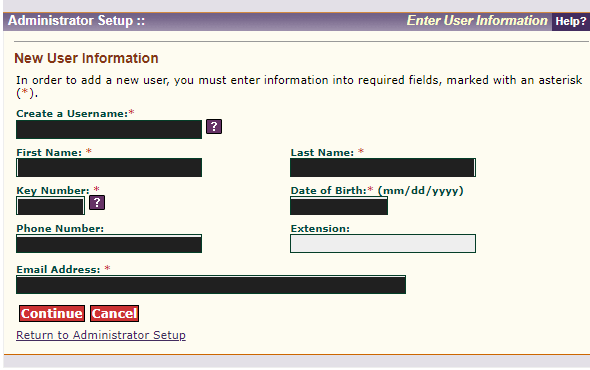
Screenshot source: Magellan Provider Website Orientation, page 18, New User Information; sample values solid-masked.
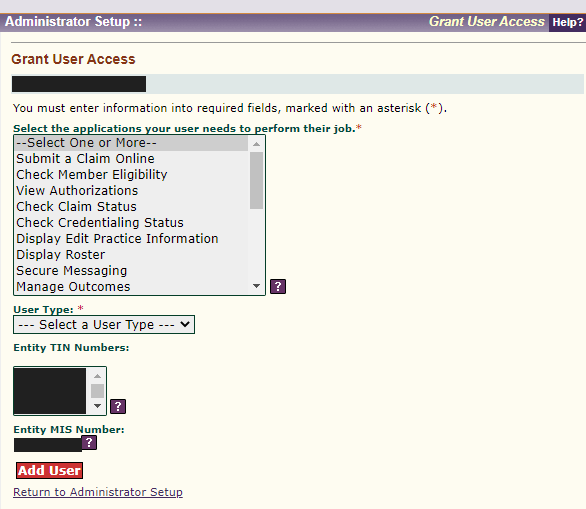
Screenshot source: Magellan Provider Website Orientation, page 18, Grant User Access; name and entity identifiers solid-masked.
When a user should lose access, Magellan’s orientation says the Administrator can set application access to None. The training distinguishes this from technically deleting the user. Keep access limited to the tasks the biller is authorized to perform. Administrator Setup, page 17.
Forgot your Magellan login or seeing deactivated?
Use Forgot Username or Forgot Password in the Sign In box. The website-access FAQ directs users who still need assistance to Provider Services through the Chat button or the site FAQs. No password-reset request or credential needs to be shared with your biller. Current website-access FAQ.
The deactivated-login FAQ says accounts inactive for six or more months are automatically deactivated. It directs users to Contact Us and the requested reactivation information. That is different from an incorrect-password error. Why is my login deactivated?.
Keep portal setup separate from payer and program instructions
Administrator access controls the website tools for your practice. Check the program’s provider site for its transaction route, especially where Magellan directs you to Availity. Do not assume a working national login opens every Magellan program’s claims or authorization tools. Official program/provider-site routing.
Related provider login guides
Frequently Asked Questions
Where is the Magellan provider login?
Use the official MagellanProvider.com sign-in page. It has username and password fields and recovery links.
How do I create a Magellan provider account?
Use New User for first-time setup. If your practice already has an Administrator, ask that person for your individual account. The first practice account requires a designated Administrator.
Can my biller have their own Magellan login?
Yes. The Administrator uses Administrator Setup to create an additional user and select the applications and TIN/MIS access needed for the work.
Does Magellan Idaho use the national provider login?
Magellan Idaho directs providers to Availity Essentials for key transactions. Follow Idaho’s instructions and the existing Availity biller-access guide for organization/user setup.
Why is my Magellan login deactivated?
The current FAQ says accounts inactive for six or more months are automatically deactivated. Use its Contact Us or Provider Services help route for reactivation.
How do I remove a former biller’s Magellan access?
Magellan’s orientation says the Administrator can change the user’s application access to None; it describes this as preventing access rather than technically deleting the user.
Planning a private practice?
Use Bomi's free Build resources to plan the business, provider identity, payer setup, and billing workflow before you see clients.
Use Build resources
About Bomi
Founded by George Ruan, Dax Earl, and Andrey Goder, Bomi helps independent therapists and group practices with insurance billing, credentialing, and payer follow-up. Bomi grew out of Dax’s experience helping his mother with her therapy practice, with a clear purpose: reduce the administrative burden of insurance while keeping practice owners in control.
Meet our founders