
PAVE Login: Create Your Medi-Cal Account
By George Ruan • July 4, 2026
For PAVE provider login, open the official Medi-Cal PAVE portal and sign in with your own personal User Profile.
Account and role guidance checked October 10, 2026. PAVE handles enrollment applications and provider-record changes; creating a login does not mean your enrollment is approved. DHCS explains what PAVE does.
Sections
- Direct links: PAVE login, registration and help
- TL;DR: use your own login, and give your biller their own
- Who needs their own PAVE login
- Before you create access
- Create your personal PAVE User Profile
- Create or join the correct provider profile
- Add your biller with their own login
- Login problems and missing provider access
- Related Medi-Cal guides
- Frequently Asked Questions
- Sources
Direct links: PAVE login, registration and help
Sign in: PAVE portal — use the email and password for your personal User Profile.
Create an account: PAVE Sign Up — register the actual person who will use the account.
Forgot your password or username? PAVE technical help — call 866-252-1949 for log-in assistance; avoid creating another account just to regain access.
Help desk: DHCS PAVE support — 866-252-1949, Monday–Friday, 8am–6pm Pacific, excluding state holidays.
Enrollment questions: Provider Enrollment Division — 916-323-1945; the enrollment application is separate from personal-account registration.
The PAVE profile guide shows this sign-in screen with Sign Up for first-time users; its earlier layout asks for the username before the password.
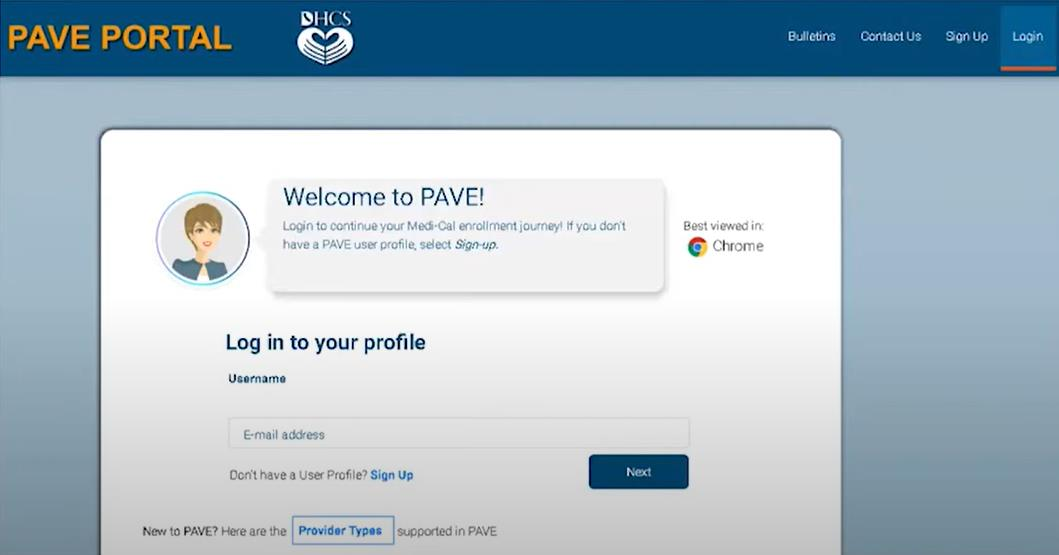
Screenshot source: Medi-Cal PAVE Profile Creation Instructional Guide, page 1; undated guide announced June 5, 2024.
TL;DR: use your own login, and give your biller their own
Use your own PAVE User Profile. Your biller creates their own login, and the practice Administrator grants a role such as Supervisor for limited assistance; broader privileges need a separate decision. A login and an invitation are separate from Medi-Cal enrollment approval.
Who needs their own PAVE login
You, your office administrator and your biller each use a personal User Profile. Keep your password and account-verification messages private. The provider’s PAVE profile, also called a Business Profile in some guides, holds the enrollment work; it is shared through assigned access, not a shared password. One person can access multiple PAVE profiles, each with its own permissions. See DHCS’s profile and role training, pages 12 and 19–22.
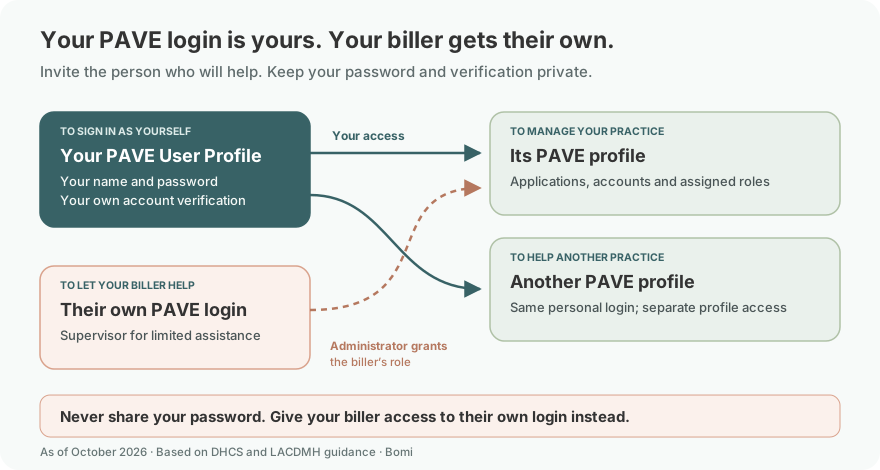
The limited-assistance example uses Supervisor, which Los Angeles County’s March 2026 FAQ, question 20 recommends for helping with an application without signing or submitting it. The DHCS roles deck, pages 27–30 describes broader roles; choose privileges for the work actually needed.
Before you create access
First confirm whether the practice already has a PAVE profile and who administers it. An existing invitation may be the right route for an employee or biller. Keep the provider’s NPI and enrollment details available when connecting to a provider profile; do not enter another person’s identity as your personal account. DHCS profile guidance distinguishes the individual user from the provider’s enrollment profile.
Create your personal PAVE User Profile
Choose Sign Up, then enter your own name, username, password, telephone number and recovery email. Complete the account-verification prompt using a method you control. The official profile guide, pages 2–3 illustrates text, phone-call and recovery-email verification options. Follow the live prompts if the screen has changed.
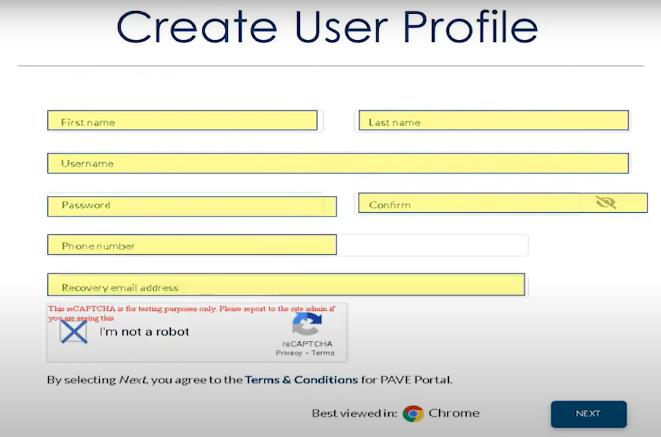
Screenshot source: Medi-Cal PAVE Profile Creation Instructional Guide, page 2; undated guide announced June 5, 2024.
Create or join the correct provider profile
For a new provider profile, the official guide, page 4 shows entering the NPI, choosing Verify, naming the PAVE profile and selecting Create my PAVE Profile. Use the provider’s real information, not the sample data in the image.
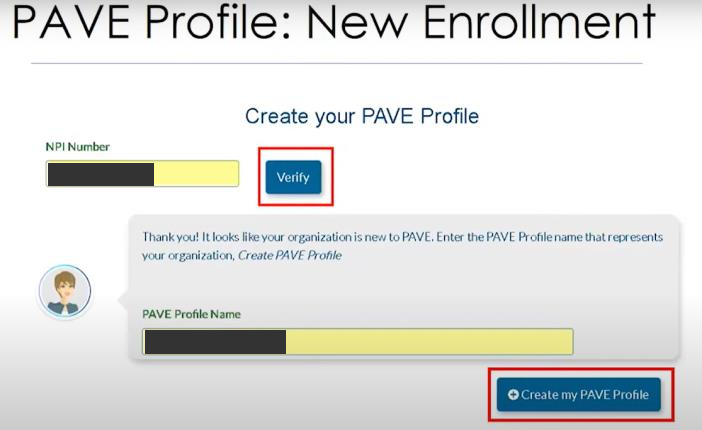
Screenshot source: Medi-Cal PAVE Profile Creation Instructional Guide, page 4; sample NPI and name masked.
For an existing profile, the guide’s existing-profile section, pages 5–6 shows provider verification or a request to join the existing profile. If you cannot verify the provider details or the correct profile already belongs to another administrator, contact the help desk instead of guessing answers or creating a duplicate profile.
Add your biller with their own login
The practice Administrator opens the correct provider profile, then My Tools → User Administration → Invite User. Enter the biller’s own name and email, choose the privileges needed, review them and send the invitation. The biller accepts it with their own PAVE User Profile. The county FAQ, question 20 illustrates this flow and recommends Supervisor for limited assistance.
Administrator includes managing user privileges. Grant it only when the biller needs that broader control. A portal role does not give someone legal authority to sign a Medi-Cal application: DHCS’s authorized-signer instructions separately define who may legally bind the applicant. See the PAVE biller-access walkthrough for the invitation screens and role comparison.
Login problems and missing provider access
Password or username trouble: use PAVE technical support at 866-252-1949. Keep recovery messages and verification codes with the person who owns the login.
You can sign in but cannot see the provider: confirm that the invitation was accepted and that the Administrator invited the same email as your User Profile. Personal-account creation alone does not grant access to someone else’s provider profile. Review the invitation instructions.
You cannot sign an application: check both your assigned privileges and legal authority. Do not use another person’s login to get around either requirement. DHCS signer guidance.
Related Medi-Cal guides
Give your biller access to PAVE — invitations and privileges.
Medi-Cal PAVE business-license and lease documents — prepare the enrollment documents after account access is settled.
Frequently Asked Questions
Where is the Medi-Cal PAVE portal login?
Use the official PAVE portal at pave.dhcs.ca.gov and your own personal User Profile. Account registration and Medi-Cal provider enrollment are separate steps.
How do I create a Medi-Cal PAVE account?
Choose Sign Up, create your personal User Profile and complete account verification. Then create or join the correct provider PAVE profile, following the official guide and any existing administrator invitation.
Can my biller use my PAVE login?
Give the biller access through their own User Profile instead of sharing yours. The practice Administrator invites the person and assigns the needed privileges; Supervisor is the county-recommended example for limited assistance.
Can one PAVE login access more than one provider profile?
Yes. DHCS’s training distinguishes one person’s User Profile from the PAVE profiles they can access. A biller can have one personal login and separate access to multiple clients’ profiles.
What do I do if I forgot my PAVE password or username?
Contact the PAVE technical help desk at 866-252-1949 for log-in assistance. Its published hours are Monday–Friday, 8am–6pm Pacific, excluding state holidays.
Sources
DHCS PAVE overview — enrollment purpose.
Medi-Cal PAVE Profile Creation Instructional Guide — account and profile steps, pages 1–6.
DHCS PAVE profiles and roles training — September 7, 2021 revision currently linked by DHCS.
LACDMH PAVE FAQ — revised March 11, 2026; question 20 covers assistance and invitations.
DHCS authorized-signer instructions — role assignment and signing authority.
Provider Enrollment Division contacts — current technical and enrollment help.
Planning a private practice?
Use Bomi's free Build resources to plan the business, provider identity, payer setup, and billing workflow before you see clients.
Use Build resources
About Bomi
Founded by George Ruan, Dax Earl, and Andrey Goder, Bomi helps independent therapists and group practices with insurance billing, credentialing, and payer follow-up. Bomi grew out of Dax’s experience helping his mother with her therapy practice, with a clear purpose: reduce the administrative burden of insurance while keeping practice owners in control.
Meet our founders