
AMMIS Login: Alabama Medicaid Portal and Clerk Access
By George Ruan • October 9, 2026
For AMMIS provider login, open AMMIS official login and sign in with your own Alabama Medicaid web account.
Links and current guide versions checked October 9, 2026. For provider and biller information, see the official Medicaid provider page.
Sections
- Direct links: AMMIS sign-in, setup and help
- TL;DR: use your own login, and give your biller their own
- Who needs their own AMMIS login
- Before you create access
- Create or use your AMMIS account
- Add your biller: Clerk roles
- Login errors, forgotten IDs and missing access
- Related guides
- Frequently Asked Questions
Direct links: AMMIS sign-in, setup and help
Registration: Account Setup — Login ID and PIN letter required
Missing User Name/Login ID or PIN: EMC Helpdesk guidance; 800-456-1242.
Help Desk contacts: 334-215-0111; 800-456-1242 within Alabama and border communities; AlabamaSystemsEMC@gainwelltechnologies.com
The AMMIS sign-in page looks like this. Use your own account when signing in.
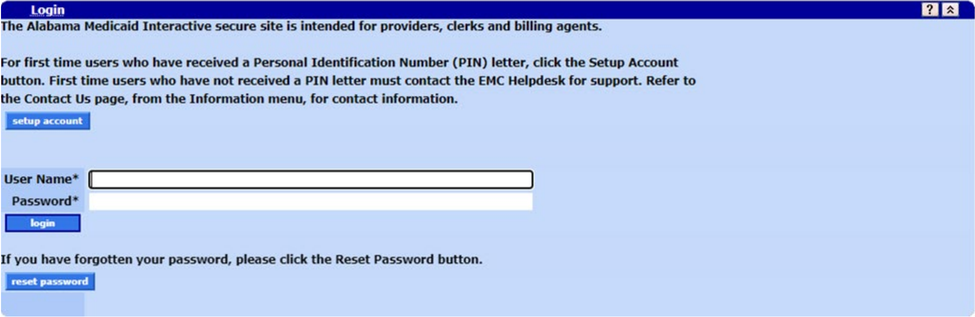
Screenshot source: AMMIS Interactive Services Website User Manual v61.0, March 25, 2026, PDF 45, printed 24; stale announcement panel excluded.
TL;DR: use your own login, and give your biller their own
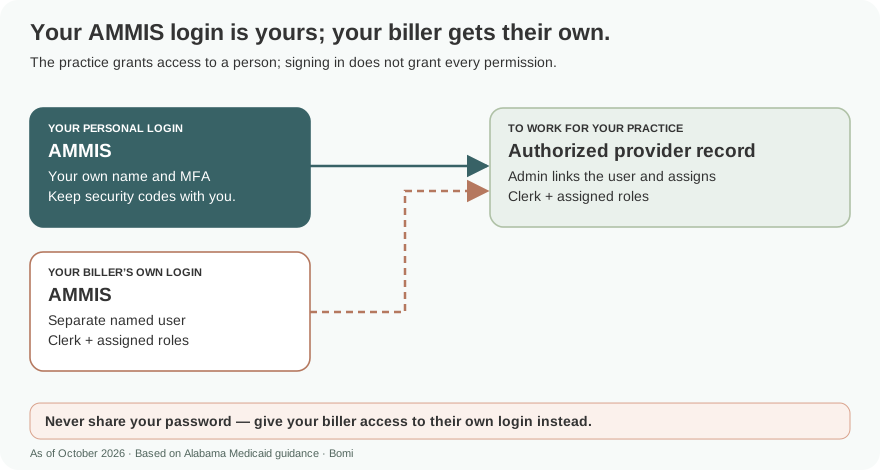
Use your own web account. Your biller gets their own Clerk account, which the administrator links and gives assigned roles. Provider enrollment has a separate official page. official guide.
Who needs their own AMMIS login
The administrator and biller should each use their own account and keep their password private. AMMIS uses Clerk access for delegated work. Alabama Medicaid’s official alert describes MFA for administrator, Clerk and other web account types; follow the portal’s current MFA prompts. official guide.
Check Alabama Medicaid’s published MFA requirements for your account type.official MFA alert.
Before you create access
Identify the provider account and which Clerk roles the biller needs. Use the current Interactive Services Website User Manual for account setup and access administration. A provider-enrollment application is a separate process from signing in to the interactive portal. official guide.
Create or use your AMMIS account
Before provider account setup, obtain the PIN letter and its Login ID and Personal Identification Number. Enter those case-sensitive values on Account Setup, then complete the personal contact information, security questions and your own password. Follow the MFA prompts for your web account type. Existing users sign in with their own username and password; use Reset Password for recovery. official guide.
Add your biller: Clerk roles
The administrator opens Account, Clerk Maintenance and add clerk. For an existing Clerk, search for the biller’s current username, select that Clerk, assign the required roles and submit. For a new Clerk, enter their own first and last name, phone, email and confirmation, plus an initial password and confirmation; move the needed Available Roles to Assigned Roles and submit. The initial password is expired, so the Clerk must change it on first sign-in. Give the initial password only to that Clerk through a secure channel; keep the biller’s permanent password private and never share the administrator’s password. official guide.
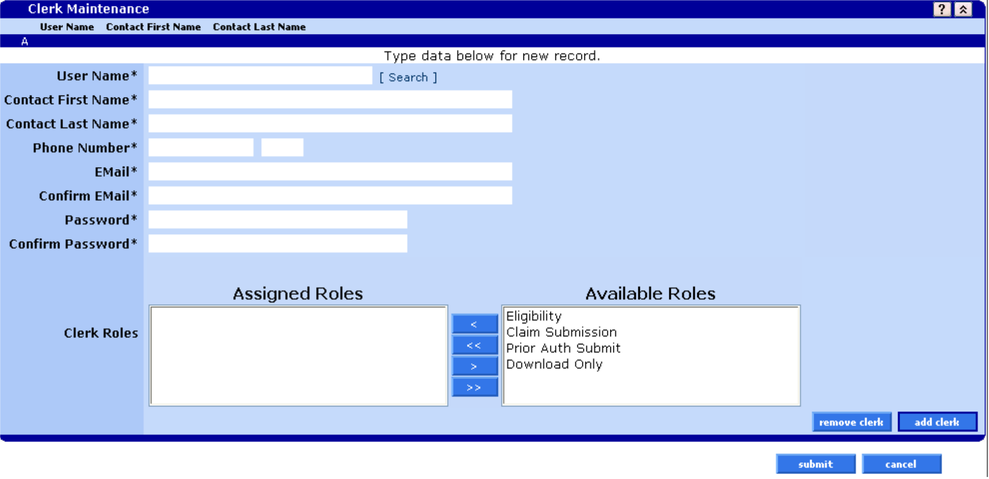
Screenshot source: AMMIS Interactive Services Website User Manual v61.0, March 25, 2026, PDF 86, printed 65.
Login errors, forgotten IDs and missing access
Use the portal’s reset-password link for a password problem and the official MFA alert for MFA requirements. When sign-in works but a function is missing, ask the administrator to inspect the Clerk’s assigned roles in Clerk Maintenance. official guide.
Related guides
Check which provider number the account should represent in our NPI Type 1 vs Type 2 guide. For help with practice enrollment and payer access, see Bomi credentialing support.
Frequently Asked Questions
Where is the Alabama Medicaid AMMIS login?
Use medicaid.alabamaservices.org/alportal/ and the Secure Site login form. The public form includes account-setup and reset-password links.
How do I give a biller Alabama Medicaid portal access?
In Clerk Maintenance, link an existing Clerk by username or create a new Clerk with their contact information, an initial password and the needed roles. Submit the assignment. A new Clerk must change the initial password on first sign-in and keep their permanent password private.
Does Alabama Medicaid require MFA for Clerks?
The official Alabama Medicaid MFA alert includes Clerk and administrator accounts. Follow the current portal prompts and the alert’s guidance.
Planning a private practice?
Use Bomi's free Build resources to plan the business, provider identity, payer setup, and billing workflow before you see clients.
Use Build resources
About Bomi
Founded by George Ruan, Dax Earl, and Andrey Goder, Bomi helps independent therapists and group practices with insurance billing, credentialing, and payer follow-up. Bomi grew out of Dax’s experience helping his mother with her therapy practice, with a clear purpose: reduce the administrative burden of insurance while keeping practice owners in control.
Meet our founders