
Health PAS-Online Login: WV Medicaid Account and Biller Access
By George Ruan • October 10, 2026
For Health PAS-Online provider login, open Health PAS-Online provider login and sign in with your own authorized Trading Partner Account user login.
Last checked: October 10, 2026.
Sections
- Direct links: Health PAS-Online login, registration and help
- TL;DR: use your own login, and give your biller their own
- Who needs their own Health PAS-Online login
- Before you create access
- Account setup steps
- Add your biller with Claims Submissions permission
- Login errors and lockouts
- Related guides
- Frequently Asked Questions
Direct links: Health PAS-Online login, registration and help
WV Medicaid sign-in / Forgot User Name / Forgot Password — use the recovery links on the official Sign In screen.
Current official User Guides catalog — registration and account maintenance guides.
Official portal phone and email support — 888-483-0793. Provider Services: wvmmis@gainwelltechnologies.com; EDI Helpdesk: edihelpdesk@gainwelltechnologies.com.
TPA registration and enrollment access instructions — choose the route matching your enrollment status.
The currently offered West Virginia account-maintenance guide shows User Name, Password, an acceptance checkbox and recovery links. The figure below is from that dated guide; start from the official Sign In link for the current screen.
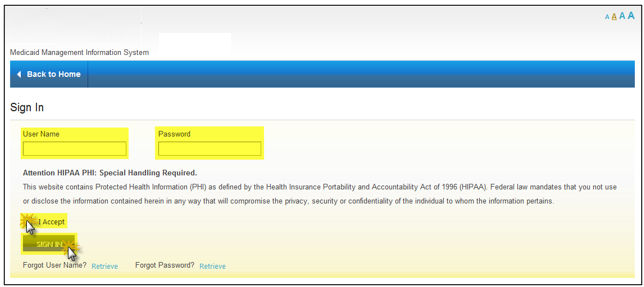
Screenshot source: West Virginia Trading Partner Account Maintenance Provider User Guide v0.12 (February 7, 2024), PDF page 11 (printed page 5).
TL;DR: use your own login, and give your biller their own
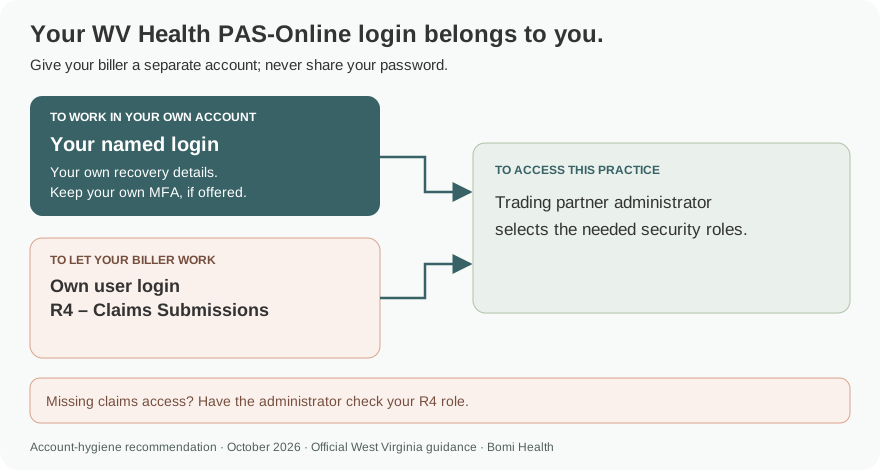
Use your own WV Medicaid login. Your trading partner administrator adds a separate user for your biller and selects Claims Submissions and any other needed permissions. A billing company can instead have a Billing Agent / Clearinghouse account, and provider enrollment is a separate step. Official portal guidance.
Who needs their own Health PAS-Online login
The registration guide says the first registrant becomes trading partner administrator and can add individual logons with selected security access. One Trading Partner Account may associate multiple billing/pay-to provider records. Our recommendation is to keep each person’s recovery details and any offered MFA with that person, and never share your password. Official portal guidance.
Before you create access
Know whether the provider is already enrolled. The registration guide has different routes for Provider - Already Enrolled, Provider - Not Yet Enrolled and Billing Agent / Clearinghouse. For an enrolled billing provider, have the provider identifier, tax ID and the PIN from the enrollment welcome letter available for provider association. Official portal guidance.
Account setup steps
Choose Register on the official WV portal and select the user type matching your status. An enrolled provider uses Provider - Already Enrolled; a new applicant uses Provider - Not Yet Enrolled. A billing service or clearinghouse has its own registration option. TPA Registration User Guide.
Complete the demographic, account, confirmation and agreement steps. The guide then directs you to the activation email containing the activation link, PIN and Trading Partner ID. Activate the account before attempting secure portal access. The administrator can add other people after registration is approved and activated. TPA registration and activation instructions.
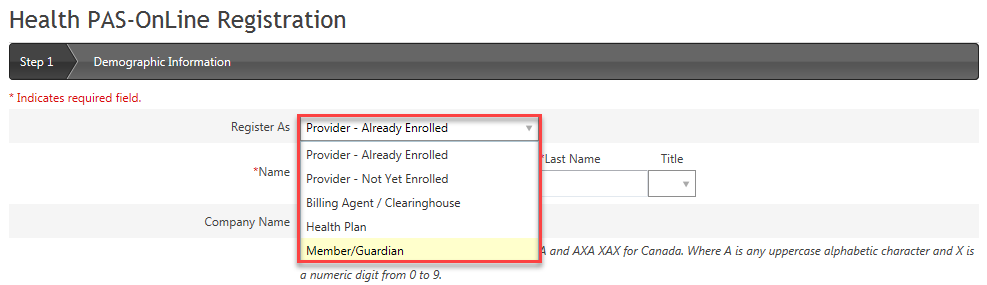
Screenshot source: West Virginia Trading Partner Account Registration User Guide v1.8 (February 8, 2024), PDF page 11 (printed page 3).
Add your biller with Claims Submissions permission
The administrator opens Account Maintenance > Manage Users and Add User. Enter the biller’s first name, last name and email. Select the needed security roles and Submit. The guide labels the initial user status Invited. TPA Account Maintenance guide.
For medical claims, the role table calls R4 Claims Submissions; eligibility is R5 Eligibility and payment-status access is R6 Finance. R7 User Management controls managing user accounts. Choose the roles for the biller’s work and keep the login separate from the administrator’s. TPA security role table.
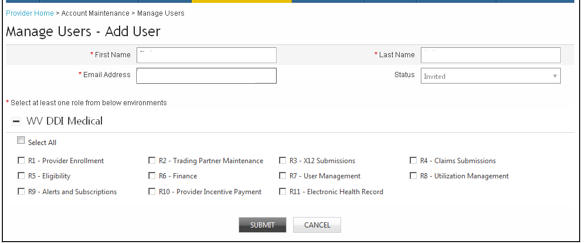
Screenshot source: West Virginia Trading Partner Account Maintenance Provider User Guide v0.12 (February 7, 2024), PDF page 23 (printed page 17).
A billing agency working through its own account uses the Billing Agent / Clearinghouse registration route and the documented provider-association process. File-based X12 transaction submission also requires EDI testing and certification; adding a website user does not complete those requirements. TPA registration and EDI requirements.
Login errors and lockouts
The registration guide documents forgotten-user-name and password recovery from the sign-in page. Start at the official portal, use the appropriate recovery option, and use the current Contact Us page if recovery fails. TPA registration guide, recovery sections.
If a user can sign in but cannot manage users or submit claims, have the administrator check the selected roles. The account-maintenance guide requires R7 User Management for user administration and lists Claims Submissions separately. TPA Account Maintenance role table.
Related guides
Frequently Asked Questions
Where is the West Virginia Medicaid provider portal login?
Open wvmmis.com and use Sign In for Health PAS-Online. Use the official portal entry rather than bookmarking a temporary SSO redirect with session parameters.
How do I register for a WV Medicaid Trading Partner Account?
Use Register on the official portal and choose the correct type: already-enrolled provider, provider not yet enrolled, or Billing Agent / Clearinghouse. Complete the account and agreement steps, then activate through the email described by the guide.
How do I add my biller to WV Health PAS-Online?
The trading partner administrator uses Account Maintenance > Manage Users > Add User, enters the biller’s own name and email, assigns the needed roles and submits. R4 Claims Submissions covers medical claims access.
Can one WV Trading Partner Account include multiple provider records?
Yes. The registration guide says one Trading Partner Account should be registered even if multiple billing/pay-to provider records enroll. The administrator manages provider associations and separate user logons.
Want Bomi to handle insurance billing?
Bomi helps therapy practices with benefit checks, claims, denials, balances, CAQH, attestations, and revenue management.
Book a call
About Bomi
Founded by George Ruan, Dax Earl, and Andrey Goder, Bomi helps independent therapists and group practices with insurance billing, credentialing, and payer follow-up. Bomi grew out of Dax’s experience helping his mother with her therapy practice, with a clear purpose: reduce the administrative burden of insurance while keeping practice owners in control.
Meet our founders