
RI Medicaid Healthcare Portal Login: Registration and Delegate Access
By George Ruan • October 10, 2026
For RI Medicaid Healthcare Portal provider login, open RI Medicaid Healthcare Portal provider login and sign in with your own authorized Trading Partner or Delegate account.
Last checked: October 10, 2026.
Sections
- Direct links: RI Medicaid Healthcare Portal login, registration and help
- TL;DR: use your own login, and give your biller their own
- Who needs their own RI Medicaid Healthcare Portal login
- Before you create access
- Account setup steps
- Add your biller as a Delegate
- Login errors and lockouts
- Related guides
- Frequently Asked Questions
Direct links: RI Medicaid Healthcare Portal login, registration and help
RI Medicaid Healthcare Portal login / Register Now / Forgot User ID — the public first screen asks for User ID.
Password reset help: RI EDI Services — 401-784-8100; 800-964-6211 in-state; riediservices@gainwelltechnologies.com. Include your NPI and Trading Partner ID when requesting a Healthcare Portal password reset.
Trading Partner enrollment — complete this before portal registration.
Registering to use the HCP guide — Trading Partner, Billing Agent and Delegate routes.
The RI Medicaid login panel asks for User ID first and shows Register Now, Forgot User ID and Where do I enter my password?
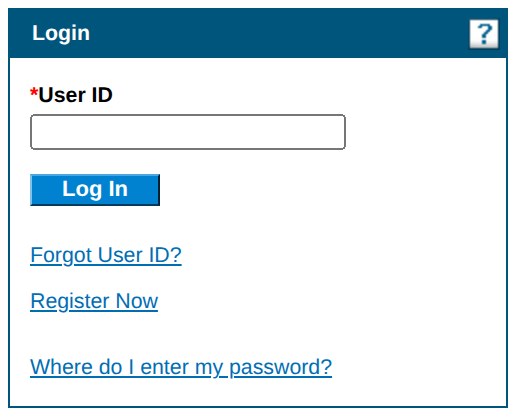
Screenshot source: Screenshot of the public RI Medicaid Healthcare Portal sign-in page, captured October 10, 2026.
TL;DR: use your own login, and give your biller their own
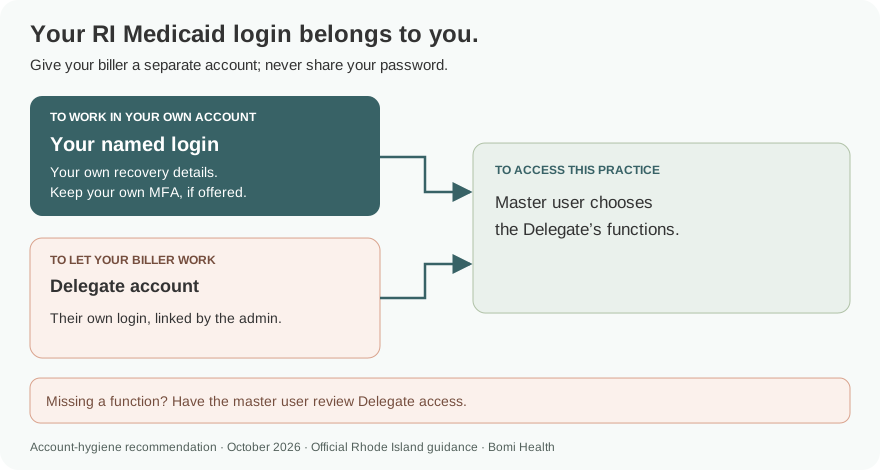
Use your own RI Medicaid portal login. The master user adds your biller as a Delegate and selects the functions they can use; the biller completes registration for their own login. Trading Partner enrollment comes before portal registration. Official portal guidance.
Who needs their own RI Medicaid Healthcare Portal login
The registration guide separates the Trading Partner master account from individual Delegate accounts. A Delegate uses their own selected user ID. Our recommendation is to keep each user’s recovery details and any offered MFA with that person and never share your password. A billing company’s Trading Partner enrollment and an individual Delegate login are different access choices. Official portal guidance.
Before you create access
Confirm that the Trading Partner is enrolled with RI Medicaid. EOHHS says the Healthcare Portal registration process is for enrolled Trading Partners. Keep the Trading Partner enrollment information available for the master account; a new Delegate instead needs the details provided by the master user or EDI administrator. Official portal guidance.
Account setup steps
Open the official portal and choose Register Now. Select the registration option matching the account: Trading Partner for the enrolled organization’s master registration, or Delegate for a person being added. Billing Agent is a separate registration option shown in the guide. HCP registration guide.
For the Trading Partner master account, follow the enrolled-Trading-Partner registration steps. The portal states that Trading Partners use their Trading Partner ID as User ID. A Delegate chooses an individual user ID during their own registration. HCP registration guide.
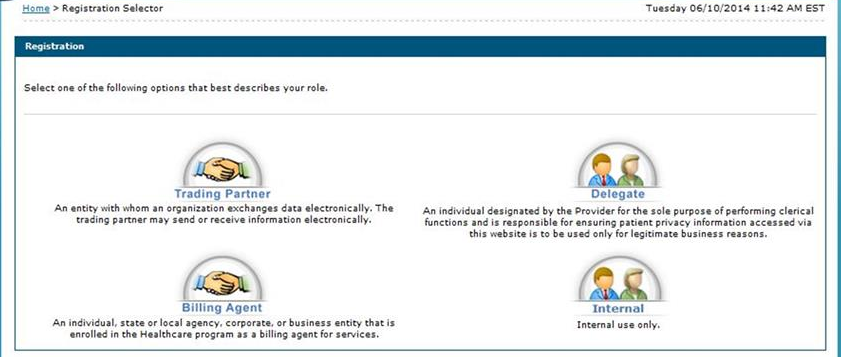
Screenshot source: RI Medicaid Healthcare Portal: Registering to use the HCP v1.6 (November 3, 2022), PDF page 5.
Add your biller as a Delegate
The master user opens Manage Account and Add Delegates. On Add New Delegate, enter the biller’s name and Add Date, assign the Delegate PIN, and select the authorized functions. Submit to generate the Delegate Code. HCP registration guide, Delegate assignment.
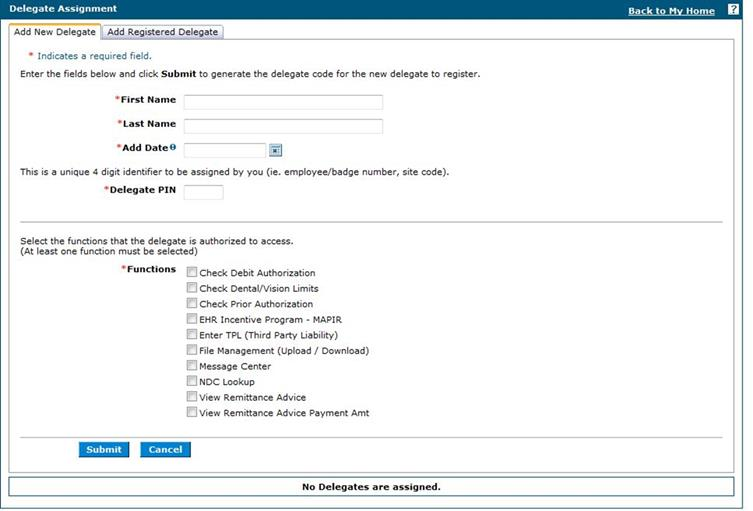
Screenshot source: RI Medicaid Healthcare Portal: Registering to use the HCP v1.6 (November 3, 2022), PDF page 23.
Give the biller the registration details through an appropriate secure channel. They choose Register Now > Delegate and enter the matching name, Add Date, Delegate PIN and Delegate Code, then continue to create their own user ID and security details. An already-registered Delegate has a separate Add Registered Delegate tab. HCP registration guide, Delegate registration.
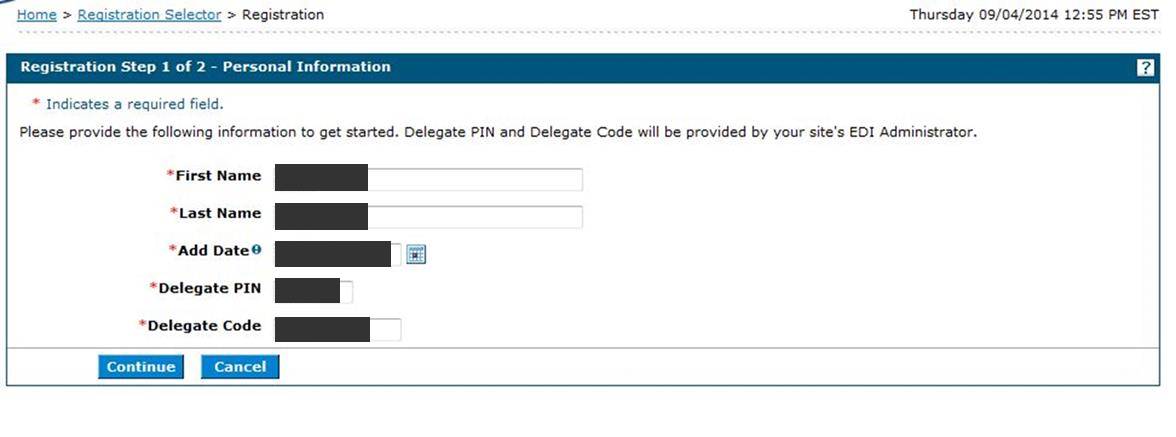
Screenshot source: RI Medicaid Healthcare Portal: Registering to use the HCP v1.6 (November 3, 2022), PDF page 28.
Login errors and lockouts
Use the recovery options on the official login page. For help with portal access, contact EOHHS’s listed Gainwell EDI Services team at 401-784-8100, or 800-964-6211 for in-state toll-free calls, or riediservices@gainwelltechnologies.com. EOHHS Healthcare Portal help.
If a Delegate can sign in but cannot use an expected function, the master user should review the assigned functions. The guide’s delegate assignment screen makes the permitted functions an explicit selection. HCP Delegate assignment instructions.
Related guides
Frequently Asked Questions
Where is the Rhode Island Medicaid provider login?
Use the RI Medicaid Healthcare Portal linked by EOHHS at riproviderportal.org. Its public login panel starts with User ID.
Do I enroll as a Trading Partner before registering for the RI Healthcare Portal?
Yes. EOHHS describes portal registration for enrolled Trading Partners. Trading Partner enrollment and portal registration are separate steps.
How do I add my biller to the RI Medicaid portal?
The master user adds a Delegate, chooses functions, assigns a Delegate PIN and generates the Delegate Code. The biller uses those details to complete their own Delegate registration.
Does an RI Medicaid Delegate use the master password?
No. The guide has a separate Delegate registration process and individual user ID. Give the biller Delegate access rather than sharing the master login.
Want Bomi to handle insurance billing?
Bomi helps therapy practices with benefit checks, claims, denials, balances, CAQH, attestations, and revenue management.
Book a call
About Bomi
Founded by George Ruan, Dax Earl, and Andrey Goder, Bomi helps independent therapists and group practices with insurance billing, credentialing, and payer follow-up. Bomi grew out of Dax’s experience helping his mother with her therapy practice, with a clear purpose: reduce the administrative burden of insurance while keeping practice owners in control.
Meet our founders