
Vermont Medicaid Portal Login: Green Mountain Care and Biller Access
By George Ruan • October 10, 2026
For Vermont Medicaid Portal provider login, open Vermont Medicaid Portal provider login and sign in with your own authorized provider or staff account.
Last checked: October 10, 2026.
Sections
- Direct links: Vermont Medicaid Portal login, registration and help
- TL;DR: use your own login, and give your biller their own
- Who needs their own Vermont Medicaid Portal login
- Before you create access
- What your Vermont login opens: PMM and web services
- Account setup steps
- Add your biller: PMM Delegate and web Team Member
- Login errors and lockouts
- Related guides
- Frequently Asked Questions
Direct links: Vermont Medicaid Portal login, registration and help
Vermont Medicaid Portal login / Forgot password — current web-services sign-in.
Provider Management Module (PMM) — provider enrollment and invitation-code registration.
Current PMM enrollment and Delegate instructions — v3.3, October 3, 2025.
Provider web-services account guidance — distinguishes PMM Delegates and Team Members.
Account requests and Provider Services on the login page — Provider Services: 800-925-1706. Account requests: Gainwell Provider Enrollment.
The Vermont Medicaid login page has User ID and Password fields, Forgot password, account-request instructions and a separate Trading Partner Account Setup section.
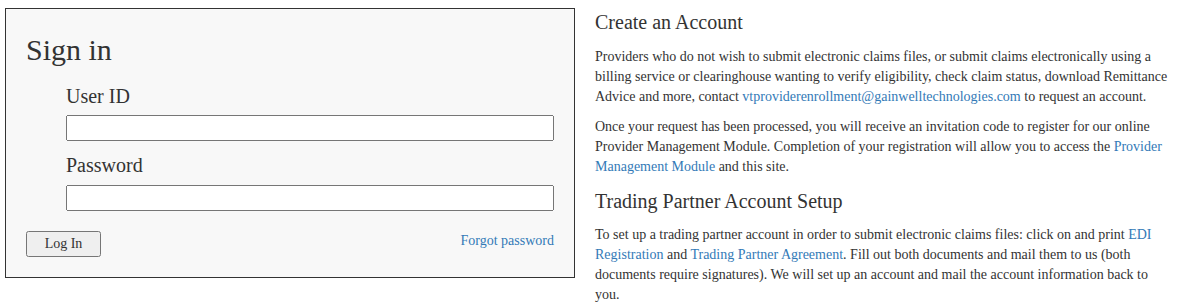
Screenshot source: Screenshot of the public Vermont Medicaid Portal sign-in page, captured October 10, 2026.
TL;DR: use your own login, and give your biller their own
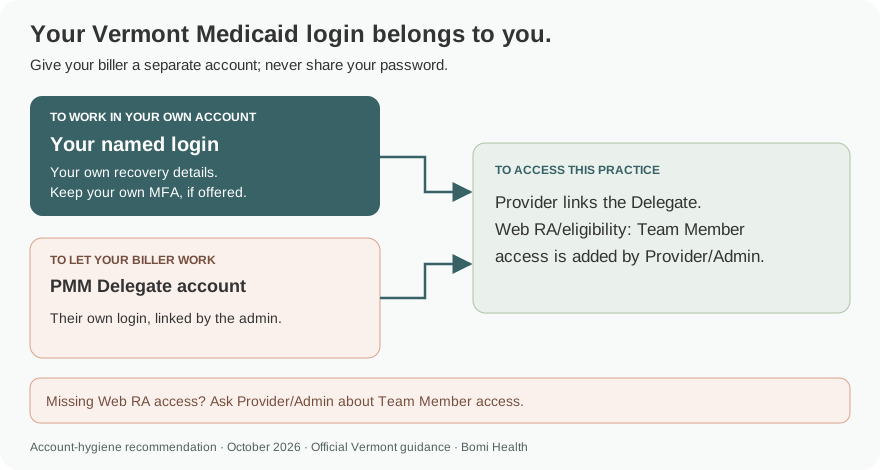
Use your own Vermont Medicaid login. For provider enrollment work, your biller gets their own PMM Delegate account linked by the provider; Web RA and eligibility access can also require the practice’s Provider/Admin to add them as a Team Member. Sending electronic claim files has separate trading-partner setup. Official portal guidance.
Who needs their own Vermont Medicaid Portal login
Vermont’s instructions distinguish a Delegate in the Provider Management Module from a Team Member for web remittance advice and eligibility. The provider links a registered Delegate by Last Name and Relationship Code. Our recommendation is to keep each person’s login, recovery details and any offered MFA with its owner and never share your password. Official portal guidance.
Before you create access
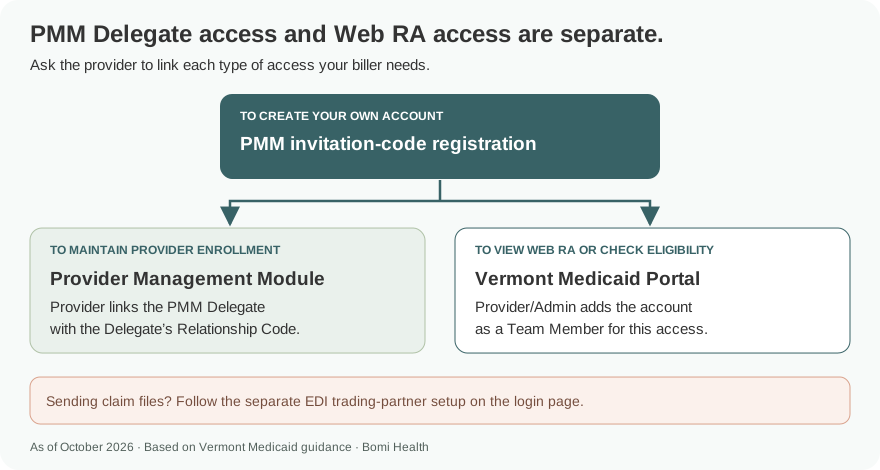
Decide what the biller needs: provider enrollment maintenance in PMM, web remittance advice and eligibility, or electronic claim-file submission. The current login page has different account-request instructions for web services and EDI trading partners. Do not assume adding a PMM Delegate supplies every web-services function. Official portal guidance.
What your Vermont login opens: PMM and web services
The current login page says PMM account registration allows access to PMM and the Vermont Medicaid site. The web-services guide separately describes the PMM Delegate relationship and Team Member access for Web RA and eligibility. Ask the Provider/Admin to set up the access needed for each task. Current account instructions; Delegate and Team Member guidance.
Account setup steps
For a provider web-services account, the current login page directs you to contact Gainwell Provider Enrollment. Once processed, you receive an invitation code for PMM registration. The page says completing registration allows access to PMM and the Vermont Medicaid site. Current Vermont Medicaid account instructions.
The October 2025 PMM guide says to choose Create User Account on the PMM homepage, enter the invitation code, verify identity, create the account profile and accept the user agreement. An approved provider’s welcome information identifies the provider and service location; the invitation code arrives in a separate notice. PMM guide, How to Register for the Provider Portal.
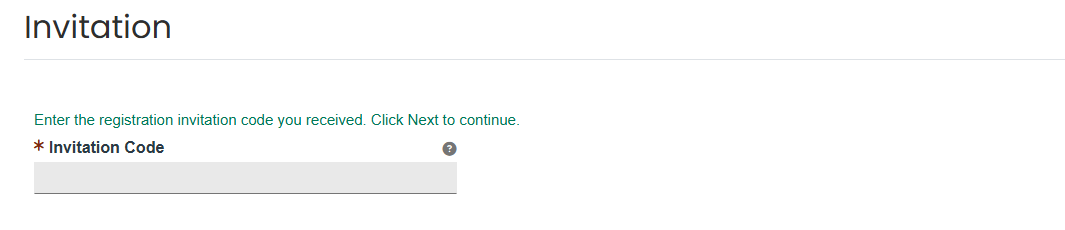
Screenshot source: Vermont PMM Provider Enrollment Instructions v3.3 (October 3, 2025), PDF page 20 (printed page 21).
Add your biller: PMM Delegate and web Team Member
For PMM enrollment maintenance, the provider opens Maintenance > Manage Delegates. To add an existing Delegate, choose Add Registered Delegate, enter their Last Name and Relationship Code, then Continue. To create a new delegate relationship for someone without a delegate account, use Add Unregistered Delegate and assign the required roles and functions before Submit. Current PMM guide, Manage Delegates.

Screenshot source: Vermont PMM Provider Enrollment Instructions v3.3 (October 3, 2025), PDF page 23 (printed page 24).
For Web RA and eligibility, Vermont’s December 2021 web-services guide says an existing PMM Delegate should not submit another web-services request form. The established Provider/Admin adds that account as a Team Member. Confirm this additional access with the practice administrator instead of sharing the provider password. Obtaining a Provider Web Services Account (December 2021).
For electronic claim files, follow the EDI Registration and Trading Partner Agreement instructions on the current login page. Those forms require signatures and separate trading-partner setup; a PMM Delegate relationship does not replace that process. Current Trading Partner Account Setup instructions.
Login errors and lockouts
Use Forgot password on the current web-services login page. If you need account or access help, Provider Services is 800-925-1706, as listed on that page. For a new web-services account, use the current Gainwell enrollment email above. Vermont Medicaid login and help.
If you can sign in but cannot view Web RA or eligibility, have the Provider/Admin check the Team Member relationship. PMM Delegate access and web-services access are described separately in the state’s account guide. Provider web-services access guidance.
Related guides
Frequently Asked Questions
Where is the Vermont Medicaid provider portal login?
Use vtmedicaid.com/secure/logon.do for the Vermont Medicaid Portal web-services login. Provider enrollment and PMM registration are at vermont.hppcloud.com.
How do I create a Vermont Medicaid web-services account?
The current login page lists the Gainwell Provider Enrollment email for web-services account requests. After processing, use the invitation code to complete PMM account registration.
How do I add a biller as a Vermont PMM Delegate?
The provider uses Maintenance > Manage Delegates. For an existing Delegate, choose Add Registered Delegate and supply their Last Name and Relationship Code. New Delegates have a separate Add Unregistered Delegate option.
Why can my PMM Delegate not see Vermont Web RA or eligibility?
The web-services guide says an existing PMM Delegate must be added as a Team Member by the established Provider/Admin for this access. Do not submit a duplicate web-services request just because the Delegate relationship already exists.
Want Bomi to handle insurance billing?
Bomi helps therapy practices with benefit checks, claims, denials, balances, CAQH, attestations, and revenue management.
Book a call
About Bomi
Founded by George Ruan, Dax Earl, and Andrey Goder, Bomi helps independent therapists and group practices with insurance billing, credentialing, and payer follow-up. Bomi grew out of Dax’s experience helping his mother with her therapy practice, with a clear purpose: reduce the administrative burden of insurance while keeping practice owners in control.
Meet our founders