
ND Health Enterprise MMIS Login: Provider Account and Biller Access
By George Ruan • October 10, 2026
For ND Health Enterprise MMIS provider login, open ND Health Enterprise MMIS provider login and sign in with your own Organization Administrator or administrator-created staff account.
Last checked: October 10, 2026.
Sections
- Direct links: ND Health Enterprise MMIS login, registration and help
- TL;DR: use your own login, and give your biller their own
- Who needs their own ND Health Enterprise MMIS login
- Before you create access
- Account setup steps
- Add your biller with Provider-Billing Staff access
- Login errors and lockouts
- Related guides
- Frequently Asked Questions
Direct links: ND Health Enterprise MMIS login, registration and help
ND Health Enterprise provider login / recovery — use Forgot User Name or Password when needed.
Provider web registration: Provider Registration > Register — for an approved provider without an Organization Administrator. Existing staff ask their administrator for their own login.
HHS Medical Services support contact — 701-328-7068 or 800-755-2604; dhsmed@nd.gov.
Official HHS portal and enrollment resources — provider enrollment and website access are different steps.
Organization Administrator fact sheet — first-time access and account administration.
Managing Provider User Security guide — individual accounts, roles and lockouts.
The ND Health Enterprise login panel has User ID and Password fields, plus Forgot User Name or Password.
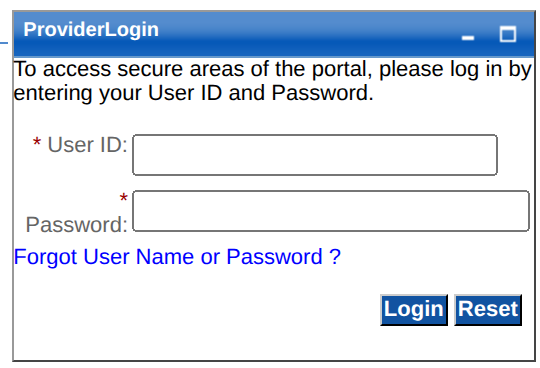
Screenshot source: Screenshot of the public ND Health Enterprise MMIS sign-in page, captured October 10, 2026.
TL;DR: use your own login, and give your biller their own
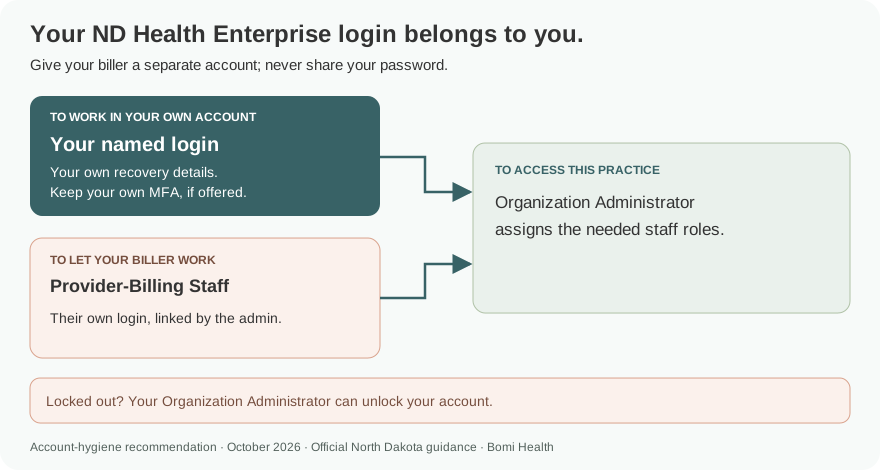
Use your own ND Health Enterprise account. The Organization Administrator gives your biller a separate login with Provider-Billing Staff access, adding other roles only for the work they need. A staff login does not enroll the provider in Medicaid. Official portal guidance.
Who needs their own ND Health Enterprise MMIS login
North Dakota puts user-account administration with the Organization Administrator. Staff roles are separate: Provider-Billing Staff handles claims, Provider-Eligibility Staff checks eligibility, and Provider-Financial Staff handles financial inquiries. Our recommendation is to use a named individual account, keep recovery details and any offered MFA with its owner, and never share your password. Official portal guidance.
Before you create access
Find out whether an Organization Administrator was designated during enrollment. The February 2024 fact sheet explains that the administrator receives a user ID and a separate password letter. If no administrator was designated, the enrolled provider can register web access using its approved seven-digit Medicaid provider number. Existing staff should ask the administrator for access. Official portal guidance.
Account setup steps
Use the HHS portal link to reach ND Health Enterprise. If the practice already has an administrator, request an individual staff account. If it has none, follow the Organization Administrator registration path with the Medicaid provider number; wait for the mailed credentials described by HHS. HHS Organization Administrator fact sheet.
The administrator changes the one-time password and creates staff accounts. The current HHS resource page still links the November 2015 security guide; its screen below shows Manage Users and Add New Users. The dated figures illustrate administration, while the first image above shows the current public login. Managing Provider User Security QRG.
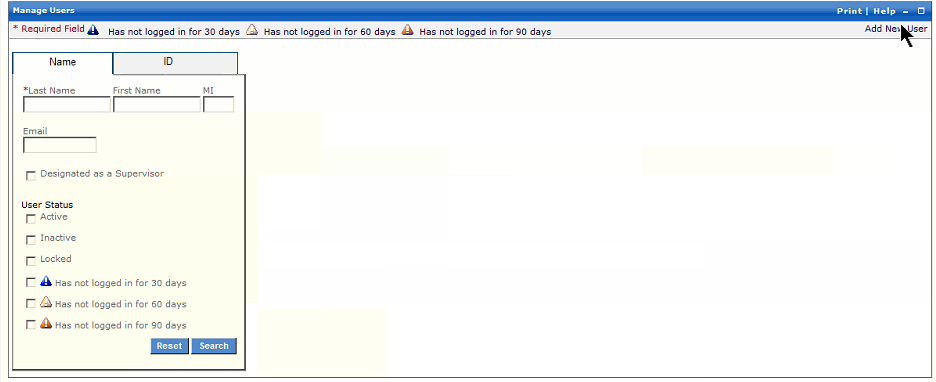
Screenshot source: Managing Provider User Security Quick Reference Guide (November 12, 2015), PDF page 2.
Add your biller with Provider-Billing Staff access
As Organization Administrator, use Add New Users. Enter a unique user ID, the biller’s own name and contact details, and an initial password. Select the roles in Available and move them to Selected before saving with Add. Managing Provider User Security QRG.
For claim creation and claim status, use Provider-Billing Staff. Add Provider-Eligibility Staff or Provider-Financial Staff only when those tasks belong to the biller. Keep administrator permissions with people responsible for managing access. ND provider security role table.
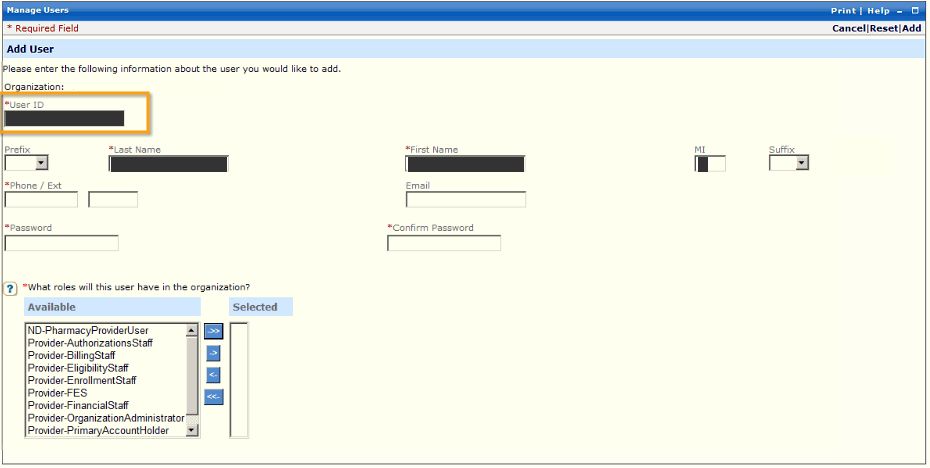
Screenshot source: Managing Provider User Security Quick Reference Guide (November 12, 2015), PDF page 2.
Login errors and lockouts
The Organization Administrator can reset passwords, unlock accounts and manage active user access. The February 2024 fact sheet says three failed login attempts disable a user. Ask the administrator to unlock the account rather than repeatedly trying passwords. HHS Organization Administrator fact sheet.
If the account is new, use the one-time password and follow the change-password prompt. A missing function after login calls for a role check by the administrator. HHS account-access guidance.
Related guides
Frequently Asked Questions
Where do I log in to North Dakota Medicaid as a provider?
Use the ND Health Enterprise MMIS provider login at mmis.nd.gov. It has User ID and Password fields and a recovery link.
How do I create an ND Health Enterprise account?
An enrolled provider’s designated Organization Administrator receives initial credentials. If no administrator was designated, follow HHS web-registration instructions with the approved seven-digit Medicaid provider number. Staff get accounts from the administrator.
What role does my North Dakota Medicaid biller need?
Provider-Billing Staff covers claims functions. Eligibility and financial tasks have separate staff roles that the Organization Administrator can assign when needed.
Who unlocks my ND MMIS account?
The Organization Administrator manages staff password resets and unlocks. HHS says three failed login attempts disable a user, so ask for help instead of continuing guesses.
Want Bomi to handle insurance billing?
Bomi helps therapy practices with benefit checks, claims, denials, balances, CAQH, attestations, and revenue management.
Book a call
About Bomi
Founded by George Ruan, Dax Earl, and Andrey Goder, Bomi helps independent therapists and group practices with insurance billing, credentialing, and payer follow-up. Bomi grew out of Dax’s experience helping his mother with her therapy practice, with a clear purpose: reduce the administrative burden of insurance while keeping practice owners in control.
Meet our founders