
NY Medicaid Behavioral Health Claims in ePACES
By George Ruan • October 9, 2026
Use the official ePACES login for New York Medicaid fee-for-service claim entry and status inquiries. First confirm that the behavioral health service belongs in the FFS lane. A member's managed-care coverage may require submission to the plan instead. This guide, checked October 9, 2026, focuses on professional claims for enrolled therapists and psychologists in private or group practice.
Sections
Confirm payer and provider before entering the claim
Run a service-date eligibility check and read managed-care and other-insurance information. The eMedNY provider guide calls for enrollment confirmation before claim submission and review of other coverage. Confirm the payer responsible for the particular service, not just that the person has Medicaid.
For managed-care-covered services, obtain the plan's claim instructions and confirm network participation. For FFS, check the individual enrollment, billing arrangement and any group affiliation against the relevant provider policy. An ETIN or portal username does not correct an inactive provider or missing billing relationship.
Use your profession's current codes and instructions
Start from the clinical social worker manual, LMHC/LMFT manual or clinical psychologist manual. Open the current policy, procedure-code schedule and professional billing instructions for the actual enrolled profession.
Do not copy a code list from another license. For example, the linked LMHC/LMFT procedure schedule, checked October 9, 2026, does not list 90791. A code appearing in another profession's table does not establish coverage for an LMHC or LMFT. Match the service, documented time and applicable policy before selecting a code.
This professional-claim workflow does not replace facility or rate-code instructions for Article 28 clinics or other institutional settings. For supervised services, consult the New York supervised-billing guide and the applicable setting's policy before deciding who may render or bill.
Complete, build and submit are different steps
The ePACES batch guide makes an important distinction: a claim marked Complete is ready to be batched. It has not necessarily been submitted to Medicaid.
Finish the claim entry and resolve validation errors so the claim is ready for batching.
Use Build Claim Batch and review the claims included in the batch.
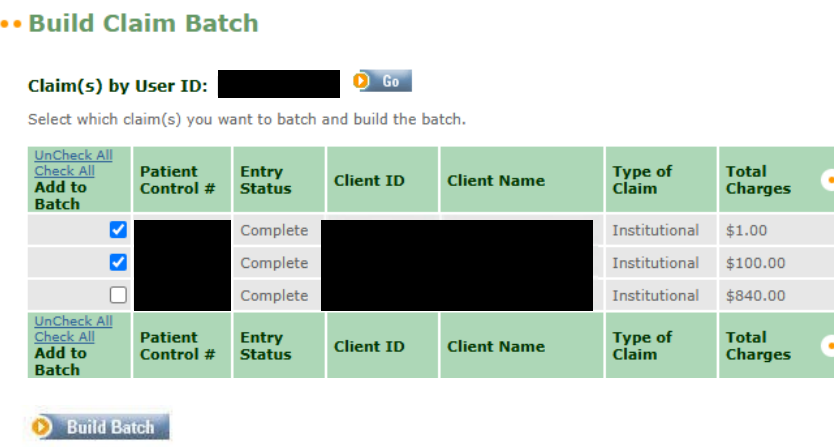
Screenshot source: ePACES Building and Submitting Claim Batches v2/revision 1 (November 7, 2024), PDF page 3.
Open Submit Claim Batches, select the intended batch and use Submit All Selected Batches.
Retain the submission confirmation. Review previously submitted batches and rejection information when checking whether a claim reached the next stage.
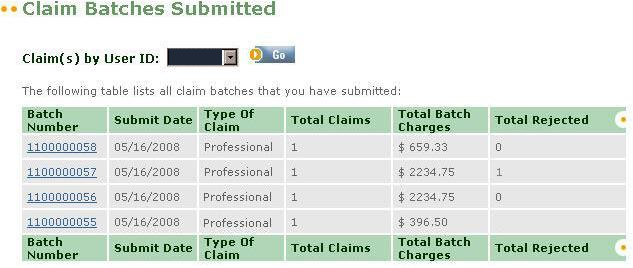
Screenshot source: ePACES Building and Submitting Claim Batches v2/revision 1 (November 7, 2024), PDF page 7.
We recommend tracking the service date, rendering and billing providers, claim reference, batch reference and submission result together. If the record only says Complete, return to the batch workflow before treating the claim as received.
The batching manual illustrates this shared workflow with different claim types. Its institutional example is a screen demonstration, not a direction to bill private-practice psychotherapy as an institutional claim. Sample amounts and dates are not current rates or filing rules.
Check claim status with the right provider
The claim-status guide directs users to submit status inquiries using the individual provider ID rather than the group ID. Select the intended provider, open Status Inquiry, refine the search and review the Status Response worklist.
The guide limits results to the last ten adjudicated claims matching the inquiry and to claims adjudicated within the past two years. A broad inquiry can therefore miss the item you want. Narrow the search rather than interpreting a short results list as the provider's full claim history.
Investigate a missing claim before resubmitting
Compare the saved submission result, batch history and rejection information with the status inquiry. A front-end rejection needs a different correction from an adjudicated denial. Avoid blindly sending a second original claim because the first is absent from a broad search.
Finally, reconcile the remittance with payment records. A submitted batch or claim-status response is not proof of a deposit. For remote visits, use the telehealth guide to check modality and place of service. If claim access itself is unavailable, review ETIN certification and user permissions before rebuilding the claim.
Frequently Asked Questions
Does Complete mean my ePACES claim was submitted?
No. The batch guide describes Complete as ready to be batched. Build the batch, submit it and retain the submission confirmation.
Which provider ID should I use for claim-status inquiries?
The ePACES claim-status guide directs users to inquire with the individual provider ID, not the group ID. Select the correct provider before searching.
Can I use the same procedure-code list for every therapist license?
No. Use the current manual and procedure schedule for the actual enrolled profession. Coverage in another profession’s table does not establish coverage for yours.
Sources
Want Bomi to handle insurance billing?
Bomi helps therapy practices with benefit checks, claims, denials, balances, CAQH, attestations, and revenue management.
Book a call
About Bomi
Founded by George Ruan, Dax Earl, and Andrey Goder, Bomi helps independent therapists and group practices with insurance billing, credentialing, and payer follow-up. Bomi grew out of Dax’s experience helping his mother with her therapy practice, with a clear purpose: reduce the administrative burden of insurance while keeping practice owners in control.
Meet our founders