
Idaho Medicaid Provider Portal Login: Trading Partner Account Setup
By George Ruan • July 14, 2026
For Idaho Medicaid provider login, open the official Health PAS Online sign-in page and use your own Trading Partner Account user name and password. A Trading Partner Account, or TPA, gives authorized users access to the provider’s portal functions.
Login and account guide checked October 10, 2026.
Sections
- Direct links: Idaho Medicaid provider portal login and TPA setup
- TL;DR: use your own login, and give your biller their own
- Who needs their own Idaho Medicaid login
- Before you create access: choose the right TPA type
- Idaho Medicaid Trading Partner Account setup
- Add your biller: invited staff user or Billing Agent association
- Idaho Medicaid login errors and account recovery
- Related Idaho Medicaid guides
- Official sources
- Frequently Asked Questions
Direct links: Idaho Medicaid provider portal login and TPA setup
Register a Trading Partner Account: first check whether the practice already has a TPA for its tax ID.
Forgot user name / password: choose Retrieve or Reset on the sign-in page.
TPA account and EDI support guide: 866-686-4272 or idedisupport@gainwelltechnologies.com.
Idaho provider enrollment: separate application and approval requirements.
The Idaho Medicaid sign-in page looks like this; enter your own credentials and review the HIPAA privacy acceptance before signing in.
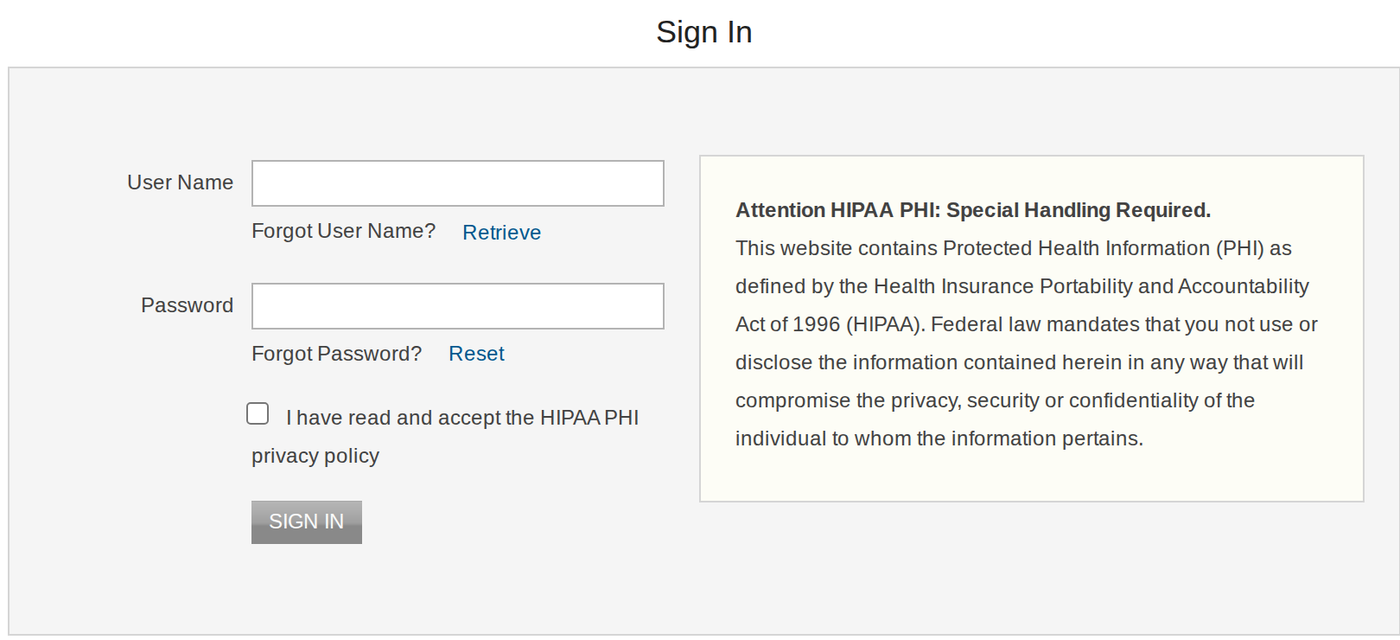
Screenshot source: Screenshot of the public Idaho Medicaid Health PAS Online sign-in page, captured October 10, 2026.
TL;DR: use your own login, and give your biller their own
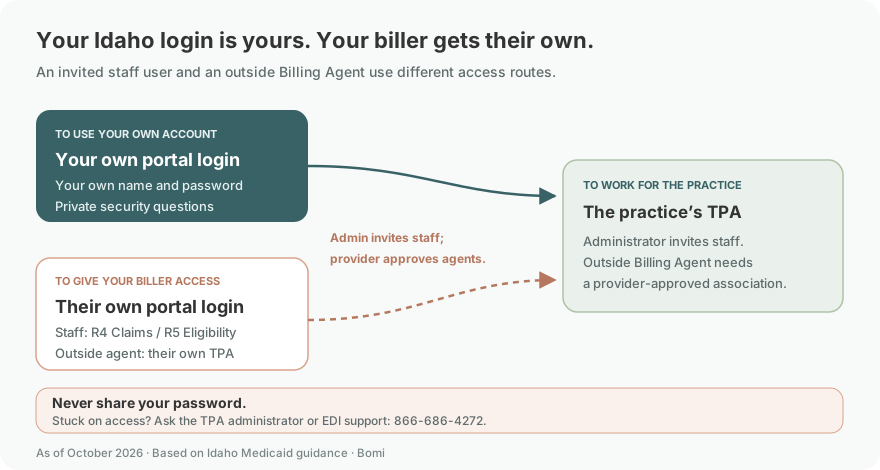
Use your own login. Your administrator invites a staff biller with the Claims Submissions or Eligibility role; an outside billing agency uses its own account, which the provider must connect. Provider enrollment is separate, as explained in the TPA registration guide.
Who needs their own Idaho Medicaid login
Each invited user sets their own user name, password and security questions. Keep those answers and your recovery email private; never share your password. The registration guide, Manage Users section separates the practice administrator’s account from the additional users it invites. Keep any MFA under your own control if the portal prompts for it.
Before you create access: choose the right TPA type
The current registration guide allows only one TPA per tax ID, with multiple providers and users in that account. Ask the practice administrator before registering a duplicate. Choose Provider – Already Enrolled for an existing enrolled provider, Provider – Not Yet Enrolled to reach the electronic enrollment application, or Billing Agent/Clearinghouse for the separate external billing organization.
Idaho Medicaid’s public TPA guide shows that account permissions differ by TPA type.
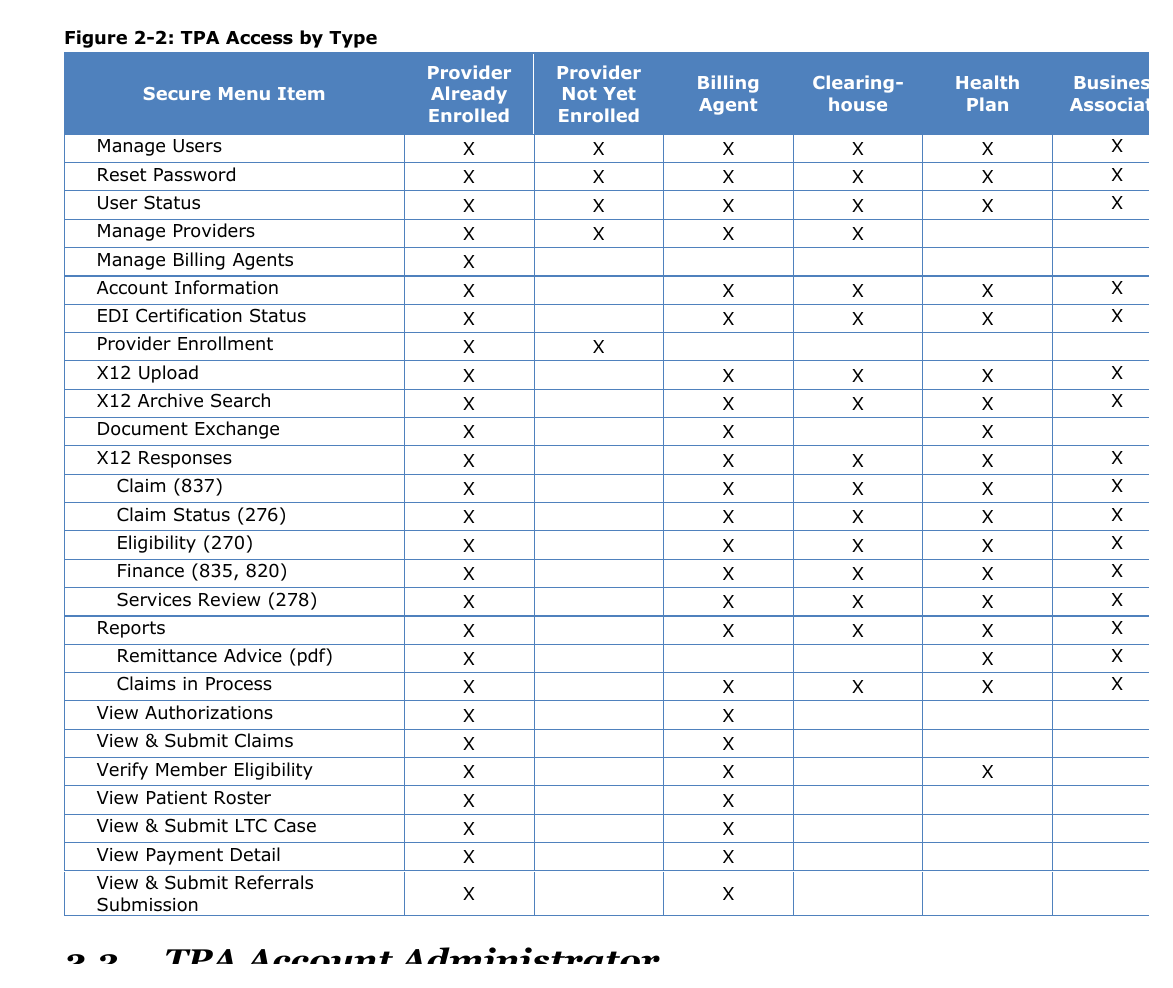
Screenshot source: Trading Partner Account Registration and Maintenance User Guide. Public Idaho Medicaid/Gainwell user-guide PDF; cropped for article readability.
Idaho Medicaid Trading Partner Account setup
Open Register from the official Idaho Medicaid site and select the account type that matches the provider or billing organization.
Enter the organization and provider information requested for that type. Use the registrant’s own name and email. The first registrant becomes the TPA administrator; the registration guide describes the tax ID, NPI/API and any enrollment identifiers requested for each path.
Create your own user name, password and security questions, then follow the email activation link and PIN instructions. Keep the activation message private.
For Provider – Not Yet Enrolled, open Provider Enrollment Application after activation and sign-in. Creating a login does not approve enrollment; follow the not-yet-enrolled guide and the Idaho enrollment guide.
The public Provider Not Yet Enrolled guide shows where the Provider Enrollment Application appears after TPA sign-in.
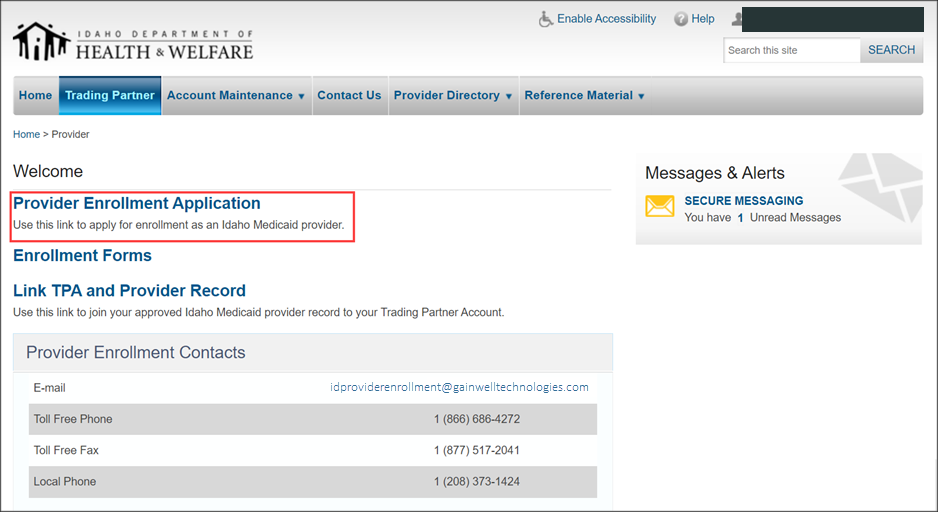
Screenshot source: Trading Partner Account Provider Not Yet Enrolled Registration Guide. Public Idaho Medicaid/Gainwell user-guide PDF; cropped for article readability.
Add your biller: invited staff user or Billing Agent association
For a staff user in the provider’s TPA, the administrator opens Account Maintenance → Manage Users → Add User, enters the biller’s own name and email, and selects only the roles needed. The registration guide, printed pages 15–16 names R4 – Claims Submissions and R5 – Eligibility. The invited person receives an email and creates their own credentials; R7 – User Management controls who can manage users.
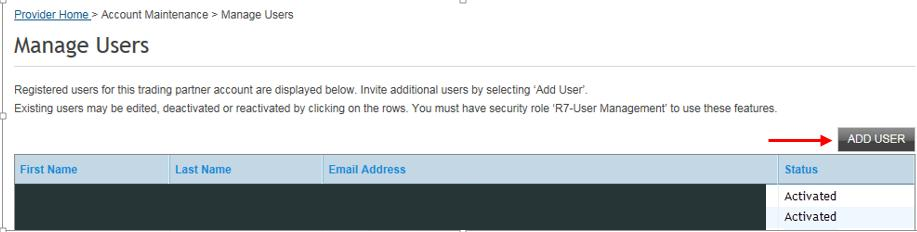
Screenshot source: Trading Partner Account Registration and Maintenance User Guide, version 18.0, printed page 15 (PDF page 16).
For an outside Billing Agent/Clearinghouse with its own TPA, the provider uses Manage Billing Agents → Add Billing Agent, searches by Trading Partner ID or name, selects the matching result and chooses Create Association. A request started by the billing agent still needs provider approval. Follow the guide’s Billing Agent Associations section, printed pages 26–30; this is different from inviting a staff user into the provider’s account.
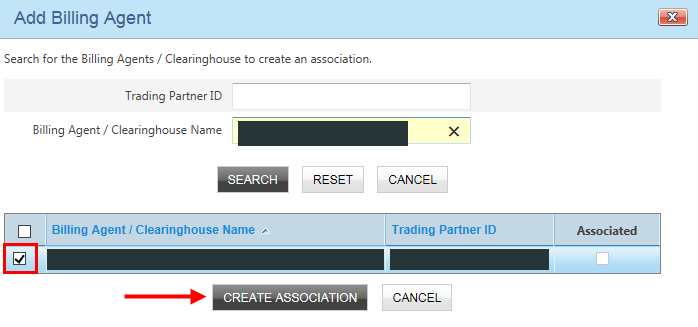
Screenshot source: Trading Partner Account Registration and Maintenance User Guide, version 18.0, printed page 27 (PDF page 28).
Idaho Medicaid login errors and account recovery
Forgot user name: choose Retrieve on the public sign-in page and follow the requested recovery information.
Forgot password: choose Reset and follow the personal security-question and recovery prompts described in the registration guide.
User deactivated, locked out or unable to recover: ask the TPA administrator to check User Status and the guide’s user-management instructions. Contact EDI support at 866-686-4272 or idedisupport@gainwelltechnologies.com if access remains unresolved; do not send passwords or answers.
Signed in but a function is missing: ask the administrator to check the TPA type, provider link and assigned role. A provider not yet enrolled has a different menu from an enrolled provider or a Billing Agent.
Related Idaho Medicaid guides
For help organizing enrollment and billing access, talk with Bomi.
Official sources
Frequently Asked Questions
Where is the Idaho Medicaid provider portal login?
Use the official Health PAS Online sign-in page linked above with your own Trading Partner Account user name and password. Retrieve and Reset are the user-name and password recovery options on that page.
How do I create an Idaho Medicaid Trading Partner Account?
Check for an existing TPA for the practice tax ID first. If a new TPA is needed, use Register on the official Idaho Medicaid site, choose the correct type, complete the personal and organization information, and follow the email activation instructions.
Can my biller use my Idaho Medicaid provider login?
Do not share your password. The administrator can invite a staff biller as their own user with the needed roles. An outside Billing Agent/Clearinghouse uses its own TPA and a provider-authorized association instead.
How do I reset my Idaho Medicaid portal password?
Choose Reset on the sign-in page and follow the personal recovery prompts. For user-status or unresolved access problems, ask the TPA administrator or EDI support at 866-686-4272 or idedisupport@gainwelltechnologies.com.
Is an Idaho Trading Partner Account only for clearinghouses?
No. Account types also include Provider – Already Enrolled and Provider – Not Yet Enrolled. The latter reaches the enrollment application; creating a user login does not approve provider enrollment.
Planning a private practice?
Use Bomi's free Build resources to plan the business, provider identity, payer setup, and billing workflow before you see clients.
Use Build resources
About Bomi
Founded by George Ruan, Dax Earl, and Andrey Goder, Bomi helps independent therapists and group practices with insurance billing, credentialing, and payer follow-up. Bomi grew out of Dax’s experience helping his mother with her therapy practice, with a clear purpose: reduce the administrative burden of insurance while keeping practice owners in control.
Meet our founders