
CAQH Login: Provider Data Portal Account Setup
By George Ruan • July 14, 2026
For CAQH provider login, open the CAQH Provider Data Portal and sign in with your own provider account, or register if you are a first-time user. The sign-in page also has Forgot Username, Forgot Password, and Check for CAQH ID links.
Sections
- Direct links: CAQH login and account setup
- TL;DR: use your own login, and give your biller their own
- Who needs their own CAQH login
- Before you create access
- Account setup and access guide
- Step 1: Register or Use the Welcome Email
- Step 2: Create the CAQH Account
- Step 3: Complete Profile Data
- Step 4: Review Errors and Attestation Status
- Step 5: Authorize Plans and Organizations
- Step 6: Complete the Documents Tab and AAR Form
- Step 7: Keep the Account Maintained
- Add office or billing support
- Login errors and password recovery
- The Fast Checklist
- Frequently Asked Questions
- Sources
Direct links: CAQH login and account setup
The CAQH Provider Data Portal sign-in page looks like this; first-time users choose Register Now.
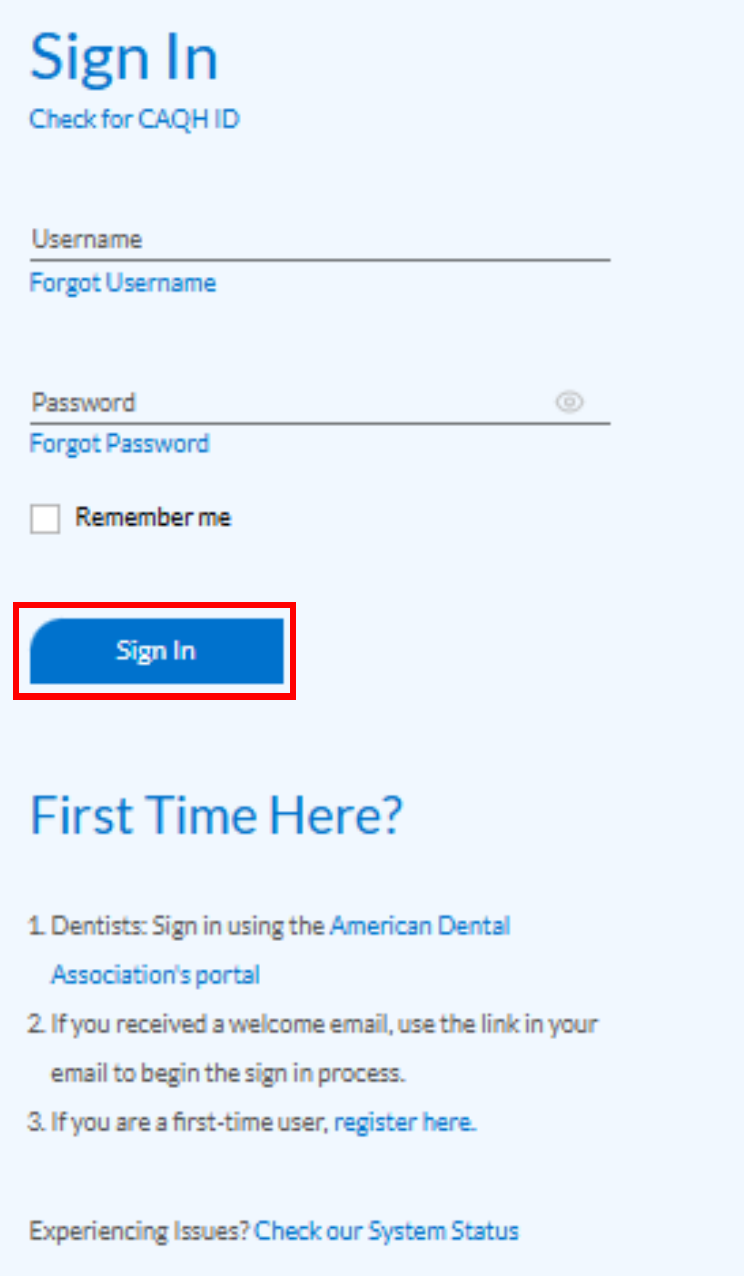
Screenshot source: DataSpring Provider Data Portal Provider User Guide v46.0, page 14 (PDF page 13).
TL;DR: use your own login, and give your biller their own
Use your own CAQH provider login. Staff helping with shared practice information use their own Practice Manager login, then you review and import their data. Payer contracts are separate. Official account and access guidance.
Who needs their own CAQH login
Use your own name and unique provider login; keep any MFA or account recovery personal. Never share your password. Staff helping with shared practice data use their own Practice Manager login, and the provider reviews and imports exported information. The current guide documents this data-transfer workflow rather than a state-Medicaid-style administrator/Agent assignment. Official individual-user and staff-access guidance.
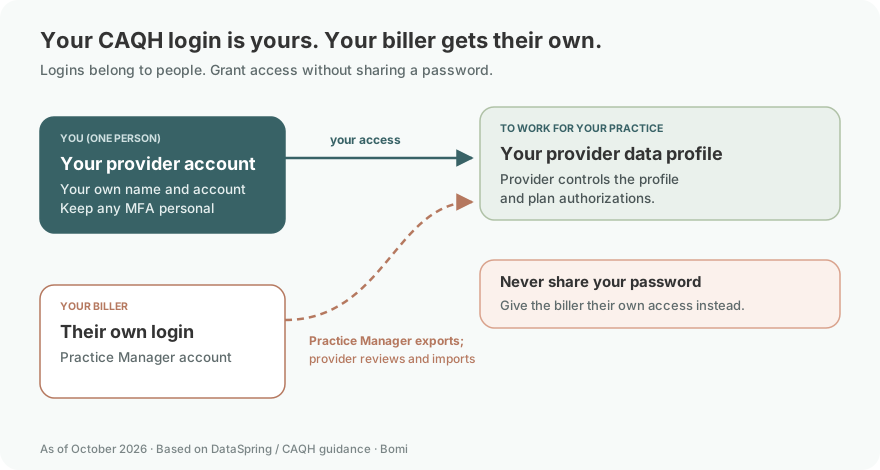
The Provider User Guide requires each user to have a unique username and password. Providers maintain their own profiles; office managers helping multiple clinicians can use the Practice Manager module for shared practice information. Current CAQH Provider User Guide, account setup and chapter 9.
Before you create access
Gather the information first. CAQH says the initial profile can take up to two hours, and preparation reduces the time required.
individual NPI and taxonomy,
Social Security number and other requested identifiers,
professional license number and expiration date,
education, internship, residency, and work history where applicable,
malpractice insurance face sheet,
practice locations and contact details,
billing contact and credentialing contact information,
DEA or controlled-substance documents if applicable, and
the list of plans or organizations that need access.
If you are not sure why this profile matters, read What Is CAQH and Why Do Providers Need It? first.
As of October 9, 2026, DataSpring’s clinician page says the CAQH rebrand does not change your portal access, account information, profile, or saved links. Keep using your existing account. New providers can follow a welcome-email link or register from the portal.
Login links reviewed: October 9, 2026.
Account setup and access guide
Last updated: July 14, 2026.
This guide answers one narrow question: how does a provider create and complete a CAQH Provider Data Portal account?
The workflow is straightforward, but the details matter. You register, create login credentials, complete your profile, review and correct errors, authorize participating organizations, attest, and upload supporting documents.
Step 1: Register or Use the Welcome Email
Go to the CAQH Provider Data Portal. If you received a welcome email from CAQH Provider Data Portal, use the link in that email. If you did not receive a welcome email, the Provider User Guide says you can begin self-registration from the portal by clicking Register.
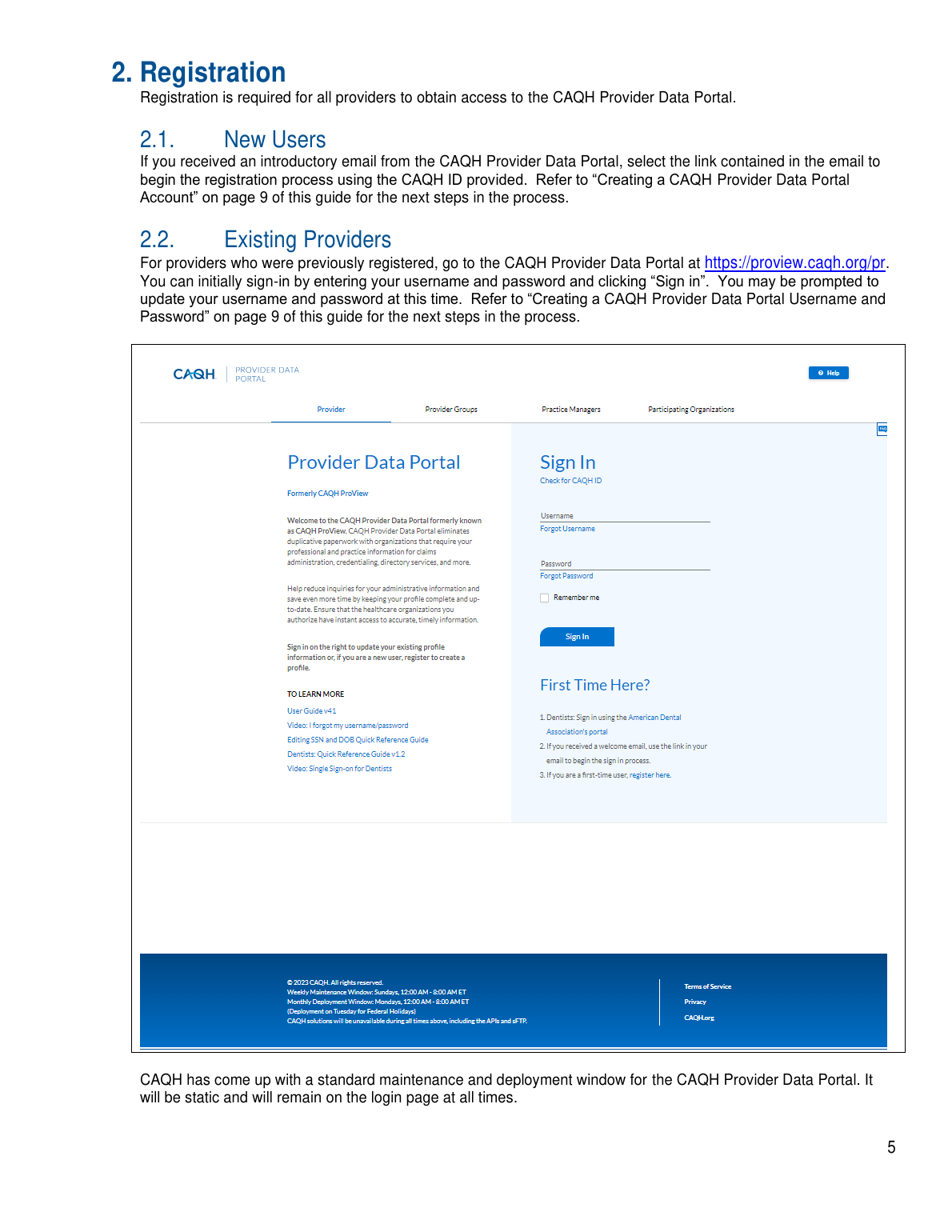
Screenshot source: CAQH Provider Data Portal Provider User Guide.
For self-registration, CAQH asks for provider type, name, address, primary practice state, birthdate, email, and personal identification numbers such as SSN, NPI, DEA, license state, and license number when applicable.
Step 2: Create the CAQH Account
After self-registration or payer invitation, CAQH sends a CAQH Provider ID and an account creation link. The guide shows the provider entering the CAQH Provider ID first, then confirming identity with requested identifiers.
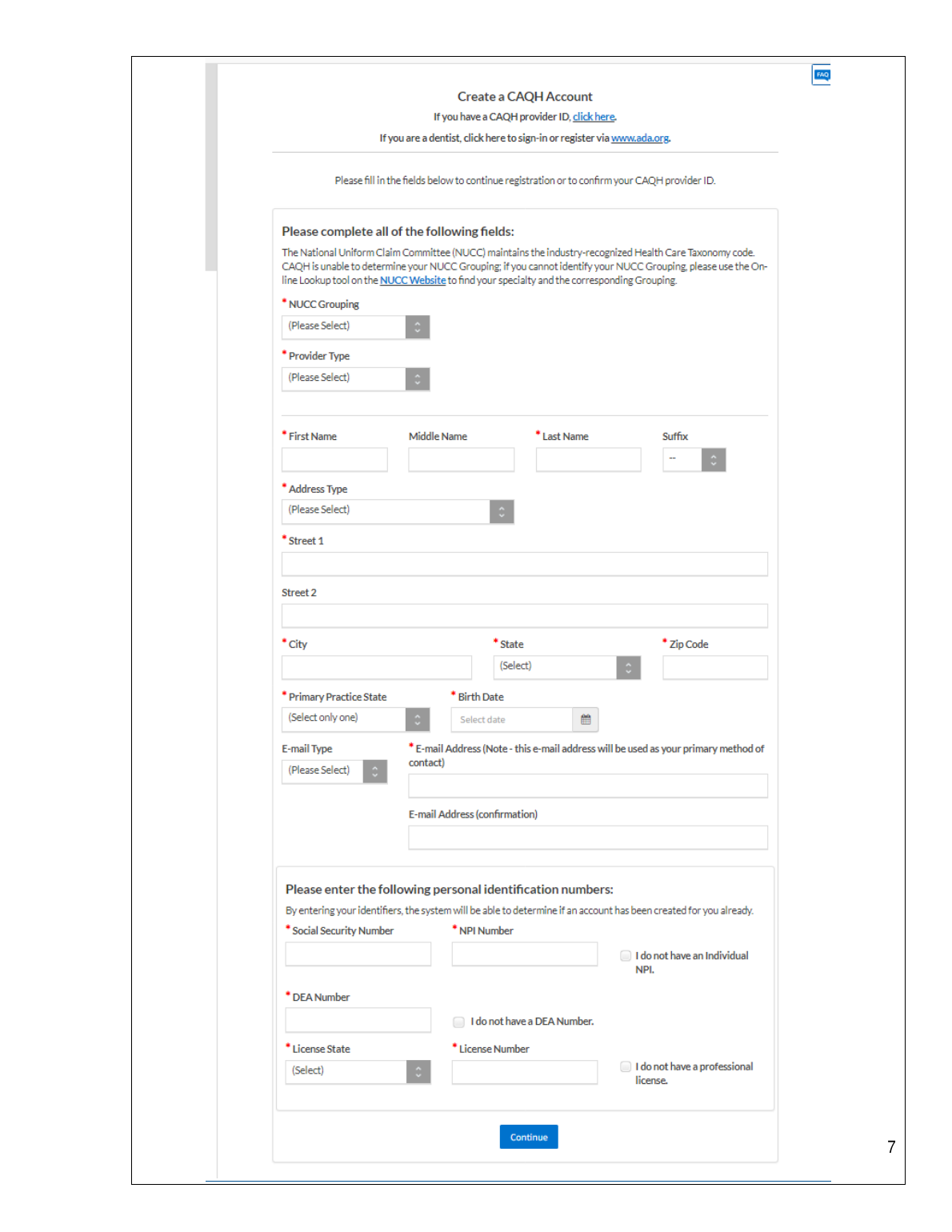
Screenshot source: CAQH Provider Data Portal Provider User Guide.
Use an email address you control long term. Credentialing stalls when the CAQH email goes to a former employer, old biller, or staff member who left the practice.
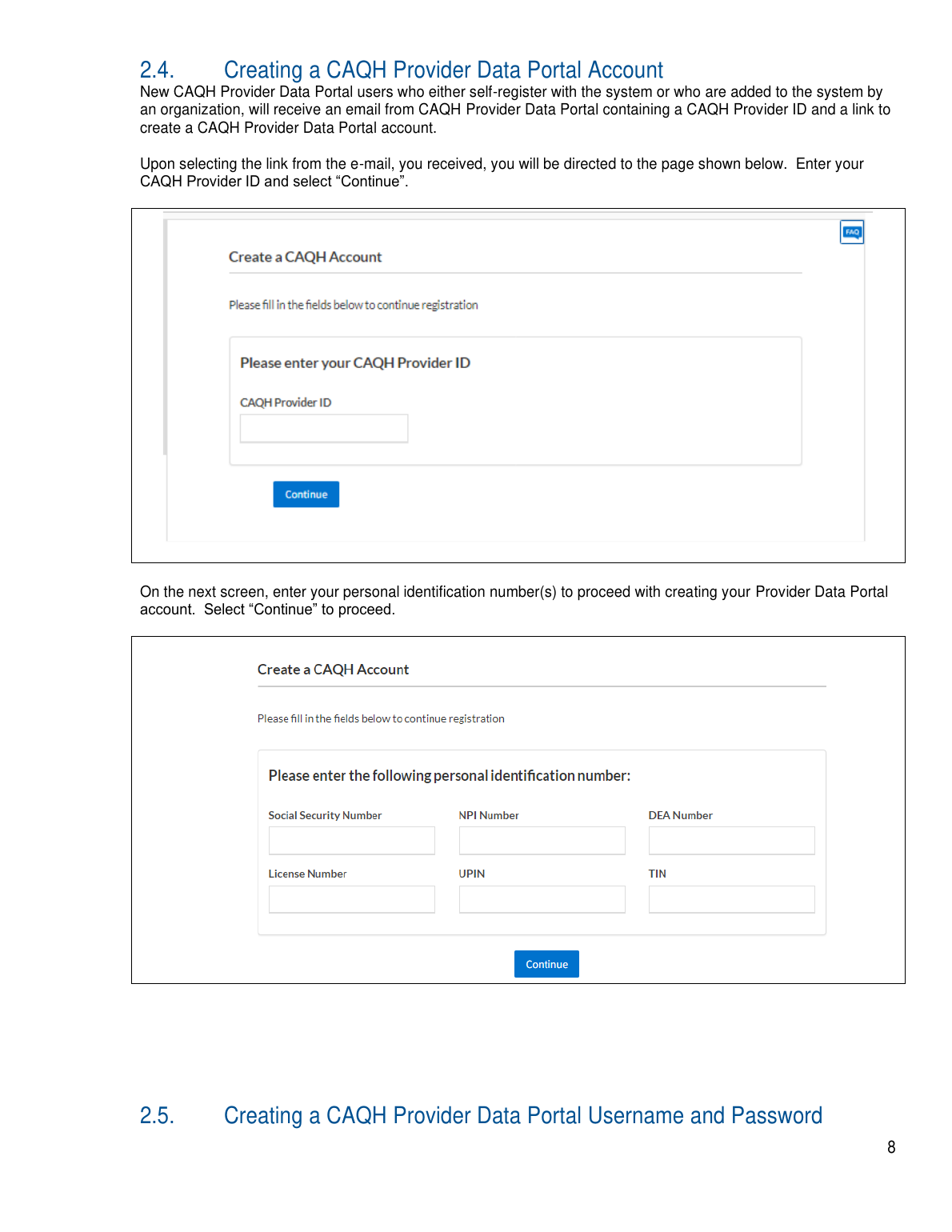
Screenshot source: CAQH Provider Data Portal Provider User Guide.
When establishing the account, choose a unique username and password and answer the requested security questions. Current provider account-creation guide.
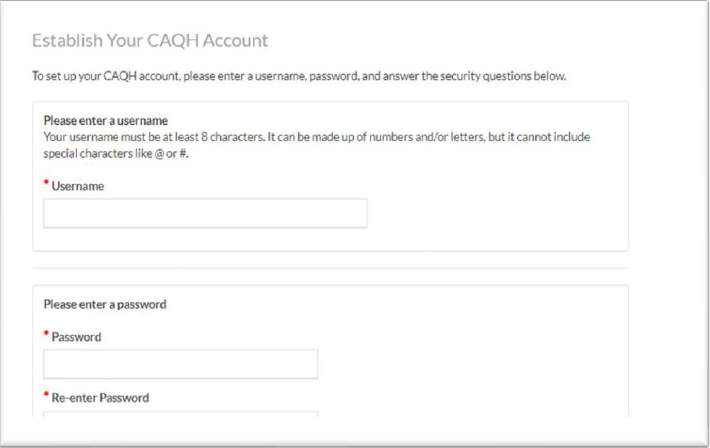
Screenshot source: DataSpring Provider Data Portal Provider User Guide v46.0, page 18 (PDF page 17).
Step 3: Complete Profile Data
Once you can log in, open Profile Data and complete every required section. Do not stop when the easy demographic fields are done. Plans usually need the whole profile to be complete, internally consistent, authorized, and attested.
Expect to work through sections like:
Personal and professional IDs: name, NPI, taxonomy, license, DEA if applicable, and other identifiers.
Education and training: schools, graduate programs, internships, residencies, and certifications when applicable.
Practice locations: service addresses, phone/fax, telehealth, office hours, accepting-new-patients status, and location-level details.
Credentialing history: work history, gaps, disciplinary questions, sanctions, malpractice history, and disclosure questions.
Contacts: credentialing contact, practice contact, and billing contact information.
Step 4: Review Errors and Attestation Status
CAQH routes the provider through review screens before the profile is complete. The Provider User Guide describes a Correct Errors screen that highlights required and suggested fixes. Fix required errors and seriously review suggested fixes before you treat the profile as ready.
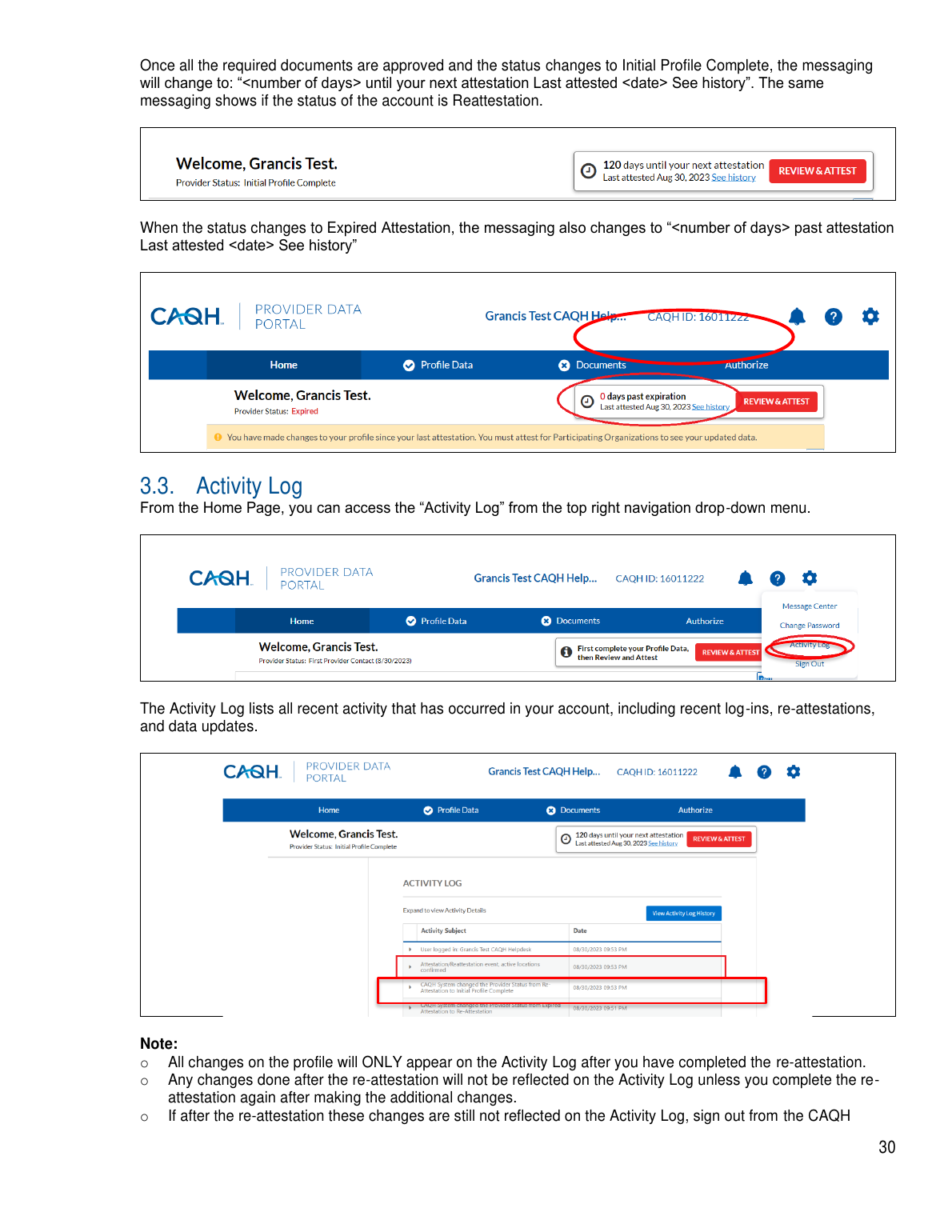
Screenshot source: CAQH Provider Data Portal Provider User Guide.
Attestation is the provider saying the profile data is accurate and complete. For a first-time profile, though, clicking Review & Attest is not always the final blocker. CAQH can move you next to Documents and ask you to submit required forms before the profile becomes Initial Profile Complete.
Step 5: Authorize Plans and Organizations
A complete CAQH profile does not automatically help a payer that has no access. Use the Authorize area to give participating organizations access to your data profile. This is a common missing step when a credentialing file appears complete but the payer still says it cannot retrieve the profile.
Practical rule: when a payer requests your CAQH ID, also confirm that payer is authorized in CAQH.
Step 6: Complete the Documents Tab and AAR Form
This is the step that is easy to miss. The CAQH guide says the message changes to "Next: Submit your documents for approval" after the initial attestation. The profile is not truly Initial Profile Complete until the required documents are received and approved.
In Documents, look for any Missing or required document slots. One of the important first-time documents may be the CAQH Authorization, Attestation, and Release form, often called the AAR form. Download the form from the matching Documents row, sign and date it, then upload it back into that row.
CAQH examples also include a malpractice insurance policy face sheet and DEA or controlled-substance documents when applicable. Some states can require extra release forms. The portal decides what is required from your provider type, practice state, and profile answers, so do not upload random forms that do not appear as required in Documents.
For therapists, the two most common document problems are an expired license upload and a malpractice face sheet that does not show the provider, coverage dates, limits, and carrier clearly enough.
Practical rule: the first-time CAQH setup is not done just because you clicked Attest. It is done when Profile Data is attested and the required Documents items, including the AAR form if shown, are uploaded and approved.
Step 7: Keep the Account Maintained
As of October 9, 2026, re-attest every 120 days, or every 180 days for Illinois providers. Update changed information and respond to quarterly directory-confirmation requests as well. DataSpring maintenance FAQs.
Log in after every license or malpractice renewal.
Update practice location and contact changes before payers discover them elsewhere.
Check that the right payers are authorized.
Respond to CAQH or DataSpring attestation reminders quickly.
Keep your CAQH Provider ID in your credentialing tracker.
Add office or billing support
Never share your password. Give the biller their own login and use the documented access method shown above. Official access instructions.
For staff helping with practice data, use the documented Practice Manager workflow rather than sharing a clinician’s password. Practice Managers can export common practice information for the provider to review and import. This is separate from authorizing health plans to view a profile. CAQH Practice Manager data-import instructions.
Login errors and password recovery
Start with Forgot Username, Forgot Password or Check for CAQH ID on the official CAQH login page. The current guide also explains recovery when the primary email is unavailable; follow that process instead of creating a duplicate profile. CAQH account-recovery instructions.
The Fast Checklist
Create or recover your Provider Data Portal login.
Verify the email address and security questions are current.
Complete every Profile Data section.
Resolve required errors and review suggested fixes.
Authorize every payer or organization that needs access.
Review and attest the profile data.
Open Documents, sign and upload the CAQH AAR form if it appears, and upload every required missing document.
Monitor document status until required documents are approved and the profile is Initial Profile Complete.
Re-attest before the profile expires.
That is the workable version of CAQH setup: not just creating a login, but getting the profile into a state where payers can actually use it.
Frequently Asked Questions
Where is the CAQH provider login?
Use https://proview.caqh.org/pr to reach the CAQH Provider Data Portal sign-in page. Existing providers sign in; first-time users can register or use their CAQH welcome-email link.
How do I recover my CAQH login or password?
The Provider Data Portal sign-in page has Forgot Username and Forgot Password links, plus Check for CAQH ID. Start there to recover an existing account.
Do I need a new CAQH login because of DataSpring?
No. DataSpring’s clinician page says portal access, account information, provider profiles, and saved links remain the same after the rebrand.
How do I create a CAQH Provider Data Portal account?
Start at the CAQH Provider Data Portal. Use your welcome email if you received one, or use self-registration from the portal. CAQH will issue or confirm your CAQH Provider ID and walk you through account creation.
What information do I need to complete CAQH?
You should gather your NPI, taxonomy, license information, SSN and other requested identifiers, education and work history, practice locations, malpractice coverage, and supporting documents.
When do I authorize payers in CAQH?
Authorize participating organizations after your profile is ready enough for them to access. If a payer says it cannot retrieve your CAQH, check authorization and attestation status.
Is creating a CAQH login enough?
No. A login only gets you into the portal. Payers need a complete, accurate, authorized, attested profile with required documents uploaded and approved.
What is the CAQH Authorization, Attestation, and Release form?
The CAQH Authorization, Attestation, and Release form, often called the AAR form, is a document CAQH may show in the Documents tab during first-time setup. If it appears as required, download it, sign and date it, upload it back into the matching Documents row, and wait for approval.
Sources
Planning a private practice?
Use Bomi's free Build resources to plan the business, provider identity, payer setup, and billing workflow before you see clients.
Use Build resources
About Bomi
Founded by George Ruan, Dax Earl, and Andrey Goder, Bomi helps independent therapists and group practices with insurance billing, credentialing, and payer follow-up. Bomi grew out of Dax’s experience helping his mother with her therapy practice, with a clear purpose: reduce the administrative burden of insurance while keeping practice owners in control.
Meet our founders