
Verify New Mexico Medicaid Eligibility: Turquoise Claims
By George Ruan • October 9, 2026
As of October 9, 2026.
New Mexico Medicaid eligibility verification now runs through Turquoise Claims for provider inquiries. Start at YesNM, sign in with your provider account, and open Turquoise Claims. As of October 9, 2026, HCA identifies the new system as the replacement for the old Medicaid Provider Web Portal. HCA Turquoise Claims entry and guides.
For a therapy practice, the useful result is more than “the client has a Medicaid card.” You need eligibility for the visit you are preparing to bill, the responsible coverage/plan, and a separate check of whether your service and clinician meet the payer’s requirements. Treat the following checklist as a practice workflow rather than a payment guarantee.
Sections
- Open the current member eligibility inquiry
- Read the result for the date you need
- Turquoise Care eligibility and the assigned MCO
- What to do when the search is empty or does not match
- Keep a useful verification record
- Related New Mexico Medicaid guides
- Need help with New Mexico Medicaid billing?
- Frequently Asked Questions
Open the current member eligibility inquiry
From the Turquoise Claims menu, select Member, then Check Eligibility. On Check Eligibility Search, select the blue add icon.
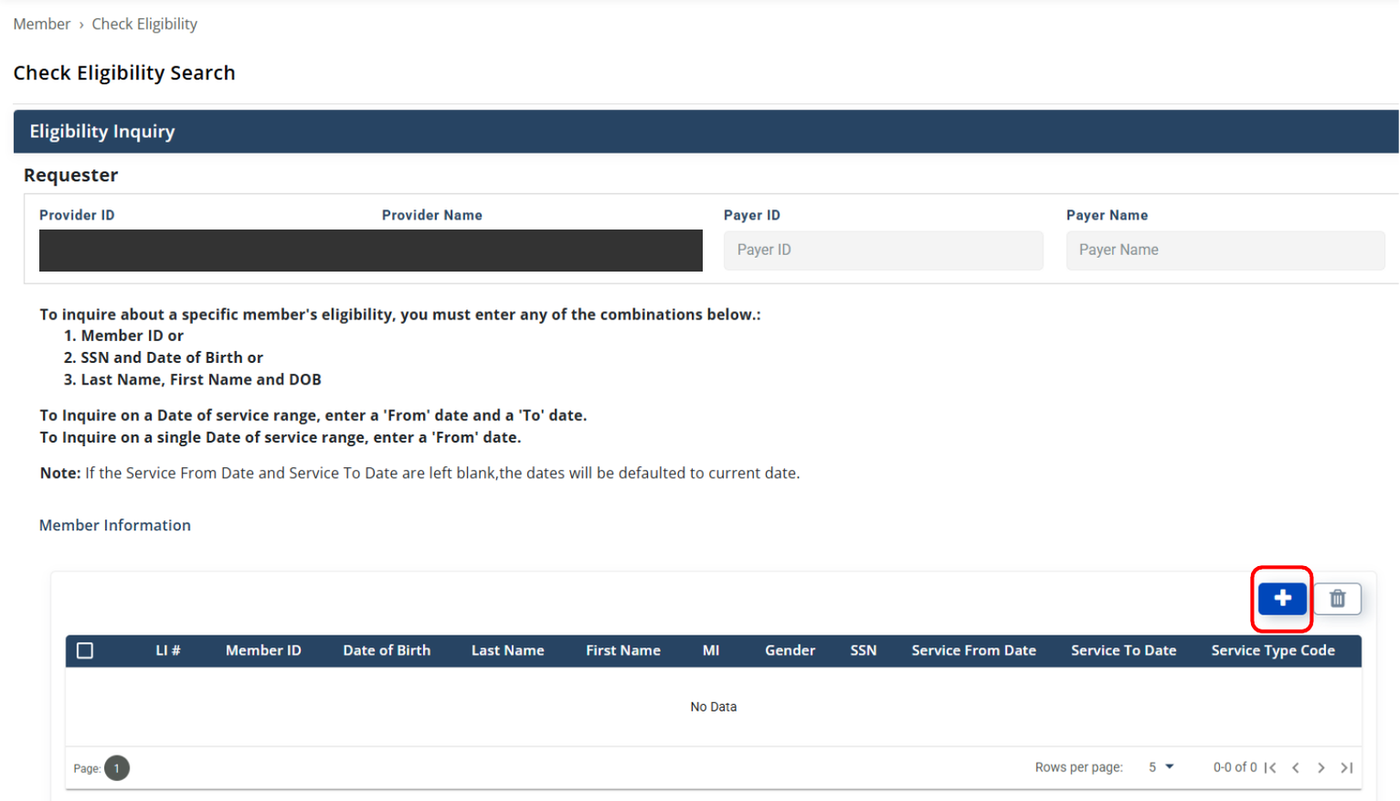
Screenshot source: Turquoise Claims Verifying Member Eligibility Participant User Guide, page 2.
Enter one supported member-identity combination: Member ID; SSN and date of birth; or last name, first name, and date of birth. For a Member ID search, HCA’s current guide instructs users to add the four leading zeros in the Member ID field. Select +Add; once the member information populates, select Search and review the eligibility information.
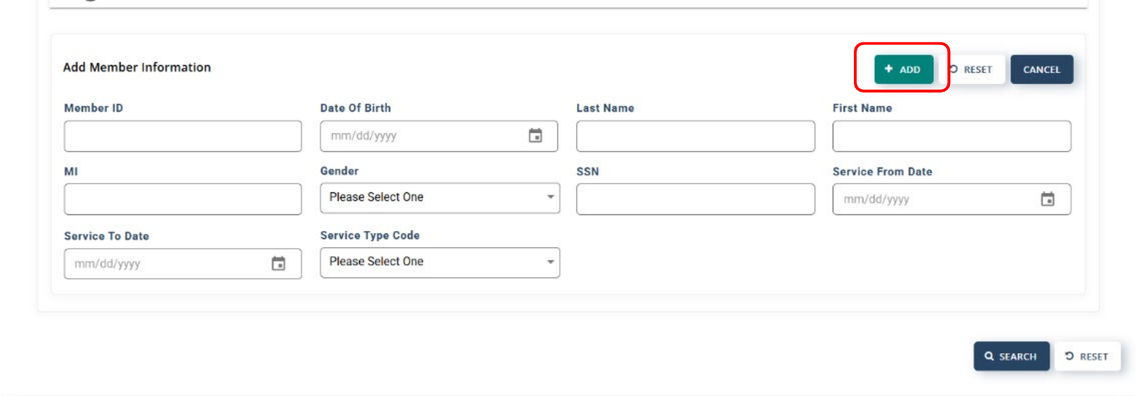
Screenshot source: Turquoise Claims Verifying Member Eligibility Participant User Guide, page 3.
Source for these steps: HCA Verifying Member Eligibility guide, March 25, 2026.
Use the minimum member information needed in your authorized practice workflow. Do not enter patient details in public search pages or send them to an unrelated website. The instructions above describe the secure provider inquiry, not a public benefits application.
Read the result for the date you need
Before scheduling or billing, compare the returned coverage information with the date of service. Review effective and termination dates and plan information displayed in the result. If the result does not clearly cover the intended service date, resolve that gap instead of treating a present-day eligibility response as proof for a different visit.
HCA describes Turquoise Claims as supporting real-time member eligibility inquiry. The provider account and organization role give your staff access to that inquiry; they do not decide whether a specific therapy service is covered. HCA current inquiry functions.
Turquoise Care eligibility and the assigned MCO
For managed-care billing, keep the plan assignment tied to the visit you are checking. HCA’s claims FAQ explains that MCOs continue to adjudicate claims and that payer IDs route claims to the appropriate MCO. A member-eligibility response and a provider’s network contract are separate evidence. HCA managed care claim responsibilities.
Identity: confirm that the returned member is the person your practice intended to check.
Coverage: confirm the coverage period relevant to the visit and identify the responsible plan.
Service: check the intended procedure and clinician/provider type against the current behavioral health guidance.
Participation: confirm the clinician, billing group, and location with the assigned plan.
Authorization: confirm whether an approval is needed for that service and plan, and resolve missing information before relying on reimbursement.
This is a suggested review checklist. For service/provider scope, HCA directs readers to its behavioral health manual and fee schedule. Do not turn a positive eligibility result into a statement that every behavioral health procedure will pay. HCA behavioral health billing reference.
What to do when the search is empty or does not match
First compare the submitted identity fields with HCA’s supported combinations. The leading-zero instruction applies to the Turquoise Claims Member ID search field; it is not a direction to rewrite an ID on every claim or every MCO portal. Return to the official guide when the inquiry does not find the intended member. HCA current search-field instructions.
If your staff cannot reach the inquiry at all, have the organization administrator check their assigned claims roles. HCA’s account guide says roles change which system functions a user can access. Enrollment workspace membership and claims access are different setup tasks. HCA user-role setup guide.
Keep a useful verification record
Record when the check was performed and which service date it was meant to support.
Save the eligibility evidence in the practice’s approved record system.
Record unresolved plan, network, or authorization questions with an owner for follow-up.
Recheck when the coverage information changes or a later visit is being prepared.
These recordkeeping steps are a suggested billing habit. They help the person submitting a claim understand what was checked and what remains unresolved, without promising coverage or payment.
Related New Mexico Medicaid guides
Need help with New Mexico Medicaid billing?
Bomi helps therapy practices coordinate credentialing, eligibility, claims, and denial follow-up. Bring the state enrollment record, requested plan participation, and unresolved billing questions into one clear workflow.
See Bomi’s billing services or credentialing support.
Frequently Asked Questions
How do providers verify New Mexico Medicaid eligibility?
Sign into YesNM, open Turquoise Claims, and use Member → Check Eligibility. Follow HCA’s current guide for supported identity combinations.
Why does the Turquoise Claims guide mention four leading zeros?
HCA’s March 25, 2026 guide instructs users to add four leading zeros in the Member ID eligibility-search field. That is not a universal claim-format instruction.
Does active Turquoise Care eligibility guarantee a therapy claim will pay?
No. Review the relevant coverage period, service/provider requirements, plan participation, authorization, and claim route separately.
Want Bomi to handle insurance billing?
Bomi helps therapy practices with benefit checks, claims, denials, balances, CAQH, attestations, and revenue management.
Book a call
About Bomi
Founded by George Ruan, Dax Earl, and Andrey Goder, Bomi helps independent therapists and group practices with insurance billing, credentialing, and payer follow-up. Bomi grew out of Dax’s experience helping his mother with her therapy practice, with a clear purpose: reduce the administrative burden of insurance while keeping practice owners in control.
Meet our founders