
CHAMPVA CO-299 / N24 Denial: How to Set Up VA EFT
By George Ruan • October 11, 2026
Last reviewed: October 11, 2026.
If CHAMPVA denies your therapy claims with CARC 299 and RARC N24, the claim is usually fine. VA is holding payment because it has no direct deposit on file for your billing tax ID. The fix is a VA vendor file request, submitted by the practice owner through the VA Financial Services Center (VA-FSC) Customer Engagement Portal. It takes about 5 to 20 minutes, and VA says not to resubmit the claims.
We wrote this after a CHAMPVA EFT setup took weeks longer than it needed to, because the work went to the wrong places first. Bomi handles therapist billing and credentialing, and this is the short path we now recommend to every practice that sees this denial.
Sections
TL;DR
CO-299 / N24 means payment requires EFT enrollment. VA’s instruction is to enroll in EFT and not resubmit the claim.
CHAMPVA has no provider network. CAQH, credentialing, and clearinghouse enrollment do not fix this denial.
Enrollment is the online VA Form 10091 at cep.fsc.va.gov, signed in with ID.me. The person who signs in becomes the authorized representative on the VA vendor file.
In practice, the owner has to do it. A biller cannot submit it from their own login without written authority VA will accept.
Have bank details ready before you start. The form cannot be saved and resumed.
Keep the VCOM case number VA generates. Wait 15 days before calling VA-FSC for status.
What CO-299 and N24 Mean on a CHAMPVA Claim
VA’s family member claim denial codes page lists CARC 299 / RARC N24 as “Payment requires EFT enrollment.” It says payment may be held because you are not enrolled in electronic funds transfer, and gives two instructions: enroll in EFT to receive payment, and do not resubmit the claim.
On the remittance this often shows up as group code CO with the description “The billing provider is not eligible to receive payment for the service billed.” That wording sounds like a credentialing or eligibility problem. For CHAMPVA it almost always is not.
VA’s provider payments page states that community care providers must enroll in EFT to receive payment from VA, and that federal law requires VA to pay medical and dental providers electronically. No EFT on file means no payment, even on a claim that was otherwise accepted.
Why claim status can look contradictory: a 276/277 claim status check may show the claim as accepted and in process while the remittance shows a CO-299 denial. The claim reached VA. The payment is what is blocked.
What Does Not Fix It
The CHAMPVA Guidebook says CHAMPVA does not have a network of medical providers, and generally treats a provider as authorized when they practice within the scope of their license. There is no CHAMPVA contract to sign and no credentialing file to update.
CAQH. CHAMPVA does not credential through CAQH.
Clearinghouse enrollment. CHAMPVA medical claims go through Optum Insight with payer ID 84146. That is claim routing. It does not create the VA payment account.
Resubmitting or correcting the claim. VA says not to resubmit a CO-299 / N24 claim.
Mailing or faxing a paper VA Form 10091. VA’s provider payments page directs providers to the online portal. The older paper form also quoted 15 to 30 business days. Use the webform so you get a case number you can track.
Asking your biller to do it from their own ID.me login. See the next section.
Who Has to Submit It
The VA-FSC webform guide says the portal fills in the name, email, and phone from the ID.me account that signed in, and automatically makes that person an authorized representative on the vendor file. An authorized representative can change the vendor file’s banking and address information.
The paper VA Form 10091 allows someone other than the payee to sign only if they are “designated and authorized, in writing, to represent the Payee/Vendor.” In our experience, VA-FSC will not discuss a practice’s vendor file with a third-party biller emailing from a different domain. It asks the practice to send a signed authorization letter from the practice’s own email first. That letter lets VA talk to the biller. It does not submit the EFT enrollment.
Fastest path: the practice owner signs in with their own ID.me account and submits the form. Your biller can prepare every non-bank field in advance so the owner only types bank details and clicks through.
Before You Open the Form
The webform must be completed in one sitting. Gather these first:
Billing tax ID. The same TIN or EIN that appears on the denied CHAMPVA claims. For an individual billing on an SSN, the SSN.
Legal payee name exactly as the IRS has it. Use your IRS EIN letter or W-9. If a single-member LLC’s EIN is registered to the owner’s name, use that name and put the business name in the DBA field.
Billing NPI. The NPI that appears as the billing provider on the denied claims.
Payee mailing address. The practice’s official mailing address.
Bank routing number, account number, and account type. If this is an update, you also need the previous bank’s name, routing number, and account number.
An ID.me account with a working email. The portal pulls your email from ID.me. If it is wrong, you have to fix it in ID.me.
Step by Step in the VA-FSC Portal
These steps and screenshots come from the VA-FSC webform guide. The screenshots show VA’s sample values, not real practice data. Portal labels change, so trust the live screen if it differs.
Step 1: Sign in and open Vendor Account Setup
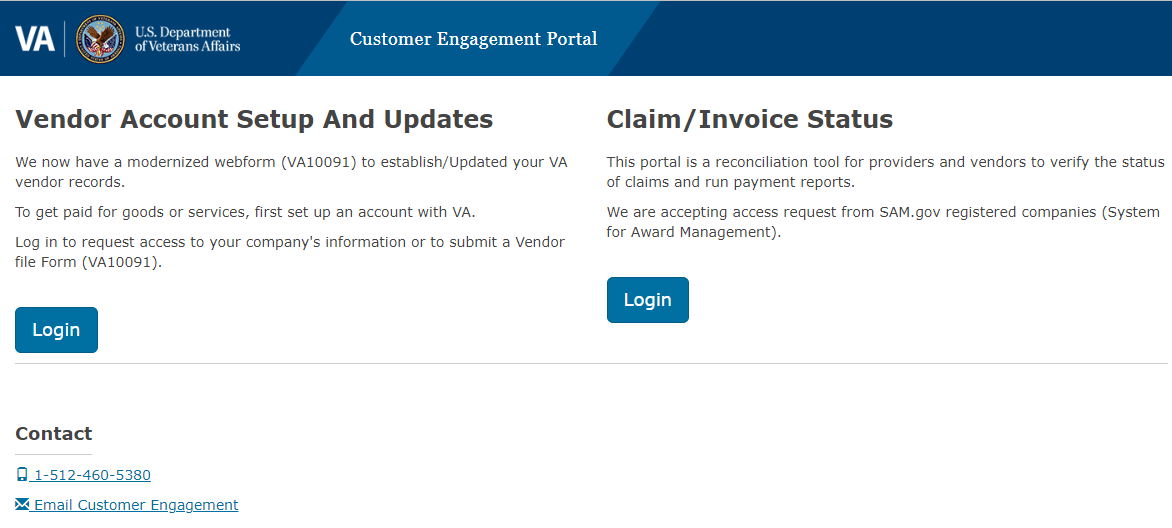
Go to cep.fsc.va.gov and sign in through ID.me. Read the Authorized Use Only notice and click I Agree. Then, under Vendor Account Setup and Updates, click Login. Do not use the Claim/Invoice Status login, which goes to a different part of the portal.
Step 2: Tax ID Information
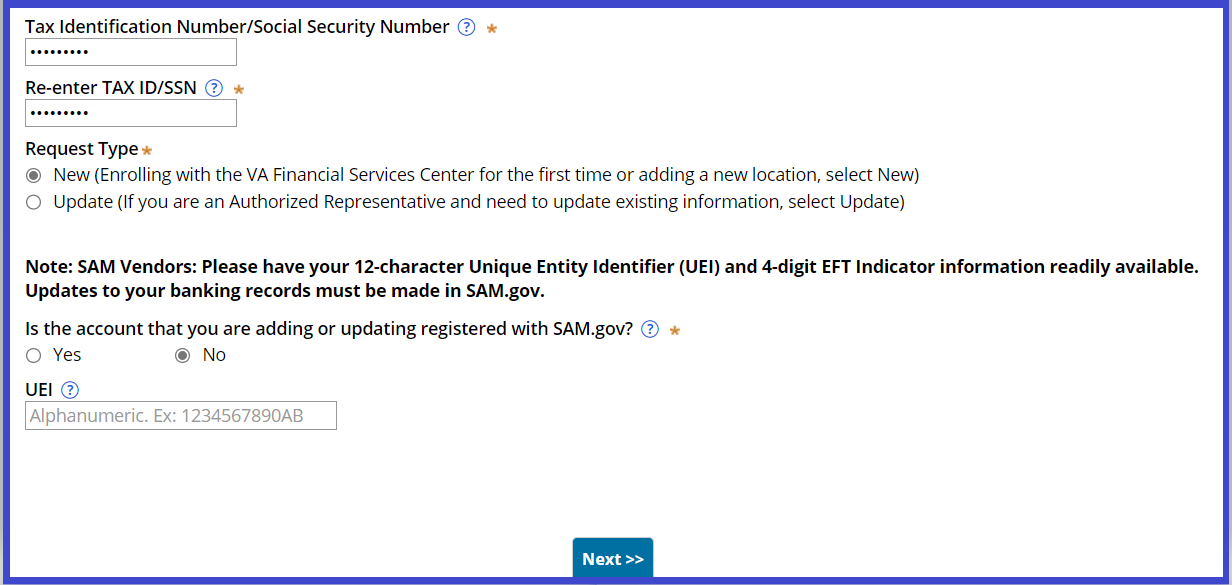
Enter the TIN twice. For Request Type, choose New unless you have already completed a VA vendor file for this TIN; VA says to choose New if in doubt. Answer the SAM.gov question No unless the practice is a registered SAM.gov vendor.
Step 3: Payee Information
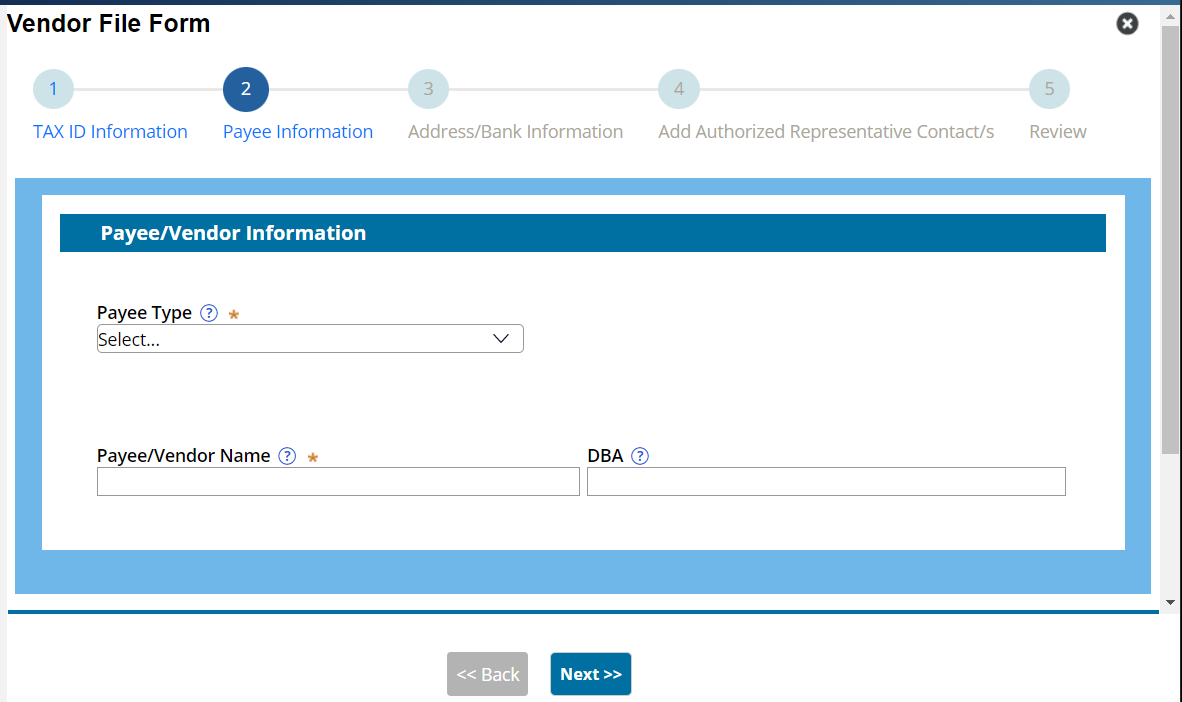
Choose Payee Type Medical Provider. Enter the IRS legal name, any DBA, and the billing NPI.
Step 4: Address and Bank Information
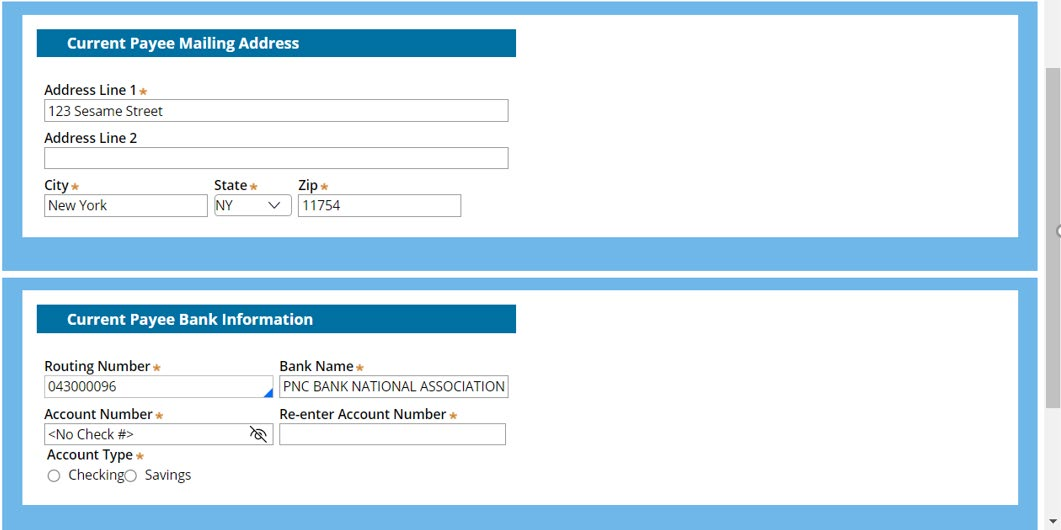
Enter the mailing address and routing number. The bank name fills in automatically; check it. Enter the account number twice, without the check number, then choose checking or savings.
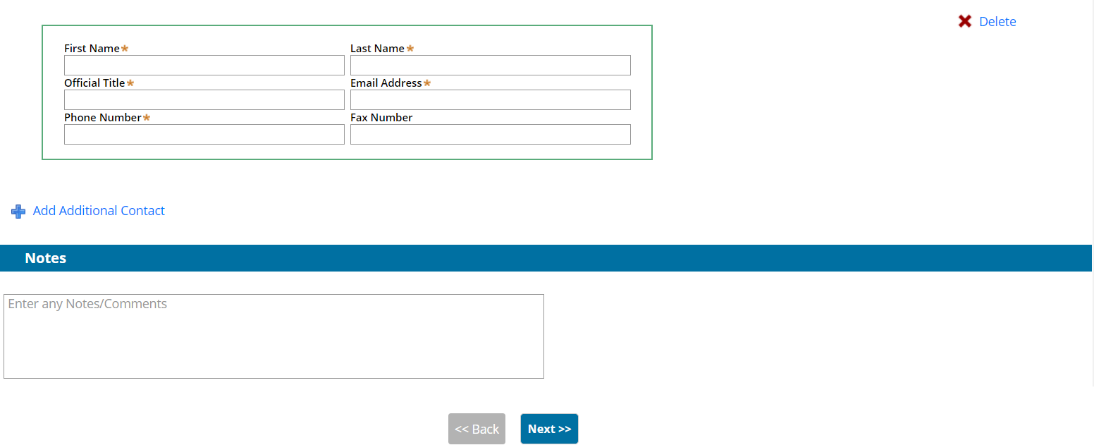
Step 5: Authorized Representatives
You are listed automatically from your ID.me account. Adding others with Add Additional Contact is optional. Anyone you add can change the vendor file’s bank and address information, so add only people you would trust with that.
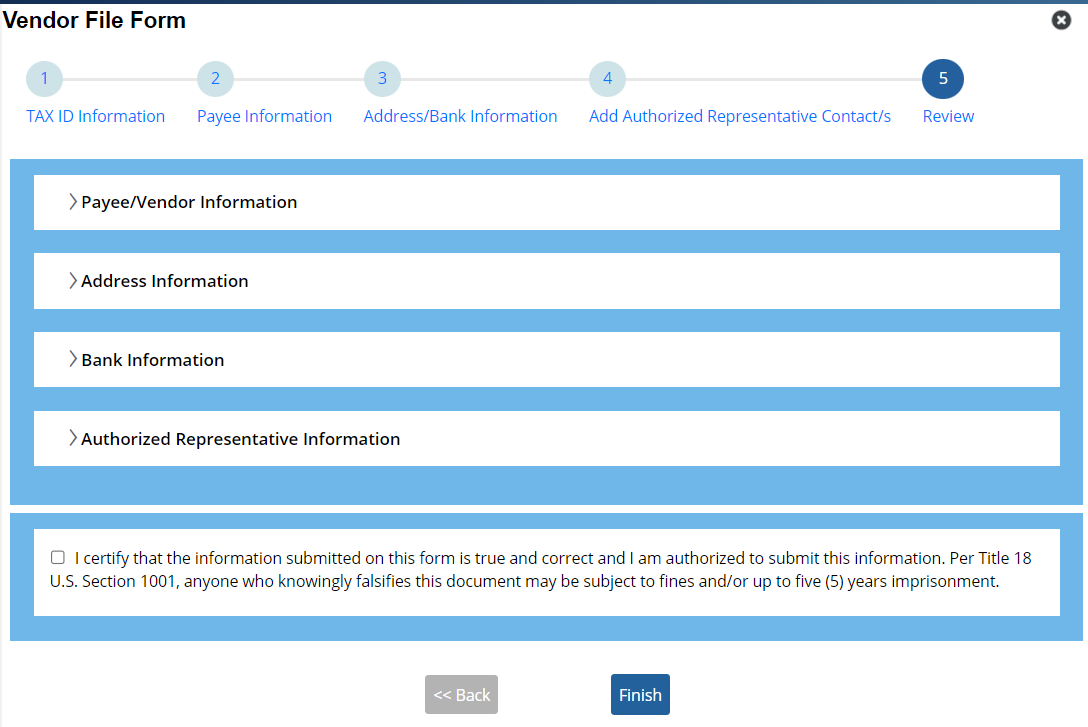
Step 6: Review and Finish
Expand every section, fix any typo, check the certification box, and click Finish.
After You Submit
Save the case number. It starts with VCOM- and arrives by email from FSC.CustomerSupportDoNotReply@va.gov.
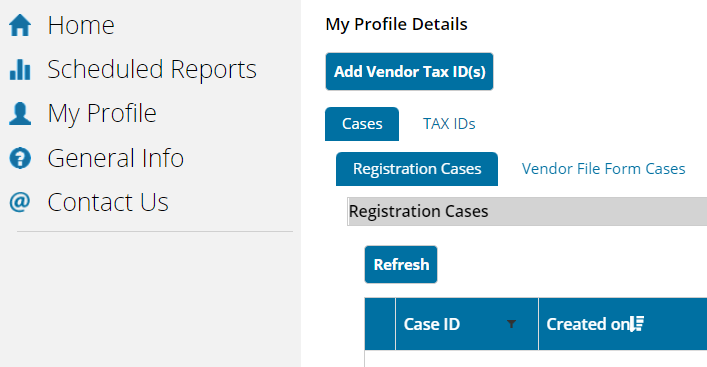
No case number? Check My Profile, then Vendor File Form Cases, before you submit again. VA says a submission with no case number most likely failed.
Expect up to two weeks. The webform guide says to allow up to two weeks, and you will get a second email when the case is Resolved. The older paper form quoted 15 to 30 business days.
Status after 15 days. If you have no update after 15 days, call the VA-FSC help desk at 1-877-353-9791 with your VCOM number ready.
Give your biller the VCOM number. Never email credentials, verification codes, or bank details. The case number is enough to track the request.
What Happens to the Held Claims
VA’s instruction for CO-299 / N24 is not to resubmit. After the vendor file is resolved, watch for payment on the held claims through your remittances and 276/277 claim status checks. If they still show no payment several weeks after the VCOM case is Resolved, call with the claim numbers and the case number instead of refiling.
Keep timely filing in view. VA’s CHAMPVA claim guidance says claims must be filed within one year of the date of service. Starting EFT enrollment the week the first CO-299 appears keeps you well inside that window.
Checklist
Confirm the denial is CARC 299 with RARC N24 on a CHAMPVA claim.
Stop any resubmission, correction, or credentialing work on it.
Have the owner sign in to cep.fsc.va.gov with ID.me and complete Vendor Account Setup in one sitting.
Record the VCOM case number with your biller.
Follow up with VA-FSC after 15 days if the case is not Resolved.
Track the held claims for payment once the case is Resolved, and calendar the one-year filing limit.
This article is general billing education, not legal or payer-specific advice. VA forms, portal screens, and processing times change; confirm against the current VA-FSC guidance before you submit.
Frequently Asked Questions
What does CO-299 with N24 mean on a CHAMPVA claim?
VA lists CARC 299 / RARC N24 as “Payment requires EFT enrollment.” Payment is held because VA has no electronic funds transfer account on file for the billing tax ID. Enroll in EFT through the VA-FSC Customer Engagement Portal and do not resubmit the claim.
Do I need to be credentialed or in network with CHAMPVA?
No. The CHAMPVA Guidebook says CHAMPVA does not have a network of medical providers and generally treats licensed providers practicing within their scope as authorized. CAQH and credentialing do not affect this denial.
Where do providers enroll in CHAMPVA EFT?
Through the online VA Form 10091 in the VA Financial Services Center Customer Engagement Portal at cep.fsc.va.gov. Sign in with ID.me and use the Vendor Account Setup and Updates login, not the Claim/Invoice Status login.
Can my biller submit CHAMPVA EFT enrollment for me?
Not easily. The portal makes whoever signs in with ID.me an authorized representative on the vendor file, and VA Form 10091 requires written authority for anyone other than the payee. The fastest path is for the owner to submit it, with the biller preparing the non-bank fields in advance.
How long does VA-FSC take to process EFT enrollment?
The VA-FSC webform guide says to allow up to two weeks and to wait 15 days before calling for status. The older paper VA Form 10091 quoted 15 to 30 business days. Keep your VCOM case number for any follow-up at 1-877-353-9791.
Should I resubmit the denied CHAMPVA claims after EFT is set up?
VA’s denial guidance for CARC 299 / RARC N24 says not to resubmit the claim. Track the held claims for payment after the vendor file case is resolved, and call with the claim and case numbers if payment does not follow.
Sources
Related Bomi Guides
Want Bomi to handle insurance billing?
Bomi helps therapy practices with benefit checks, claims, denials, balances, CAQH, attestations, and revenue management.
Book a call
About Bomi
Founded by George Ruan, Dax Earl, and Andrey Goder, Bomi helps independent therapists and group practices with insurance billing, credentialing, and payer follow-up. Bomi grew out of Dax’s experience helping his mother with her therapy practice, with a clear purpose: reduce the administrative burden of insurance while keeping practice owners in control.
Meet our founders