
Centene / Ambetter Provider Login: Secure Portal and Availity
By George Ruan • October 10, 2026
For Centene / Ambetter provider login, open Availity Essentials and sign in with your own Availity account for Ambetter’s published eligibility and claims route; use the state plan’s secure portal when its instructions direct you there.
Last checked: October 10, 2026.
Sections
- Direct links: login, registration, recovery, help and enrollment
- TL;DR: use your own login, and give your biller their own
- Who needs their own provider login
- Choose the right Centene plan before creating access
- Before you create access
- Account setup: Availity or your state secure portal
- Add your biller: User access or Portal Account Manager approval
- Centene / Ambetter login errors and lockouts
- Keep network enrollment separate
- Related provider guides
- Frequently Asked Questions
Direct links: login, registration, recovery, help and enrollment
State secure-provider-portal login: Sunshine Health example — use your actual plan’s site for other states.
Forgot password — use the recovery link on sign-in.
Forgot user ID — use the ID-recovery link on sign-in.
Help desk: Availity Client Services — 800-282-4548, Monday–Friday, 8 a.m.–8 p.m. Eastern.
State secure-portal password/user-ID help: Sunshine example — Account Manager or Florida Provider Services 844-477-8313.
Provider network enrollment: Ambetter — Marketplace participation.
The public Availity sign-in page looks like this. Existing users choose Sign In; new users choose Create a Free Account.
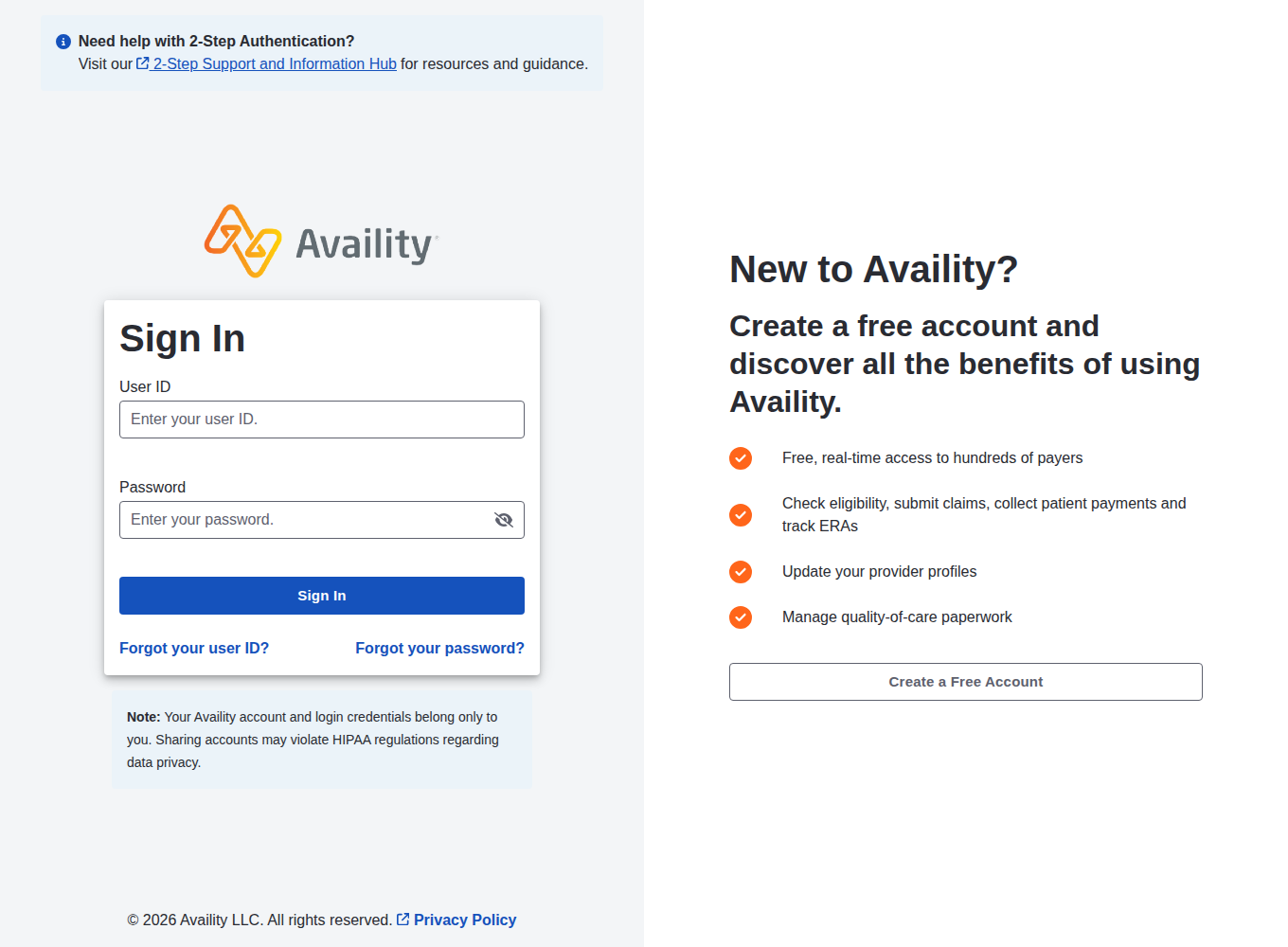
Screenshot source: Screenshot of the public Availity Essentials sign-in page, captured October 10, 2026.
TL;DR: use your own login, and give your biller their own
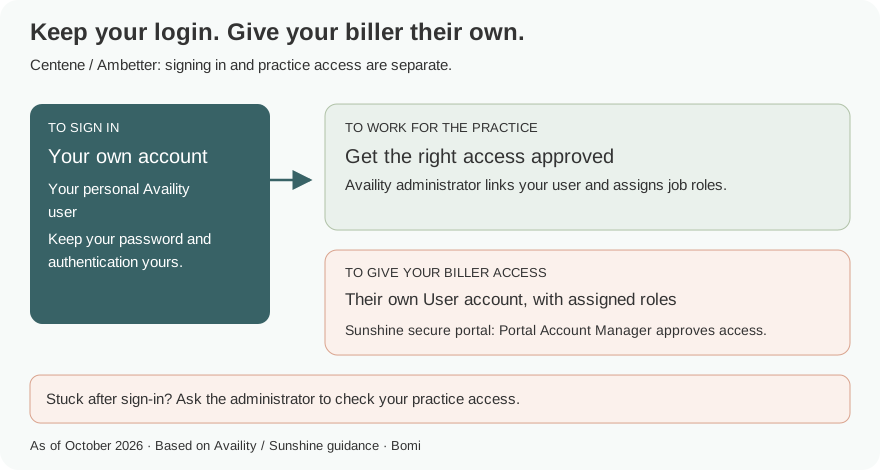
Use your own login. In Availity, your biller gets their own User account with roles your administrator assigns; in a Centene state secure portal, the Portal Account Manager controls user access. Ambetter Marketplace coverage, Medicaid plan participation and portal registration are separate. Official account and access guidance
Who needs their own provider login
Your biller uses their own Availity user account. An administrator assigns roles for the work they need, such as eligibility or claim status. “Biller” is a job, not a special universal Availity role; the documented account is a User with assigned roles. Do not grant Administrator merely because someone submits claims. Official user and administrator guidance
Choose the right Centene plan before creating access
Centene is a parent company, not one national Medicaid portal. Ambetter is its Marketplace brand. Start with the member’s actual plan and state, then use that plan’s provider website. Ambetter’s national provider resources currently link to Availity for eligibility and claims; the 2026 Nebraska manual says the plan’s existing secure portal remains available for other functions. Do not use an Ambetter member login for Medicaid provider work. Ambetter provider resources
For a Medicaid example, Sunshine Health’s current public help describes its Secure Provider Portal and Availity as an alternative for many transactions. The screenshot below is that Florida plan’s public entry page, not a universal screen for every Centene subsidiary. Sunshine Health portal tips
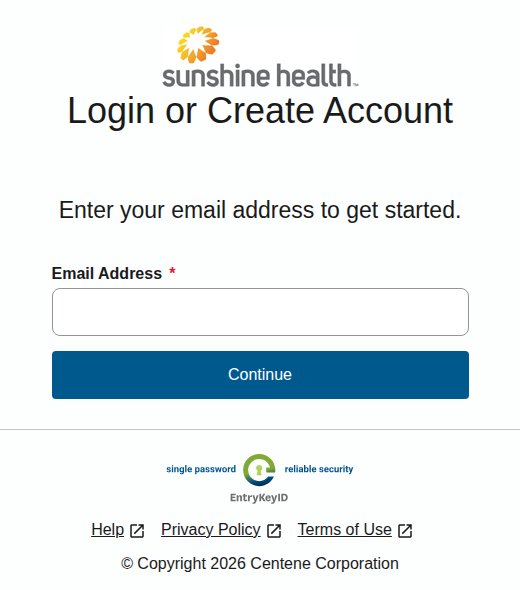
Screenshot source: Screenshot of the public Sunshine Health provider sign-in page, captured October 10, 2026; Florida plan example.
2026 Ambetter Nebraska manual: Availity and retained secure-portal functions
Before you create access
Confirm the exact plan, state and tax ID you need. For Availity organization registration, gather the billing/physical addresses, tax ID and applicable NPI. For a state secure portal, follow its own registration and provider-record rules. Sunshine’s Account Manager supports users registered under the same tax ID; this does not establish access to every Centene plan. Availity registration prerequisites
Account setup: Availity or your state secure portal
If the practice already uses Availity, ask its administrator to add you instead of registering a duplicate organization. If the practice is new, the person who will administer it starts the Healthcare Provider registration, creates a personal account, verifies the requested information and registers the organization through Manage My Organization. Complete the email and 2-step authentication prompts for your own account. Availity administrator guide (2025)
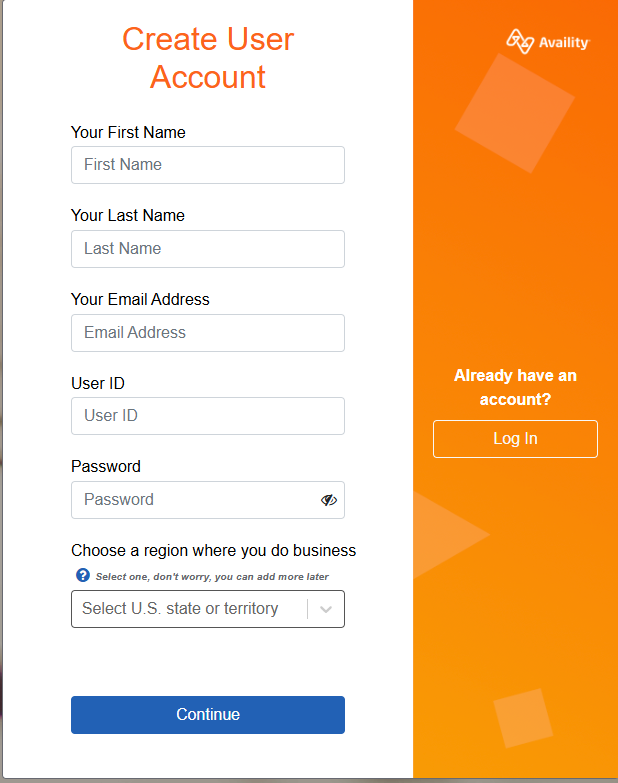
Screenshot source: Aetna Better Health of Florida, Claims Provider Training, February 25, 2026, PDF page 11; blank Availity account example, official alternate language-host copy.
For Sunshine’s secure portal, the current public screen starts with your own email address and Continue. Use its Help link if you cannot complete entry. Older Sunshine manuals show a different registration form; use the current public page for sign-in rather than treating the older password fields as today’s form. Sunshine provider sign-in
Add your biller: User access or Portal Account Manager approval
The administrator opens Manage My Team(s), selects the correct organization and uses Add User or Invite Users. Enter the biller’s own details, then assign the roles their actual job needs. The March 2026 administrator guide identifies “Add users using Invite Users” as the help topic for this workflow. Review the organization and permissions before sending; an invitation is access to your practice, not a network application. Administrator guide, revised March 2026
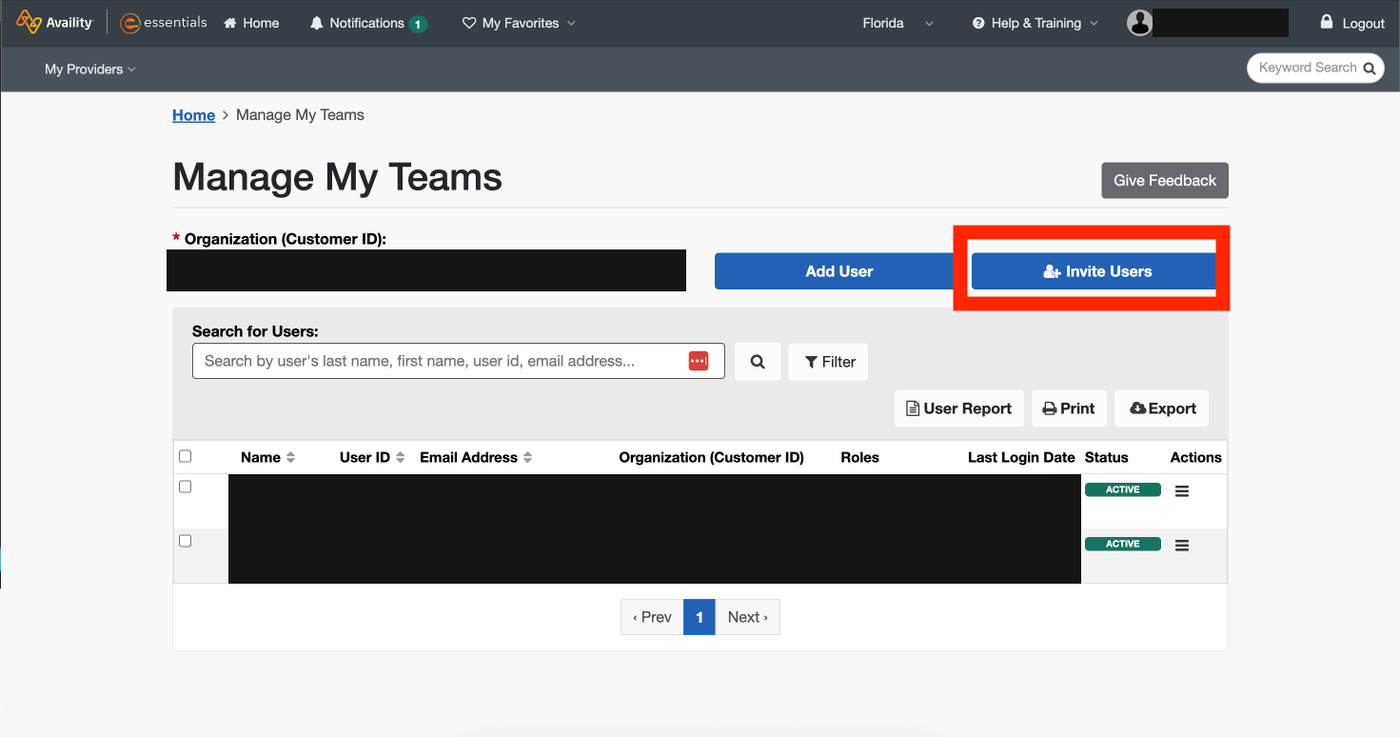
Screenshot source: Inherited Bomi Availity Manage My Teams example; original capture date unknown; solid-masked repo-local copy, not a new signed-in capture.
For Sunshine’s secure portal, ask the Portal Account Manager to verify the new user and assign only the needed permissions. Current Sunshine guidance says this manager can verify registrations, enable/disable users, modify permissions and help with locked accounts. The older quick-start example below illustrates user permissions; it is not the current sign-in screen. Current Sunshine user-access guidance
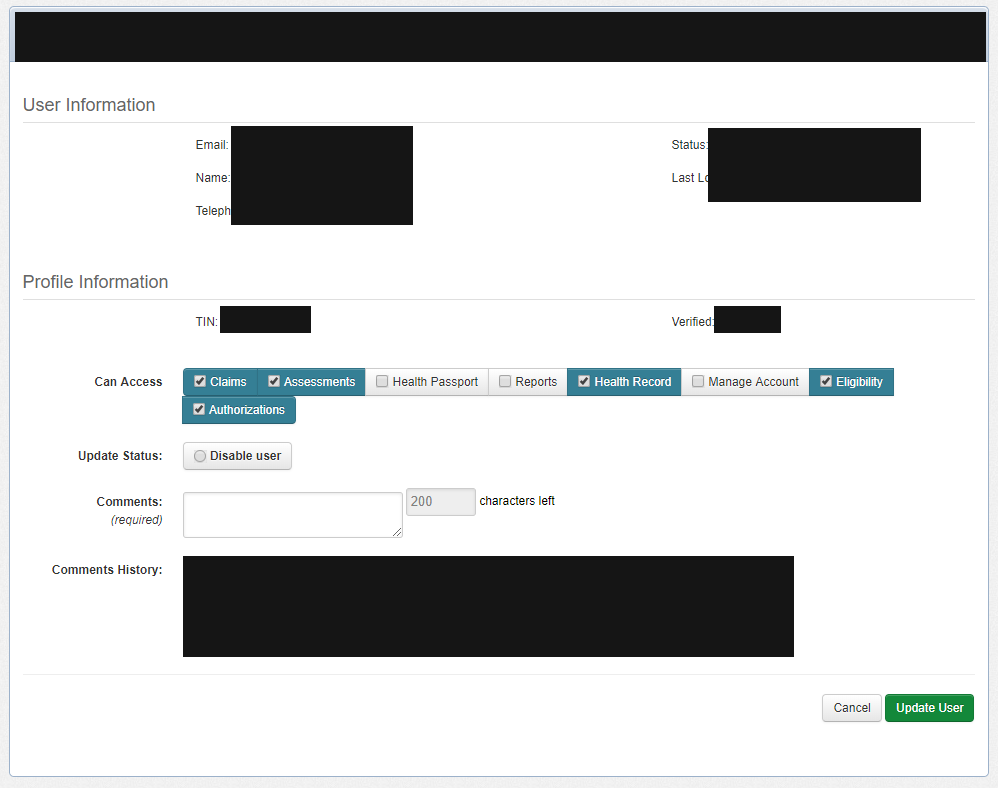
Screenshot source: Sunshine Health Secure Provider Portal Quick Start Guide, September 30, 2021, PDF page 14 / printed page 13; older permissions example, identifiers solid-masked.
Centene / Ambetter login errors and lockouts
Use “Forgot your user ID?” or “Forgot your password?” on the public sign-in page for credential recovery. If you can sign in but cannot see the practice or a tool, ask your organization administrator to check membership and assigned roles. For technical login help call Availity Client Services at 800-282-4548, Monday–Friday, 8 a.m.–8 p.m. Eastern. A password reset does not create a missing payer permission. Availity technical support
For Sunshine secure-portal lockouts, use its current entry-page Help or the recovery options presented after starting sign-in. Sunshine’s portal-tips page also directs users to their Portal Account Manager and Provider Services at 844-477-8313. That number is a Florida Sunshine contact, not a national Centene help desk. If the portal opens but the wrong product appears, Sunshine says to check the line-of-business selection. Sunshine login and line-of-business help
Keep network enrollment separate
A portal account gives a person access; it does not create a Medicaid enrollment or an Ambetter contract. Use the state plan’s provider network application. The Direct links include Ambetter’s network route and a Sunshine Medicaid participation example so you can distinguish these tasks before entering information. Ambetter provider participation resources
Related provider guides
Frequently Asked Questions
What is the Centene / Ambetter provider login?
Ambetter’s national resources point providers to Availity for eligibility and claims. For Centene Medicaid work, select the actual state plan and use its official provider portal instructions; there is no single portal assumed for all subsidiaries.
Is Ambetter the same as Medicaid?
No. Ambetter is a Marketplace brand. Select the Medicaid plan actually covering the member before choosing provider access or enrollment.
Can my biller use my Centene portal password?
Give the biller a separate authorized account. For Availity, an administrator assigns the User account’s roles. For the Sunshine secure-portal example, the Portal Account Manager manages individual access.
How do I recover a Centene or Ambetter provider login?
Use Availity’s user-ID/password recovery links for Availity. For the state secure portal, start at its official entry page and Help/recovery route, then contact the plan’s portal support or Account Manager.
Want Bomi to handle insurance billing?
Bomi helps therapy practices with benefit checks, claims, denials, balances, CAQH, attestations, and revenue management.
Book a call
About Bomi
Founded by George Ruan, Dax Earl, and Andrey Goder, Bomi helps independent therapists and group practices with insurance billing, credentialing, and payer follow-up. Bomi grew out of Dax’s experience helping his mother with her therapy practice, with a clear purpose: reduce the administrative burden of insurance while keeping practice owners in control.
Meet our founders