
GAMMIS Login: Georgia Medicaid Provider Portal
By George Ruan • October 9, 2026
For GAMMIS provider login, open the official GAMMIS portal and select Login/Manage Account to sign in with your own provider or billing-agent account.
As of October 9, 2026. Use the provider route for practice work; the public home page also has separate member registration.
Sections
- Direct links: GAMMIS login, account help and enrollment
- TL;DR: use your own login, and give your biller their own
- Who needs their own GAMMIS login?
- Before you create access: provider ID, PIN and administrator
- GAMMIS account setup and sign-in
- Add your biller or delegate
- GAMMIS login errors, password resets and MFA lockouts
- Related Georgia practice questions
- Frequently Asked Questions
- Sources
Direct links: GAMMIS login, account help and enrollment
Provider login: select Login/Manage Account on the official home page.
New provider access / PIN activation: under Providers, select PIN Activation. Use the activation information for the correct provider location.
Password recovery instructions: section 2.4.2 describes Having trouble logging in? on the sign-in page. Start through the official login above; no separate reset URL is needed.
Forgot username or MFA reset help: the account guide directs these issues to EDI Services, 877-261-8785 or 770-325-9590. General Provider Contact Center: 800-766-4456.
Enrollment Wizard: apply to become a participating Georgia Medicaid provider.
Web Portal Training: account management, MFA troubleshooting and billing-agent guidance.
The public GAMMIS sign-in page has fields for your username and password.
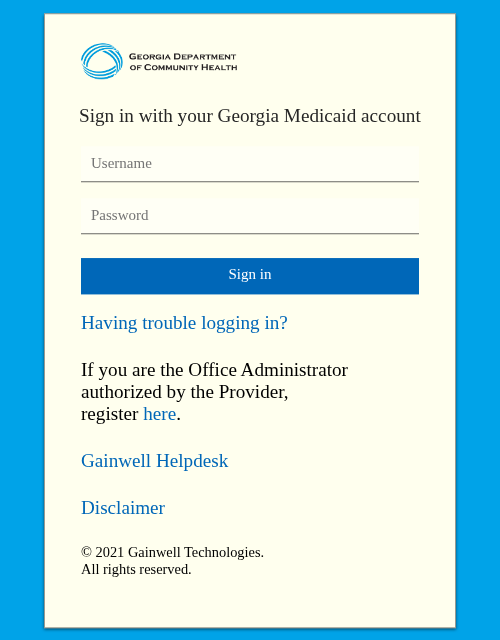
Screenshot source: Screenshot of the public GAMMIS sign-in page, captured October 9, 2026.
TL;DR: use your own login, and give your biller their own
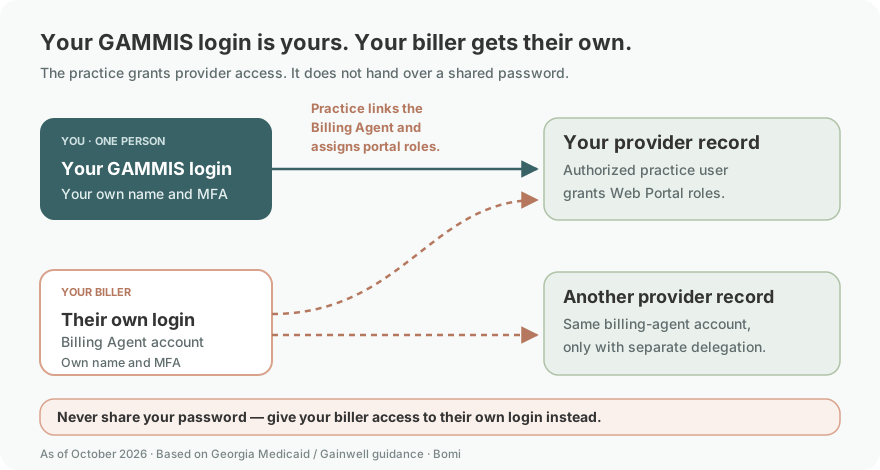
Use your own GAMMIS login and MFA. Your biller uses their own Billing Agent account, and the practice’s authorized user grants its provider access using the account guide. Enrollment applications and CareSource plan claims have separate routes.
Who needs their own GAMMIS login?
Each person doing practice work should use their own authorized account rather than share the owner’s password or MFA device. The User Account Management Guide describes provider registration, billing-agent accounts and delegated roles. It says one billing agent can be associated with multiple provider accounts, and a provider can delegate to more than one billing agent.
Use your own name and your own MFA when registering your authorized account. Never share your password: the practice grants access to the biller’s own Billing Agent account instead. Each provider ID assigned a PIN is registered individually; the account guide specifically permits a billing-agent account to serve multiple provider accounts when each delegates access.
Before you create access: provider ID, PIN and administrator
Identify the authorized administrator and whether the provider location already has registered access. The account guide says each Georgia Medicaid ID assigned a PIN is registered individually, using the provider’s PIN letter. Retrieve the correct location’s activation information rather than creating unrelated accounts to work around a missing letter. Keep the provider ID, PIN and recovery material private.
Choose the guide for your role. Registering an enrolled provider record is different from creating a billing-agent account and receiving delegated access. If the practice is not enrolled, review the Enrollment Wizard and provider-type requirements first; portal access alone does not resolve participation.
GAMMIS account setup and sign-in
The account-management guide and MFA guide are dated 2022 and remain listed in the official training catalogue checked October 9, 2026. Use current prompts if screen labels change. For provider registration, the published sequence is:
Provider registration: open the official GAMMIS home page and select provider PIN Activation. Enter the provider ID and assigned PIN for the enrolled location, then follow the account-creation prompts. Keep both values private.
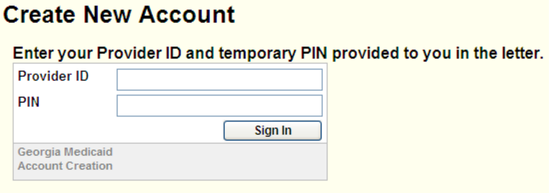
Screenshot source: GAMMIS Web Portal User Account Management Guide v5.2, printed page 2 (PDF page 6).
MFA setup: register the account’s authenticator as directed and save recovery information securely. The current training catalogue links the official MFA guide above.
Returning sign-in: return to Login/Manage Account, enter your own username and password and select Sign in. Complete the MFA prompt, then open Web Portal and confirm the intended provider account.
Add your biller or delegate
Your biller registers their own Billing Agent account, with their own contact details and MFA. The authorized practice user links that account through Manage Agent Roles and assigns the intended Web Portal permissions. Never give the biller your password or authenticator. See the account guide, sections 3.1–3.2.
Follow the account guide’s Billing Agent Setup and Maintenance section. After signing in as the authorized provider user, open MEUPS Account Management.
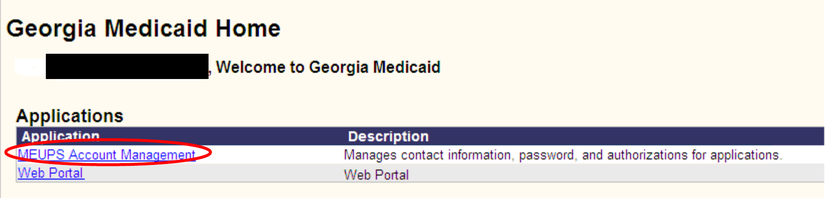
Screenshot source: GAMMIS Web Portal User Account Management Guide v5.2, printed page 24 (PDF page 28).
The guide then uses Manage Agent Roles and Add Agent. Select the intended billing-agent account, select Web Portal and check only the permissions intended for that provider. Select Save Changes. The manual’s example checkboxes illustrate the controls; they are not a recommendation to grant every role.
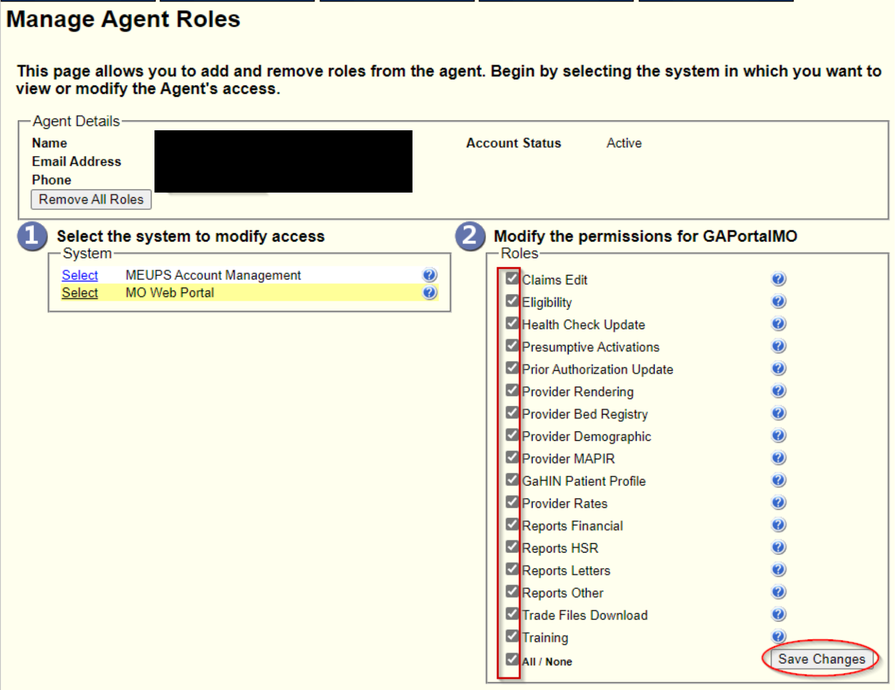
Screenshot source: GAMMIS Web Portal User Account Management Guide v5.2, printed page 27 (PDF page 31).
The guide also describes Super Agent authority for a billing agent authorized to manage other agents. Grant that authority only when that broader delegation responsibility is intended. The training catalogue includes Billing Agent Account Registration and Maintenance and a Group-Billing Delegation Quick Reference Guide for the relevant arrangements.
GAMMIS login errors, password resets and MFA lockouts
Forgotten or expired password: section 2.4.2 of the account guide describes Having trouble logging in?, the registered email address and username, and the emailed reset link. Follow the current prompts.
Forgot username or lost MFA device: the account guide directs users to EDI Services through the public Contact Information menu. Use the official phone list above; do not create a replacement provider enrollment to solve a login problem.
MFA code rejected: the MFA Troubleshooting FAQ says to confirm the correct authenticator account and the device’s clock. Follow its troubleshooting guidance instead of repeatedly guessing codes.
Missing provider permissions: have the authorized administrator review the provider association and assigned roles using the account guide.
Training document will not download: the training page notes that pop-up blocking or browser security settings can interfere with downloads. Use its download help for that specific issue.
Related Georgia practice questions
For a separate licensing and payer question, see our Georgia LAPC supervised-billing article. For insurance intake fields, see group numbers on Medicaid cards. Neither article replaces the state’s enrollment decision.
Bomi helps therapy practices coordinate credentialing and billing follow-up. Talk with Bomi if your team needs help organizing the work.
Frequently Asked Questions
Where is the GAMMIS portal login?
Open the official GAMMIS home page at www.mmis.georgia.gov/portal/default.aspx and select Login/Manage Account. Sign in with your own authorized account, complete MFA and open Web Portal. Use the provider route for practice work.
Is GAMMIS login the same as Georgia Medicaid enrollment?
No. Login and delegated permissions provide portal access. The public Enrollment Wizard covers an application to become a participating Georgia Medicaid provider; successful sign-in does not establish enrollment approval.
How do I reset my GAMMIS password?
The official account guide describes Having trouble logging in? on the sign-in page, followed by the registered email address and username and an emailed reset link. Start at the official GAMMIS login and follow its current prompts.
Who helps with a forgotten GAMMIS username or an MFA reset?
The public account guide directs forgotten-username and lost-device MFA reset issues to EDI Services. The official phone list gives 877-261-8785 and 770-325-9590. Keep recovery information private.
Can my biller have a separate GAMMIS account?
Yes. The account guide describes billing-agent accounts, provider associations and delegated roles. The authorized administrator grants the intended provider access; a biller should not use the owner’s password or authenticator.
Sources
GAMMIS home and provider functions
GAMMIS Web Portal Training catalogue
GAMMIS phone numbers and links
Web Portal User Account Management Guide, 2022
Need help getting payer-ready?
For practices enrolled in Bomi Billing, our team handles CAQH, payer applications, attestations, roster updates, and ongoing credentialing. Credentialing requires Bomi Billing.
Credentialing with billing
About Bomi
Founded by George Ruan, Dax Earl, and Andrey Goder, Bomi helps independent therapists and group practices with insurance billing, credentialing, and payer follow-up. Bomi grew out of Dax’s experience helping his mother with her therapy practice, with a clear purpose: reduce the administrative burden of insurance while keeping practice owners in control.
Meet our founders